
Introduction to Aether Pulse HyperOS Theme
The Aether Pulse HyperOS theme is a stunning creation by Yunuz Alvarez, designed to give your Xiaomi, Redmi, or POCO phone a fresh and modern look. This theme is perfect for those who want a minimal yet stylish design that enhances their smartphone experience. With its dark-to-electric-blue atmosphere, Aether Pulse brings a sense of calmness and serenity to your device.
Visual Style and Design
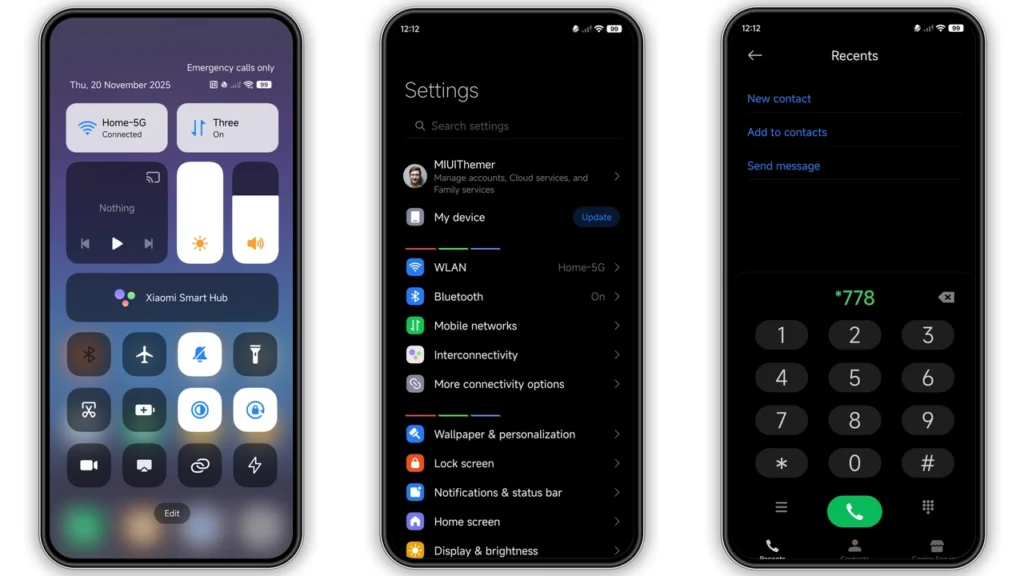
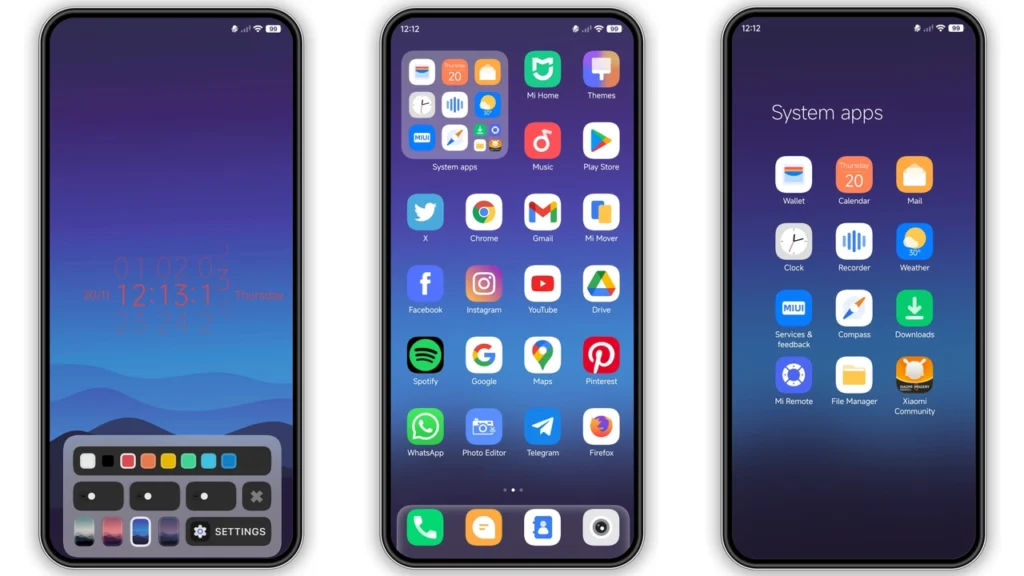
Aether Pulse features a well-designed set of icons, fresh wallpapers, a new status bar, a cool lock screen, and a stylish Always-on Display. The digital clock is prominently displayed, giving the layout a sharp and modern touch. The theme's design is clean, precise, and easy on the eyes, making it perfect for users who want a minimal look without compromising on style.
The theme's dark-to-electric-blue color scheme is both soothing and modern, making it suitable for a wide range of users. The icons are carefully designed to match the theme's color scheme, ensuring a consistent look throughout the device. The wallpapers are also carefully selected to complement the theme's design, providing a seamless and visually appealing experience.
Who May Like Aether Pulse HyperOS Theme
Aether Pulse is perfect for users who want a modern and minimal design that enhances their smartphone experience. This theme is suitable for:
• Users who want a dark theme with a touch of color
• Those who prefer a minimal design that is easy on the eyes
• Fans of modern and sleek designs
• Users who want a theme that is both stylish and functional
Compatibility Notes
Aether Pulse HyperOS theme is compatible with HyperOS and works seamlessly on Xiaomi, Redmi, and POCO smartphones. However, please note that theme compatibility may vary depending on the device model and software version. Before downloading and installing the theme, ensure that your device meets the compatibility requirements.
Install Expectations
Installing Aether Pulse HyperOS theme is a straightforward process. Once you download the theme file, you can apply it to your device using the Theme Store app. The theme will automatically change the look and feel of your device, giving it a fresh and modern appearance.
Please note that installing a new theme may require a reboot of your device. This is a normal process, and your device will be back to normal once the theme is applied. If you encounter any issues during the installation process, you can try restarting your device or seeking help from the theme developer or support community.
Practical Download Notes
To download Aether Pulse HyperOS theme, follow these steps:
1.Download the theme file: Click on the download link to get the theme file. 2.Open the Theme Store app: Once the download is complete, open the Theme Store app on your device. 3.Apply the theme: Select the theme file and apply it to your device. 4.Restart your device: If required, restart your device to complete the installation process.
Please note that the theme file is in MTZ format, which is compatible with HyperOS and MIUI devices. If you encounter any issues during the download or installation process, you can try checking the theme's compatibility or seeking help from the theme developer or support community.
Conclusion
Aether Pulse HyperOS theme is a stunning creation that brings a modern and minimal design to your Xiaomi, Redmi, or POCO phone. With its dark-to-electric-blue atmosphere, clean design, and stylish features, this theme is perfect for users who want a fresh and modern look. Whether you're a fan of minimal designs or just looking for a theme that enhances your smartphone experience, Aether Pulse is definitely worth checking out.
Final Thoughts
In conclusion, Aether Pulse HyperOS theme is a must-try for anyone looking for a modern and stylish theme. With its ease of installation, compatibility with HyperOS and MIUI devices, and stunning design, this theme is sure to enhance your smartphone experience. So, what are you waiting for? Download Aether Pulse HyperOS theme today and give your device a fresh new look!
Theme Preview
Download Links
Use the buttons below to open the theme file and the supporting link.
Aether Pulse Theme mtz File
Helpful links
More Theme Updates
For more curated HyperOS and MIUI theme updates, visit Hyper OS x MIUI .


