
Theme details
- Designer
- ELEVEN
- Size
- 51.36 MB
- Compatibility
- HyperOS, MIUI
Format · MTZ
For those of us who live and breathe smartphone personalization, finding a theme that truly elevates the daily experience is a constant quest. Enter Voidfall, a HyperOS and MIUI theme that promises to plunge your Xiaomi, Redmi, or POCO device into a realm of sophisticated darkness, complete with mesmerizing 3D depth and a premium feel. This isn't just another dark mode; it's a complete visual overhaul designed to make your phone feel brand new.
Unveiling Voidfall's Deep Dark Aesthetic
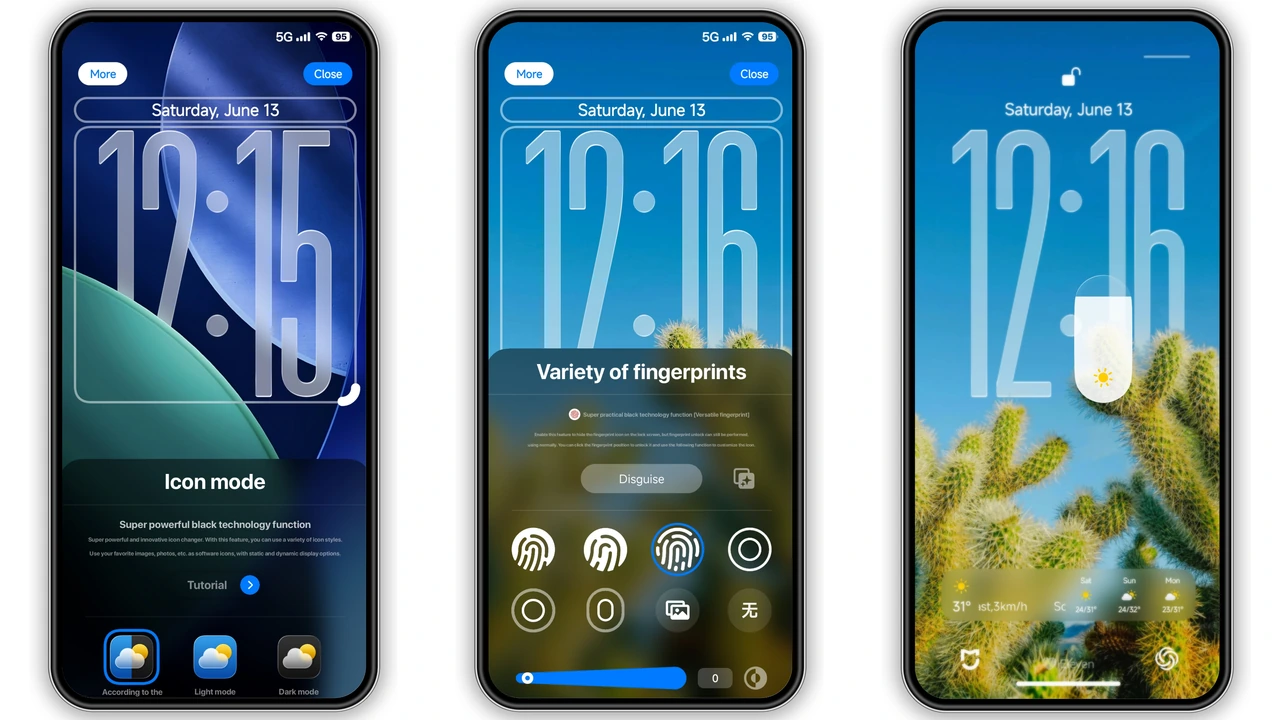
Voidfall immediately captivates with its profound dark aesthetic. The theme masterfully employs a deep, rich black as its canvas, allowing other design elements to pop with striking clarity without being overtly bright. What truly sets Voidfall apart, however, is its immersive 3D depth-of-field design. This isn't merely a flat wallpaper; elements subtly recede and emerge, giving your screen a dynamic, almost living quality. Imagine your icons floating gently above a dark abyss, or your lock screen widgets casting a soft, almost tangible shadow. This subtle yet powerful effect adds a layer of sophistication rarely seen in free themes.
The visual narrative continues with bold color gradients that punctuate the dark background, offering moments of visual interest without disrupting the overall minimalist vibe. These gradients are strategically placed, perhaps highlighting a system menu or adding a touch of flair to a notification panel. The glassy clock widgets are another standout, offering a sleek, modern way to tell time, perfectly complementing the theme's high-tech, futuristic feel. Every element, from the darkest shadow to the softest glow, feels meticulously crafted to contribute to a cohesive and utterly compelling user interface.
Suggested Read: iP26 Super 3D Depth of Field Theme Is Trending on HyperOS
Dynamic Lockscreen & Intuitive Control Center
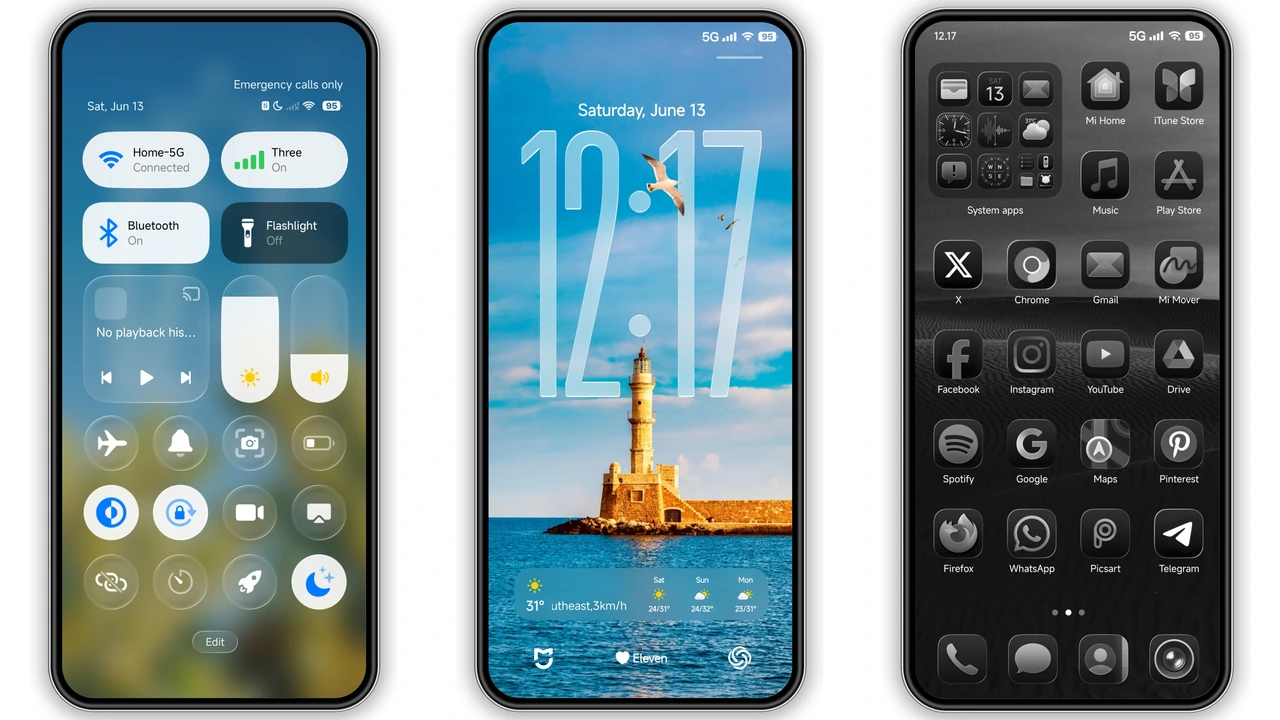
Your lock screen is the first thing you see, and Voidfall ensures it makes a lasting impression. The theme features premium lock screen styles that go far beyond a simple clock and wallpaper. Expect dynamic wallpapers that subtly shift, adding movement and life to your device even when it's idle. The layout for notifications, quick access toggles, and time display is thoughtfully redesigned, prioritizing both aesthetics and functionality. Information is presented clearly, with elegant typography that enhances readability against the dark backdrop.
The Control Center, a hub of essential toggles and shortcuts, also receives a significant upgrade. Voidfall reimagines this crucial interface with a clean, consistent design that mirrors the theme's overall aesthetic. Quick toggles are presented with sleek, monochrome icons that are easy to identify and interact with, while the background maintains the deep dark gradient, ensuring visual harmony. This attention to detail in the Control Center means that navigating your phone's core functions feels intuitive and visually pleasing, extending the premium experience beyond just the home screen.
Seamless Iconography and System UI
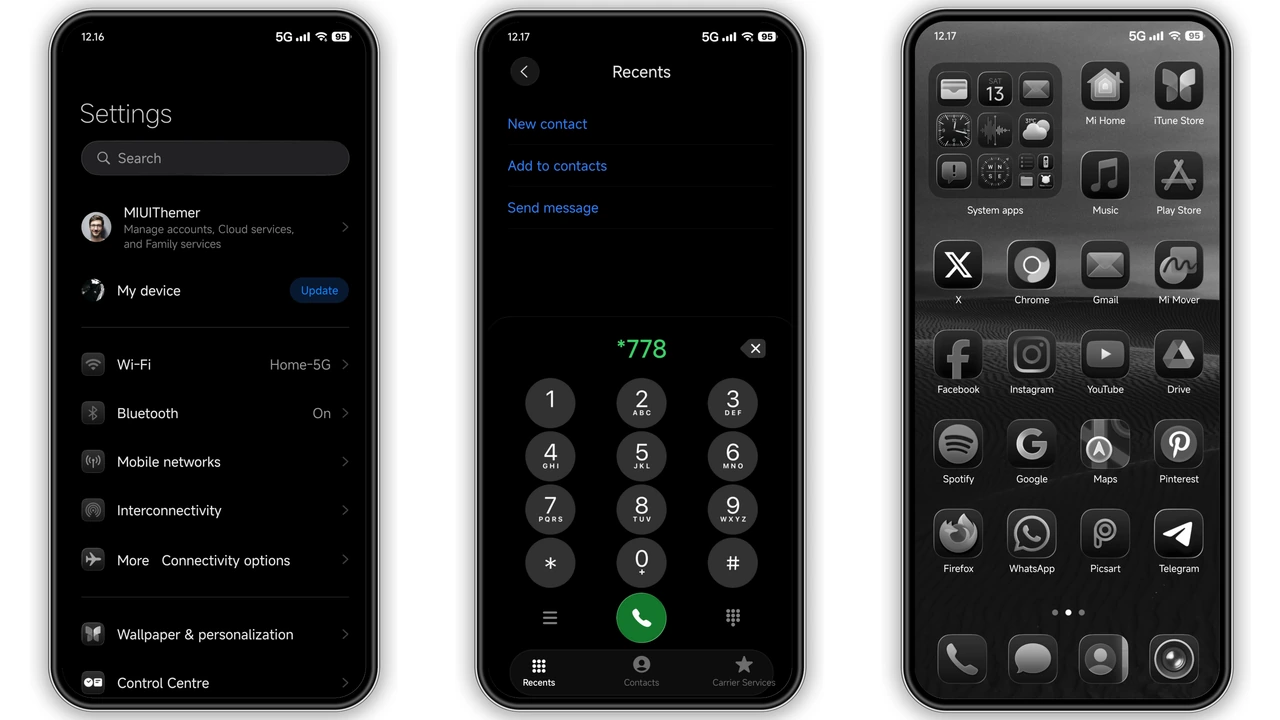
One of the hallmarks of a truly great theme is its ability to transform every corner of the system, and Voidfall delivers. The theme introduces a set of new, well-designed icons that are both fresh and instantly recognizable. These aren't just recolored stock icons; they're reimagined with a sleek, often monochrome or subtly gradient-infused palette that integrates perfectly with the dark background. Whether it's your system apps or third-party favorites, the icons maintain a consistent visual language, contributing to a polished and unified look.
Beyond the icons, the entire System UI receives a meticulous overhaul. The status bar, for instance, is streamlined and clean, with redesigned indicators that blend seamlessly into the dark top bar. The settings menu, often a neglected area in many themes, is given a refined treatment, making navigation through various options a more pleasant experience. From the dialer to the messaging app, Voidfall ensures that every interaction feels part of a larger, carefully designed ecosystem. This full visual upgrade ensures that your Xiaomi device doesn't just look good on the surface, but feels consistently premium throughout its entire operation.
Who Will Love the Voidfall Experience?
Voidfall is perfectly suited for Xiaomi, Redmi, and POCO users who are tired of the default look and crave a sophisticated, modern transformation. If you're someone who appreciates deep, rich dark modes, the kind that truly immerse you in your device's interface, then Voidfall is designed for you. Enthusiasts of 3D depth effects and subtle animations will find plenty to admire in its dynamic elements. It's also an excellent choice for users seeking a minimalist yet premium aesthetic, where every design choice feels intentional and contributes to an overall sense of elegance. If you're looking to infuse your daily smartphone usage with a touch of high-tech luxury without spending a dime, this theme is a must-try.
Compatibility Notes and Installation Expectations
Voidfall boasts broad compatibility across Xiaomi's ecosystem, supporting HyperOS and various MIUI versions. This includes HyperOS, HyperOS 2.0, HyperOS 3.0, and MIUI 14, ensuring a wide range of devices can enjoy this stunning transformation. It has been tested on numerous Xiaomi, Redmi, and POCO smartphones and is reported to work flawlessly.
Applying Voidfall is straightforward, though the method depends on your device's ROM type:
For HyperOS/MIUI Global Stable ROMs (Stock ROMs):
- Open in Browser: Start by opening the theme's official download page in a compatible browser like Firefox, Chrome, or the default Xiaomi Browser. Other browsers might not correctly redirect.
- Access Theme Store: Look for an
Download Links
Use the buttons below to open the theme file and the supporting link.
Voidfall Theme mtz File
Voidfall Theme Backup File
Helpful links
More Theme Updates
For more curated HyperOS and MIUI theme updates, visit Hyper OS x MIUI .


