Theme details
- Designer
- Yeah_Seven (VENERA)
- Size
- 41.12 MB
- Compatibility
- HyperOS, MIUI 11/12/13/14
Elevate your HyperOS or MIUI experience with VENERA, a meticulously crafted theme designed to infuse your Xiaomi, Redmi, or POCO device with a sophisticated, iOS-inspired aesthetic. Moving beyond the stock interface, VENERA offers a complete visual overhaul, focusing on a premium feel, dynamic interactions, and a refreshing user experience that truly sets your phone apart.
This theme isn't just about new wallpapers; it's a comprehensive package that redefines your device's look from the lockscreen to the system icons, offering a sleek, modern, and highly appealing interface for daily use.
Format · .mtz
Striking Lockscreen & Dynamic Depth
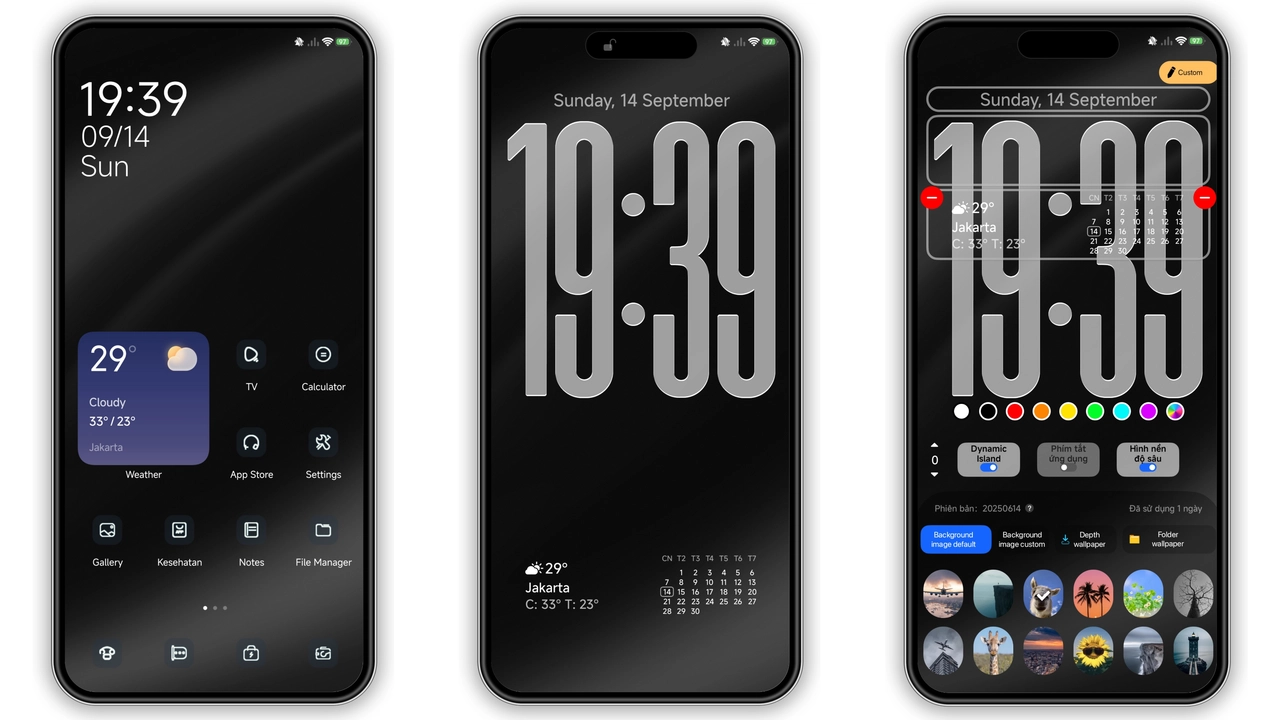
The VENERA theme immediately captivates with its cool, dynamic lockscreen. This isn't just a static background; it brings a noticeable 3D Depth of Field effect, reminiscent of modern flagship interfaces. Your notifications and widgets cleverly interact with the wallpaper, creating an immersive, layered look that feels incredibly premium. Imagine your favorite wallpaper subtly receding behind the clock and quick access toggles, adding a sophisticated visual dimension to your daily unlocks. The Always-on Display (AOD) also receives a stylish upgrade, ensuring that even at a glance, your device maintains its elegant new persona. The lockscreen typography is clean and modern, complementing the overall minimalist yet dynamic design, making every interaction a delight.
Suggested Read: Guofeng 18 HyperOS Theme: Trending iOS Style Setup for Xiaomi
Sleek Icons & Redesigned Interface
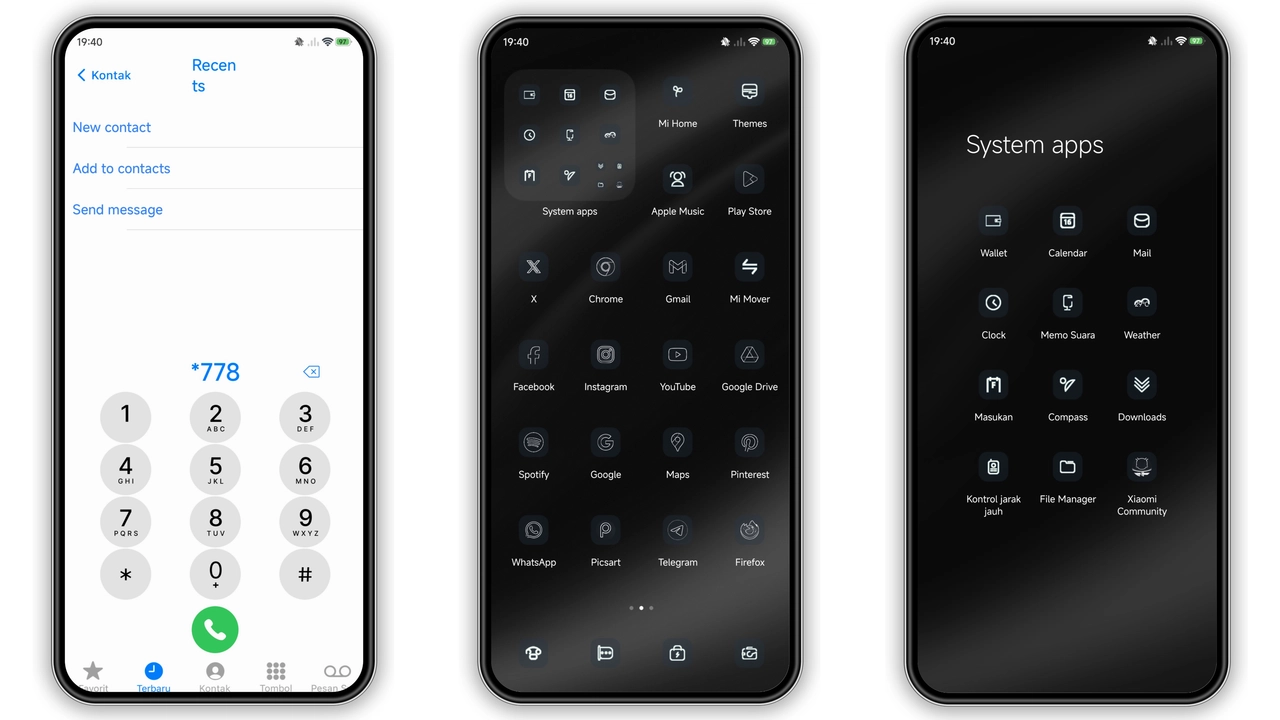
VENERA delivers a fresh set of well-designed icons that are both modern and intuitive. Each icon has been thoughtfully redesigned to align with the theme's clean, iOS-inspired aesthetic, contributing to a cohesive and polished home screen. Gone are the sometimes-cluttered stock icons; in their place, you'll find a uniform, visually pleasing collection that enhances readability and visual appeal. Beyond the app icons, the theme extends its influence to the status bar, which receives a subtle yet impactful redesign. Expect cleaner indicators, a refined Wi-Fi and signal strength display, and a generally more streamlined top-bar experience. This attention to detail across the system UI ensures a consistent premium feel, from your app drawer to your settings menu, creating a harmonious visual environment throughout your device.
An iOS-Inspired Visual Journey
For those who appreciate the clean lines, subtle animations, and user-friendly design philosophy of iOS, VENERA offers a compelling alternative within the HyperOS and MIUI ecosystem. This theme masterfully blends the best elements of iOS aesthetics with the flexibility of Xiaomi's platform, delivering an experience that feels both familiar and fresh. It's not a mere copy; rather, it's an interpretation that captures the essence of a premium, fluid mobile interface. The overall impression is one of sophistication and modernity, making your device feel more responsive and visually engaging. If you're looking to transform your Xiaomi, Redmi, or POCO device into something that stands out with an elegant, minimalist dark theme vibe and a touch of Apple's design prowess, VENERA is undoubtedly a top contender.
Compatibility Across Xiaomi Devices
VENERA boasts broad compatibility, ensuring a wide range of users can enjoy its transformative design. It's fully compatible with HyperOS and various MIUI versions, including MIUI 11, 12, 13, and 14. Whether you own a flagship Xiaomi device, a versatile Redmi, or a performance-focused POCO phone, this theme is designed to integrate seamlessly. This versatility means you can refresh the look of almost any recent Xiaomi ecosystem device. The theme works flawlessly on both Global Stable ROMs (stock firmware) and custom ROMs like Xiaomi EU ROM or MIUIRoom, offering flexibility regardless of your device's software setup.
Seamless Installation: A Step-by-Step Guide
Applying the VENERA HyperOS theme is straightforward, whether you're on a stock Global ROM or a custom build. Follow these instructions carefully to ensure a smooth transition to your new, vibrant interface.
For HyperOS or MIUI Global Stable ROMs (Stock ROMs):
- Open the download page using the Firefox browser. Some other browsers might not correctly trigger the Theme Store app link.
- Locate and tap the "Official Theme Store Link" button. This action should open a page in a Chinese language within your browser.
- Look for the three dots (usually in the top right corner) and select "Open in app." This will redirect you to the official Xiaomi Theme Store application.
- Once in the Theme Store app, proceed to download and apply the VENERA theme.
- Important Note: If the "Official Theme Store Link" does not work as expected, try opening the original download page in Chrome Browser or your device's Default Xiaomi Browser and repeat the steps.
For MIUI 11, 12, 13, 14, or HyperOS based Custom ROMs (e.g., Xiaomi EU ROM, MIUIRoom):
- Download the VENERA theme's .mtz file from the provided download link.
- Open your device's Theme Store application.
- Navigate to the "Themes" option within the app.
- Scroll to the very bottom of the page and tap on the "Import" button.
- Browse your device's storage and select the
.mtzfile you just downloaded. - Once imported, apply the VENERA theme from your list of installed themes.
General Post-Installation Tip:
After applying the theme, it's highly recommended to restart your device. This helps ensure all theme elements are loaded correctly and prevents any potential visual overlaps or inconsistencies. The theme has been tested and is known to work perfectly without issues once properly applied. The password for the theme is 'Life is unfair'. This might be required during certain installation or application steps, depending on the theme's specific configuration or source.
Pros and Cons
Pros:
- Premium iOS-Inspired Aesthetics: Delivers a sleek, modern, and clean visual overhaul.
- Dynamic Lockscreen with 3D Depth: Adds an immersive and interactive element to your device.
- Cohesive Icon Pack: Uniform, well-designed icons enhance overall UI consistency.
- Broad Compatibility: Works across HyperOS and multiple MIUI versions on Xiaomi, Redmi, and POCO devices.
- Free to Use: Offers a high-quality personalization experience without cost.
Cons:
- Installation Nuances: Stock ROM users might need to use specific browsers or follow precise steps to access the official Theme Store link.
- Password Requirement: The theme password ('Life is unfair') needs to be known for successful application.
Final Thoughts
VENERA stands out as a top-tier HyperOS theme for anyone looking to refresh their Xiaomi, Redmi, or POCO device. Its blend of iOS-inspired elegance, dynamic lockscreen features, and a consistently refined interface makes it a compelling choice. If you're seeking a premium, modern look that elevates your daily smartphone experience, VENERA offers a transformative journey. Dive in and personalize your device with this exceptional theme, making it truly yours.
Download Links
Use the buttons below to open the theme file and the supporting link.
VENERA Theme mtz File
Helpful links
More Theme Updates
For more curated HyperOS and MIUI theme updates, visit Hyper OS x MIUI .


