Parameter · Value
Designer · Maidul Islam
Size · 44.44 MB
Format · MTZ
Compatibility · HyperOS, HyperOS 2.0, HyperOS 3.0, MIUI
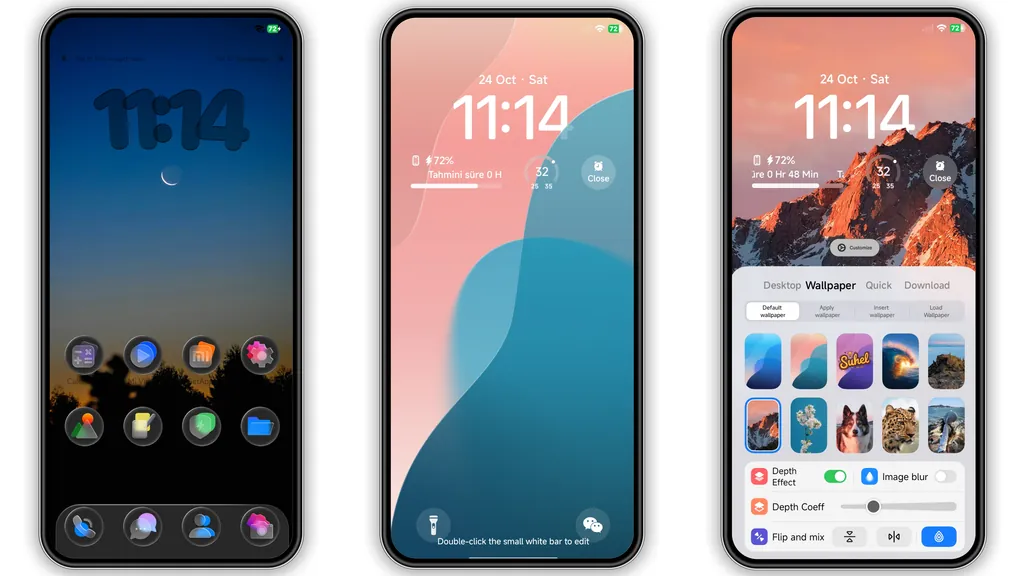
Dreamy Wallpaper Carousel
Curated collection drives visual impact. Forests, oceans, cats, sunsets rotate on home screen. High‑resolution assets respect OLED burn‑in. Each image paired with subtle vignette for depth. Users notice instant mood lift. No heavy animation, battery stays stable.
Suggested Read: Trending Daisy MTZ Theme: Fresh Look for HyperOS & MIUI
Adaptive Lock Screen Palette
Lock screen mirrors wallpaper hue. Clock glows in complementary color. Red, blue, black accents switch via theme settings. Shortcut icons adopt same shade, creating cohesive look. Dynamic change triggers on wallpaper swap, no reboot required.
Accent Color Playgrounds
Three accent families available. Red injects energy, blue offers calm, black provides sleek minimalism. Users toggle in Theme Store. Accent propagates to status bar, quick‑settings tiles, notification icons. Consistency reduces visual clutter.
Installation Flow & Expectations
Download MTZ file from the provided link. Open Theme Store app, tap “Import”, select file, apply. First‑time install may prompt permission to replace system icons—grant. Restart recommended to clear residual cache. Post‑restart, all elements align; no missing assets reported.
Pros and Cons
Pros
• Vast wallpaper library – diverse moods.
• Adaptive lock screen – automatic hue sync.
• Simple accent switch – instant personalization.
• Lightweight size – 44 MB, minimal storage impact.
• Full compatibility – HyperOS 2.0/3.0 and MIUI.
Cons
• Limited to three accent palettes – no custom color picker.
• No built‑in dark mode toggle – relies on system theme.
• MTZ format restricts use on non‑Xiaomi ROMs.
• Minor icon scaling issues on older POCO models.
Theme Preview


Download Links
Use the buttons below to open the theme file and the supporting link.
TradM Theme mtz File
Helpful links
More Theme Updates
For more curated HyperOS and MIUI theme updates, visit Hyper OS x MIUI .