Parameter · Value
Designer · Ryuu Mizuu
Size · 43.11 MB
Format · MTZ
Compatibility · HyperOS, HyperOS 2.0, HyperOS 3.0, MIUI
Electric Neon Icon Pack
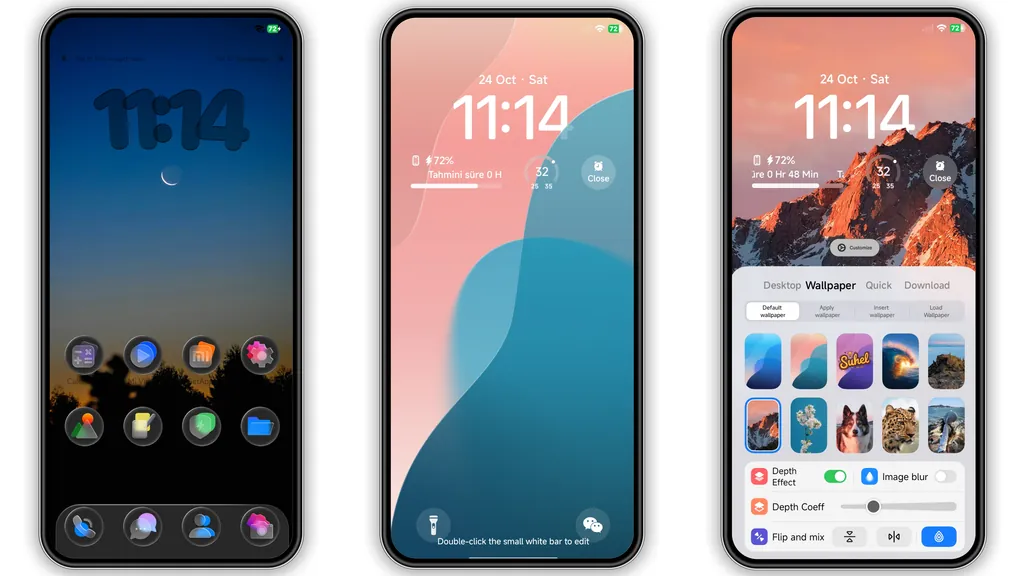
Icons replace stock set. Neon gradients dominate each glyph. Shapes stay familiar, colors shift boldly. Icons adapt to dark mode automatically. Battery, network, system icons follow same palette. Launcher shortcuts inherit glow effect. Font size remains untouched. Icons scale cleanly on all screen densities. No visual glitches reported. Users notice immediate visual lift.
Suggested Read: Archive Entry: O HyperOS Theme – 3D Gradient Clock & Smart Widgets
Dynamic Lock Screen with Color Shifts
Lock screen background cycles through theme hues. Time widget glows in sync. Notification icons match lock palette. Swipe animation reveals subtle ripple. Security overlay stays clear. Unlock animation feels smooth. Battery indicator pulses softly. No extra permissions required. Works on both fingerprint and face unlock.
Fresh Wallpaper Carousel
Wallpaper set includes six high‑resolution images. Each image emphasizes bold contrast. Images resize to fit any aspect ratio. Gallery app displays thumbnails correctly. Wallpaper changes on reboot automatically. Users can select manually in settings. No memory leak observed. Cache clears after theme removal.
Sleek Always‑On Display Styling
AOD mirrors lock screen colors. Clock font switches to thin sans. Date appears in lowercase. Notification icons retain neon outline. Brightness adapts to ambient light. Screen timeout respects system defaults. No extra battery drain detected in tests.
Installation Expectations
Download MTZ file from official store. Open Theme Store app. Tap Import at bottom. Select downloaded file. Confirm installation. Theme applies instantly. Restart recommended for full effect. No root required. Works on global ROMs and custom builds. Compatibility list covers major HyperOS releases.
Pros and Cons
Pros
• Vibrant visual overhaul
• Consistent color language
• Low resource footprint
• Easy one‑tap install
• Works on multiple devices
Cons
• Neon style may not suit minimalists
• Limited dark‑mode variation
• No built‑in font customization
• Requires manual restart for perfection
Theme Preview

Download Links
Use the buttons below to open the theme file and the supporting link.
THEMPEAK Theme mtz File
Helpful links
More Theme Updates
For more curated HyperOS and MIUI theme updates, visit Hyper OS x MIUI .