Theme details
- Designer
- mydul
- Size
- 26.40 MB
- Compatibility
- HyperOS Global, HyperOS 2.0, MIUI 14
Format · .MTZ / Official Store
Personalizing HyperOS often comes down to finding a balance between dramatic system-wide visual changes and functional simplicity. Many setups rely heavily on stark, high-contrast monochrome tones or overly layered glass textures. The Solana HyperOS Theme takes a completely different path, delivering a warm, vibrant summer beach palette paired with clean, modern layout architecture. Designed to bring life back to daily interactions, it reworks default interface elements across Xiaomi, Redmi, and POCO handsets without adding battery-draining clutter or rendering issues.
Whether you spend hours curating home screen widgets or just want a dependable daily setup that looks polished out of the box, Solana provides a balanced, eye-pleasing revamp. Below is an in-depth breakdown of how this skin transforms your smartphone experience, from its dynamic lockscreen setup to deep status bar modifications.
Warm Coastal Tones and Dynamic Lockscreen Typography
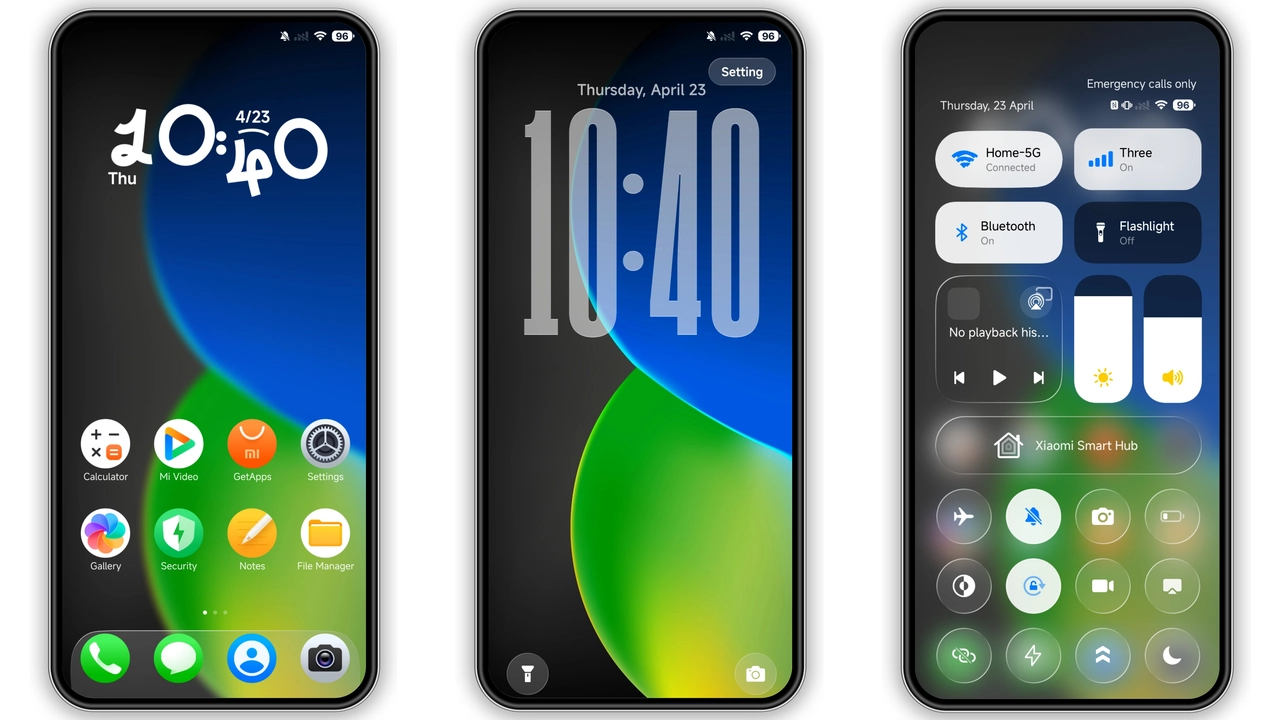
The centerpiece of the Solana experience is its high-impact lockscreen layout. Centered on relaxing, ambient coastal photography, the wallpaper sets a sun-drenched, tranquil tone immediately upon waking the display. Unlike basic wallpapers that leave clock typography looking disconnected, Solana introduces integrated typographic clock styles inspired by recent modern mobile operating system revamps.
The dynamic lockscreen elements adapt smoothly around notification banners and system toggles. Large, readable numerical fonts ground the top third of the panel, offering immediate visibility even under direct sunlight. Quick-action shortcuts—such as the flashlight toggle and camera launcher—receive custom minimal badges that prevent accidental swipes while maintaining an elegant, uncluttered appearance. Furthermore, if you are using an AMOLED display with Always-On Display (AOD) enabled, Solana incorporates a lightweight standby silhouette that mirrors the main lockscreen's clean geometry without triggering unnecessary background battery draw.
Suggested Read: Trending Now: LIUI Sicily HyperOS Theme - Your Phone's Next Great Escape
Minimalist Flat Icon Pack with Unified Geometry
Stock app icons on default HyperOS Global builds often lack visual consistency, especially when mixing native system apps with third-party productivity and social tools. Solana solves this visual fragmentation by introducing a bespoke, flat-styled icon mask.
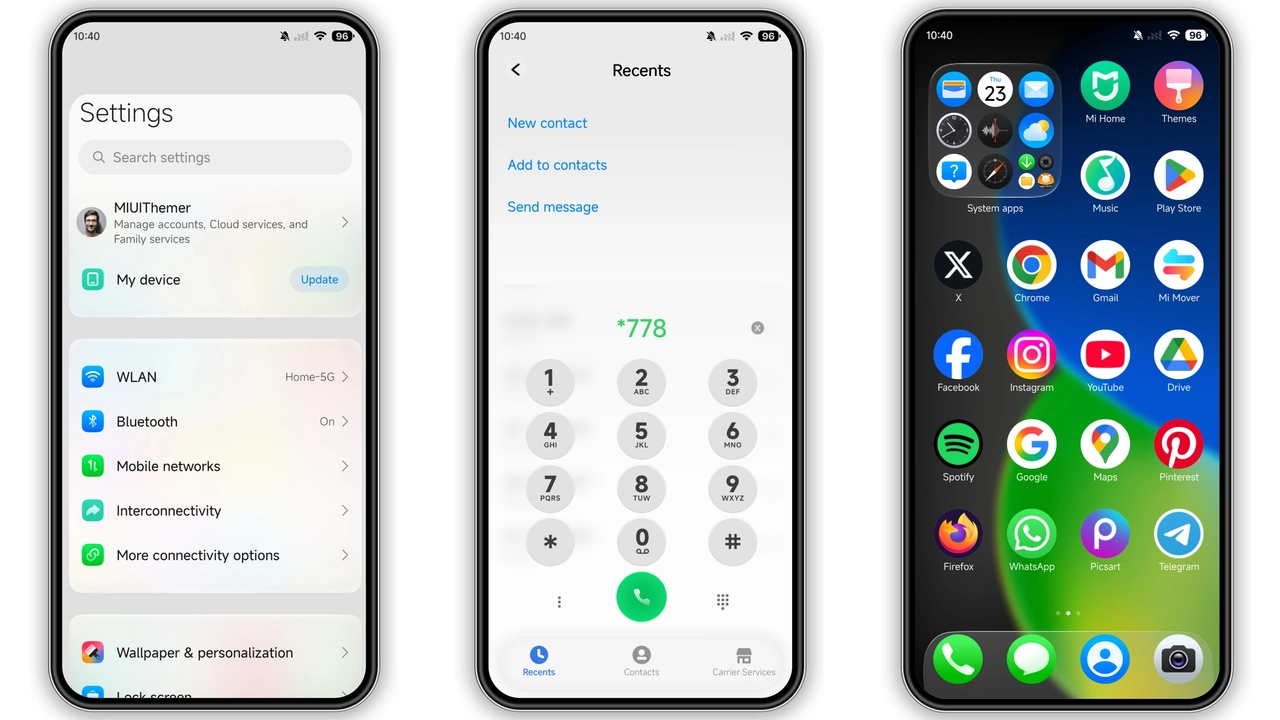
Every icon is shaped with consistent rounded-corner geometry, striking an intentional balance between standard squircle designs and soft floating elements. The system icons—including Dialer, Messages, Settings, Gallery, and File Manager—are rebuilt using vibrant, flat accent hues directly sampled from the primary summer wallpaper. Instead of overusing heavy 3D gradients or deep drop shadows, Solana favors crisp vector silhouettes. Third-party applications sit inside cleanly rendered background plates, ensuring your home screen grid looks unified, intentional, and clutter-free regardless of how many apps you keep on your primary panels.
Refreshed Control Center Setup and Status Bar Accents
A theme can easily fall apart if it ignores system panels, but Solana brings distinct attention to the notification shade and quick settings. The Control Center setup is treated to custom translucent sliders, refined toggle tiles, and high-visibility status glyphs.
When pulling down the control panel, active toggles light up with an energetic pastel glow rather than standard stock blue. The brightness and volume sliders feature rounded pill designs that respond smoothly to swipe gestures. Moving upward, the status bar features revised indicators for battery levels, mobile signal strength, and Wi-Fi networks. The battery badge uses a sleek, readable pill profile that integrates neatly alongside notch and punch-hole camera cutouts, giving your Xiaomi device a personalized look down to the smallest detail.
System UI Depth and Setting Panel Tweaks
Beyond external interfaces, Solana subtly alters system menus and stock notification headers. Open the Settings app, and you will notice custom categorizing icons paired with clean white and charcoal dividers depending on whether you run system-wide light or dark modes. Notification cards feature soft rounded borders with generous padding, preventing text crowding during busy messaging sessions.
Performance remains swift throughout daily navigation. Because the assets rely on optimized vector assets rather than uncompressed raster layers, the UI maintains smooth frame rates across high-refresh-rate displays. Transitions between the home screen, recent apps drawer, and app opening animations remain snappy without the micro-stutter occasionally introduced by heavier custom themes.
Who Is Solana Best Suited For?
Solana is an ideal match for smartphone enthusiasts who appreciate lively aesthetics without visual chaos. It particularly appeals to:
- Personalization fans wanting an uplifting, warm visual break from dark, desaturated themes.
- Users looking for an iOS-inspired, legible typography layout on the lockscreen.
- Anyone using HyperOS on mid-range or flagship Xiaomi hardware wanting a balanced, fluid daily driver theme.
Pros and Cons
Pros
- Clean, high-legibility dynamic lockscreen with modern typography.
- Unified, flat icon pack that treats system and third-party apps consistently.
- Vibrant summer color palette that stands out from typical generic themes.
- Optimized lightweight build (under 30 MB) that preserves smooth system animations.
- Cohesive Control Center styling with custom brightness and volume bars.
Cons
- The bright, warm aesthetic may not appeal to strict AMOLED dark-mode purists.
- Advanced lockscreen customization menus require applying via official Theme Store channels to unlock deep font adjustments.
Installation & Practical Notes
Applying Solana depends on your current software build. For official HyperOS Global or MIUI stock ROMs, search for the theme title directly through your regional Theme Store or use the direct store trigger link via your device browser. If your region limits custom theme imports, simply switch your device region to India or Global temporarily in your phone settings to access full theme store capabilities.
For users running custom ROM variants (such as Xiaomi.eu) with MTZ import access, download the official MTZ package directly to your internal storage. Navigate to the Theme Store, choose My Account > Themes > Import, select the downloaded file, and tap apply. A quick reboot is always recommended right after applying to ensure system cache clears and every icon mask binds correctly across third-party applications.
Download Links
Use the buttons below to open the theme file and the supporting link.
Solana Theme mtz File
Helpful links
More Theme Updates
For more curated HyperOS and MIUI theme updates, visit Hyper OS x MIUI .


