
Theme details
- Designer
- mydul
- Size
- 26.40 MB
- Compatibility
- HyperOS, HyperOS 2.0, HyperOS 3.0 (Global)
Stock smartphone interfaces often feel sterile after a few weeks of daily use, especially when every system screen blends into the same flat white or gray backdrop. Solana breaks that monotony with a vibrant, energetic visual overhaul tailored for Xiaomi, Redmi, and POCO devices. Built by designer mydul, this theme pairs a fluid green-and-blue abstract gradient wallpaper with a clean light UI, rounded iconography, and a deeply customizable 3D lockscreen.
Rather than overwhelming your display with heavy textures or cluttered widgets, Solana leans into depth and color balance. Everything feels cohesive, responsive, and modern right out of the box—whether you are running HyperOS Global or a custom community build.
Format · MTZ & Backup File
Dynamic Lockscreen Typography & 3D Clock Customization
The centerpiece of Solana is its dynamic lockscreen. Unlike static themes that lock you into a single font weight or fixed placement, Solana gives you direct control over its oversized 3D clock. Through the built-in lockscreen customization menu, you can fine-tune the clock height, swap accent colors to match your mood, and adjust how incoming notifications stack on the screen.
This flexibility matters in daily use. If you prefer a bold, poster-like timepiece sitting high above the abstract waves, you can stretch the typography vertically. If you receive dozens of messages an hour and need breathing room, lowering the clock height and switching to a compact notification style keeps everything legible without hiding the artwork underneath. The theme also extends its visual language to the Always-on Display, carrying over clean typography so your phone looks intentional even while resting on a desk.
Suggested Read: Archive Spotlight: 可爱治愈 小甜心 MTZ Theme for HyperOS & MIUI
Rounded App Icons, Light UI & Status Bar Polish
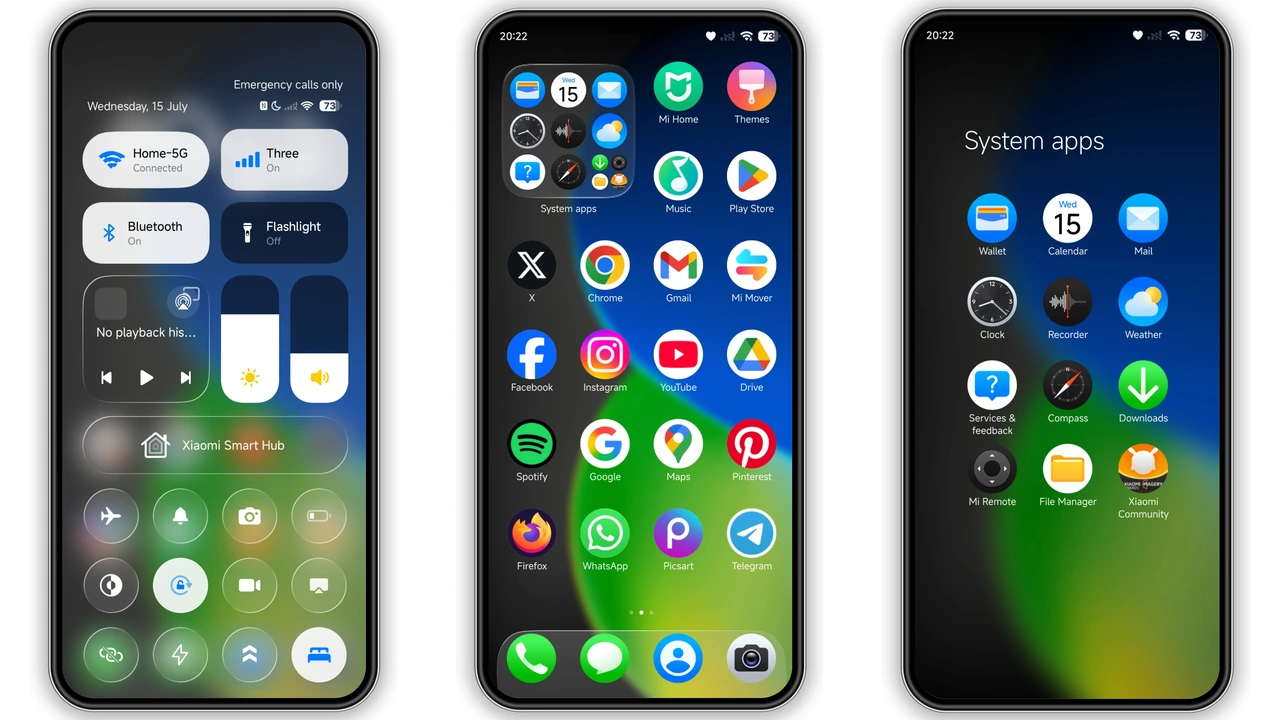
Once you unlock the device, Solana transitions smoothly into a bright, airy home screen. The icon pack adopts a smooth rounded geometry with balanced padding and crisp vector styling. System apps like Settings, Gallery, Camera, and Messaging receive tailored glyphs that harmonize with the green-and-blue palette, while third-party icons sit neatly inside matching frames so your app drawer never looks fragmented.
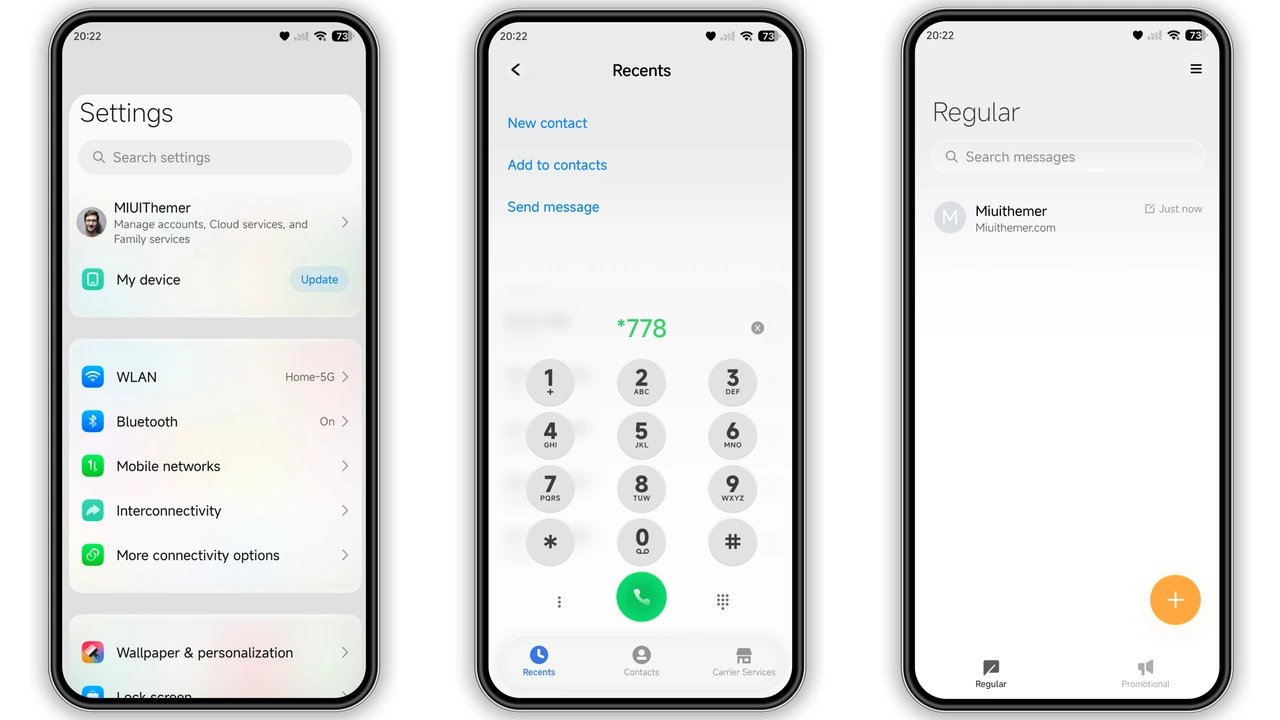
Beyond the icons, the theme refines the finer details you interact with hundreds of times a day. The status bar gets fresh battery, signal, and Wi-Fi indicators that feel sharper than stock HyperOS icons. System menus adopt a clean light UI with subtle translucency, making quick toggles and settings panels feel snappy and uncluttered.
Who will appreciate Solana the most? If you gravitate toward bright, energetic setups—or enjoy modern abstract gradients over stark minimalist dark modes—this theme hits a sweet spot. It is especially well-suited for AMOLED displays, where the rich emerald and cobalt transitions pop without straining your eyes indoors.
Compatibility, Installation & Download Notes
Solana is built specifically for the modern Xiaomi ecosystem, supporting HyperOS, HyperOS 2.0, and HyperOS 3.0 across Xiaomi, Redmi, and POCO hardware. Because Xiaomi handles theme installations differently depending on your ROM, knowing which file to grab saves a lot of trial and error.
- For Custom ROM Users (Xiaomi.eu, MIUIRoom, etc.): Download the standard MTZ file. Open the built-in Theme Store app, navigate to the Themes tab, scroll down to tap Import, and select the
.mtzfile from your storage. Apply the theme and wait a few seconds for the assets to load. - For Stock HyperOS Global ROM Users: Stock Global ROMs restrict direct third-party MTZ imports inside the Theme Store. You can either search for the theme directly via the official store region link when available, or use the Solana Backup File method to restore the theme layout without needing root access or a custom recovery.
- Post-Install Tip: Always restart your smartphone immediately after applying Solana. A quick reboot clears cached UI elements and prevents overlapping status bar icons or misaligned lockscreen widgets.
At 26.40 MB, the package is lightweight and downloads quickly even over mobile data. Keep both download options handy depending on your setup:
Pros and Cons
Pros:
- Highly customizable 3D lockscreen clock with adjustable height, color, and notification layout
- Vibrant green-and-blue abstract gradient wallpaper that looks sharp on high-resolution screens
- Smooth, uniform rounded icon pack with clean status bar refinements
- Lightweight 26.40 MB footprint compatible with HyperOS, HyperOS 2.0, and HyperOS 3.0
- Includes both MTZ and Backup file options for flexible installation
Cons:
- Light UI aesthetic may feel too bright if you strictly prefer a minimalist dark theme at night
- Stock HyperOS Global ROM users cannot import the MTZ file directly without using the backup workaround
- Requires a quick device reboot after applying to ensure zero UI overlap
Download Links
Use the buttons below to open the theme file and the supporting link.
Solana Theme mtz File
Solana Theme Backup File
Helpful links
More Theme Updates
For more curated HyperOS and MIUI theme updates, visit Hyper OS x MIUI .


