Parameter · Value
Designer · Guanglun
Size · 13.24 MB
Format · .mtz
Compatibility · HyperOS / MIUI (Xiaomi, Redmi, POCO)
Rounded Icons & Fresh Palette
The theme replaces every system icon with a soft‑rounded variant. Colors stay true to the original palette—deep blues, subtle purples, and crisp whites—while adding a subtle gradient that makes each icon pop without overwhelming the UI. The rounded treatment extends to the navigation bar, giving the whole interface a cohesive, friendly vibe. Wallpapers follow the same visual language: abstract color fields with gentle curves, ensuring icons remain legible. The overall effect feels like a modern reinterpretation of classic Xiaomi aesthetics.
Suggested Read: Testnet HyperOS Theme for Xiaomi and Redmi Phones
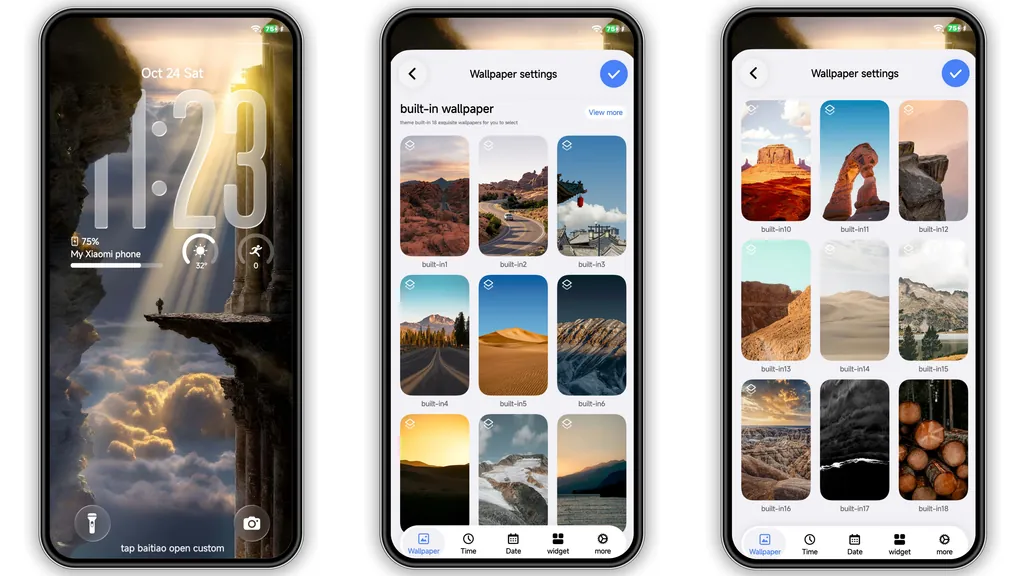
Lock Screen & AOD Revamp
Lock screen receives a full makeover. The default clock adopts a thin sans‑serif typeface, centered over a semi‑transparent color block that mirrors the theme’s primary hue. Swipe gestures retain their smooth animation, but the background now fades into the same gradient used for the home screen wallpaper. Always‑on display (AOD) inherits the same color block, displaying time, date, and notification icons in the new rounded style. Battery indicator adopts a subtle outline, making it readable in both dark and light environments.
Who’ll Love This Minimalist Color Burst
• Xiaomi purists who want a fresh look without discarding the brand’s visual identity.
• Redmi and POCO users seeking a lightweight theme that doesn’t tax battery or storage.
• Fans of rounded UI who appreciate the subtle shift from sharp corners to smooth curves.
• Color‑centric designers looking for a theme that emphasizes a limited yet vibrant palette.
The theme avoids heavy animations, so it suits devices with modest hardware. Users who prefer maximalist skins with moving particles may find it too restrained, but those after a clean, everyday look will feel instantly at home.
Installation Walkthrough & Performance Tips
1. Download the .mtz file from the official theme page. The file name reads Simple round color_miuithemer.com.mtz.
2. Open the Theme Store app on your device. Navigate to My Themes → Import.
3. Select the downloaded file and confirm import. The store will validate compatibility before applying.
4. Apply the theme. A quick reboot is recommended to clear any residual UI caches and ensure status‑bar widgets render correctly.
5. Check battery impact. Because the theme is lightweight (13 MB) and avoids heavy animations, you should notice negligible battery change. If you experience any lag, clear the theme cache via Settings → Apps → Theme Store → Storage → Clear Cache.
Pros and Cons
Pros
• Light footprint (13 MB) keeps storage usage low.
• Rounded icons give a fresh, modern feel.
• Consistent color scheme across wallpapers, lock screen, and AOD.
• Fully compatible with HyperOS and MIUI on Xiaomi, Redmi, POCO devices.
• Simple install process via native Theme Store.
Cons
• Limited animation; users seeking dynamic effects may feel underwhelmed.
• No dark‑mode specific tweaks; the same palette applies to both light and dark UI.
• Lacks extensive customization options beyond the default package.
Overall, Simple Round Color delivers a polished, cohesive look without sacrificing performance. Ideal for anyone who wants a subtle visual lift on their Xiaomi‑family phone.
Theme Preview

Download Links
Use the buttons below to open the theme file and the supporting link.
Simple round color Theme mtz File
Helpful links
More Theme Updates
For more curated HyperOS and MIUI theme updates, visit Hyper OS x MIUI .