Parameter · Value
Designer · maidul
Size · 85.24 MB
Format · MTZ
Compatibility · HyperOS / MIUI (all recent versions)
Glittering 3D Icons that Pop on Every Screen
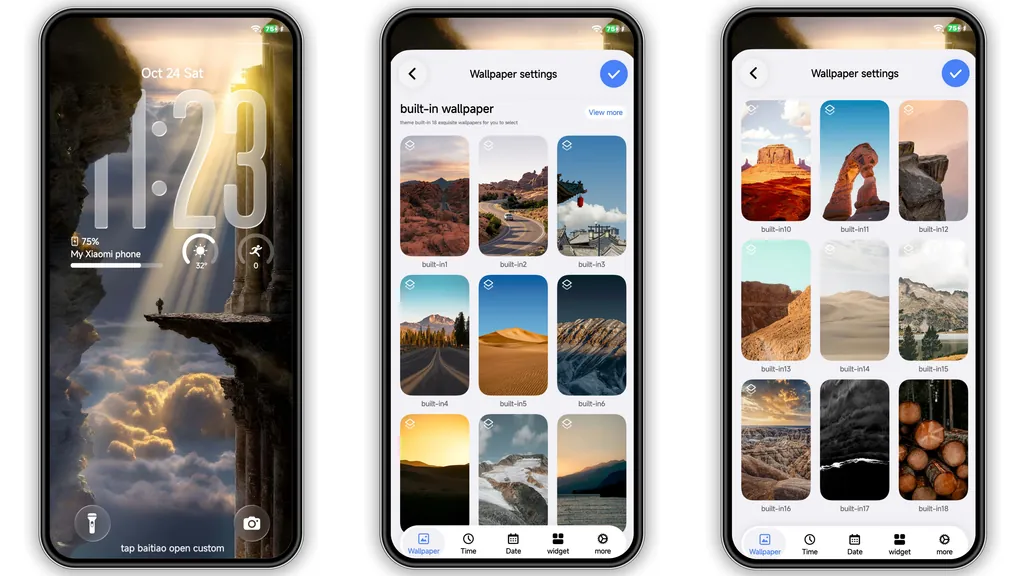
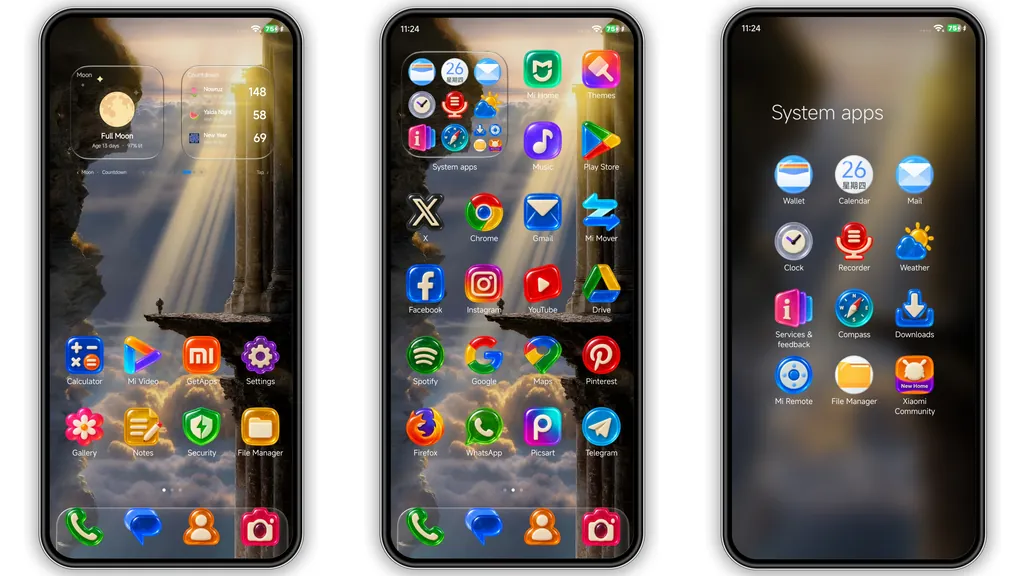
Uniswap’s icon set feels like a miniature sculpture gallery. Each app silhouette is rendered with a glossy finish, subtle depth cues, and a hint of reflective light. The 3D treatment isn’t just eye‑candy; it adds instant visual hierarchy, making frequently used apps stand out without overwhelming the home screen. The palette leans toward warm desert tones—think amber, rust, and muted teal—so the icons blend naturally with the theme’s background imagery.
Suggested Read: anime space HyperOS Theme for Xiaomi and Redmi Phones
AI‑Generated Cliff‑and‑Sunbeam Wallpaper Sets the Mood
At the heart of the theme lies an AI‑crafted wallpaper that captures a sunrise over a rugged cliff. The sunbeam slices through mist, casting soft gradients that shift gently as you swipe between home screens. Because the wallpaper is generated, every pixel feels intentionally placed, avoiding the repetitive feel of stock images. The theme also bundles 18 additional desert and mountain backdrops, giving you a curated gallery that matches the icon style.
Glass‑Style Lock Screen & Frosted Control Center
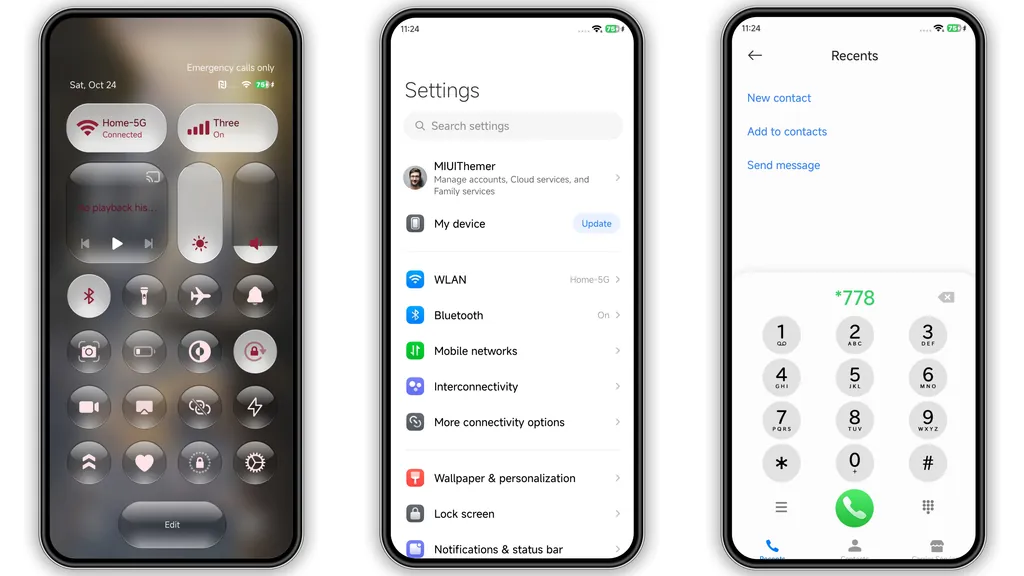
Unlocking the phone becomes a moment of polish. The lock screen features a large translucent clock that hovers over the AI wallpaper, its glassy container reflecting ambient colors. Swiping down reveals a frosted control center where toggles and quick settings appear behind a subtle blur. This visual consistency—glass meets 3D—creates a cohesive experience that feels both modern and tactile.
Installation Flow and What to Expect
1. Open the official Xiaomi Theme Store on a HyperOS or MIUI device.
2. Search for “Uniswap” and tap the download button.
3. The store will fetch the MTZ file (≈85 MB) and install it automatically.
4. Apply the theme from the Themes app; the system will prompt a quick restart.
5. After reboot, verify that icons, lock screen, and control center reflect the new assets.
The process is straightforward because the theme uses the native MTZ packaging. No third‑party file managers or root access are required. Expect a brief pause during the restart as the system caches the high‑resolution assets. Once loaded, battery impact is negligible; the theme relies on static images rather than live animations.
Who Will Love This Theme?
• Xiaomi power users who enjoy a premium aesthetic without diving into custom ROMs.
• Fans of minimalist depth, where subtle shadows add richness without clutter.
• Travel‑enthusiasts who appreciate desert and mountain scenery baked into daily use.
• Design‑savvy users looking for a cohesive visual language across lock screen, icons, and UI elements.
If you prefer ultra‑minimal flat icons or a dark‑only palette, this theme may feel too warm. Conversely, anyone tired of the default MIUI look will find Uniswap a refreshing upgrade.
Pros and Cons
• Pros
• Stunning 3D icons with consistent lighting.
• AI‑generated wallpaper adds uniqueness.
• Glass‑style lock screen feels premium.
• Fully compatible with HyperOS and MIUI.
• Simple native installation, no root needed.
• Cons
• Warm color scheme may not suit dark‑mode lovers.
• Large file size for low‑storage devices.
• Limited customization beyond the provided assets.
Overall, Uniswap delivers a polished, cohesive look that transforms a standard Xiaomi phone into a mini‑gallery of desert‑inspired design. Its blend of 3D depth, AI artistry, and glass UI makes it a standout choice for anyone craving a premium visual refresh.
Theme Preview
Download Links
Use the buttons below to open the theme file and the supporting link.
Uniswap Theme mtz File
Helpful links
More Theme Updates
For more curated HyperOS and MIUI theme updates, visit Hyper OS x MIUI .


