Theme details
- Designer
- suhel (Icons: ALIMUN, Lockscreen: Kronos)
- Size
- 50.77 MB
- Compatibility
- HyperOS Global, MIUI 14 / 13 / 12
Stock interfaces often lack personality, leaning either toward sterile minimalism or cluttered design. For users who prefer pitch-black aesthetics balanced with striking visual contrasts, the s4u dark by suhel theme for HyperOS and MIUI delivers a refined overhaul. Tailored for Xiaomi, Redmi, and POCO handsets, this theme delivers deep dark accents, bespoke iconography, and polished UI components without bogging down system responsiveness.
Whether you run an AMOLED display craving authentic black backgrounds to save battery, or simply want to revamp your daily driver with a distinctive aesthetic, this release deserves attention. Below is a breakdown of its features, design language, and everyday performance.
Format · .MTZ / Official Store
Deep Pitch-Black Atmosphere with Vibrant Character Accents
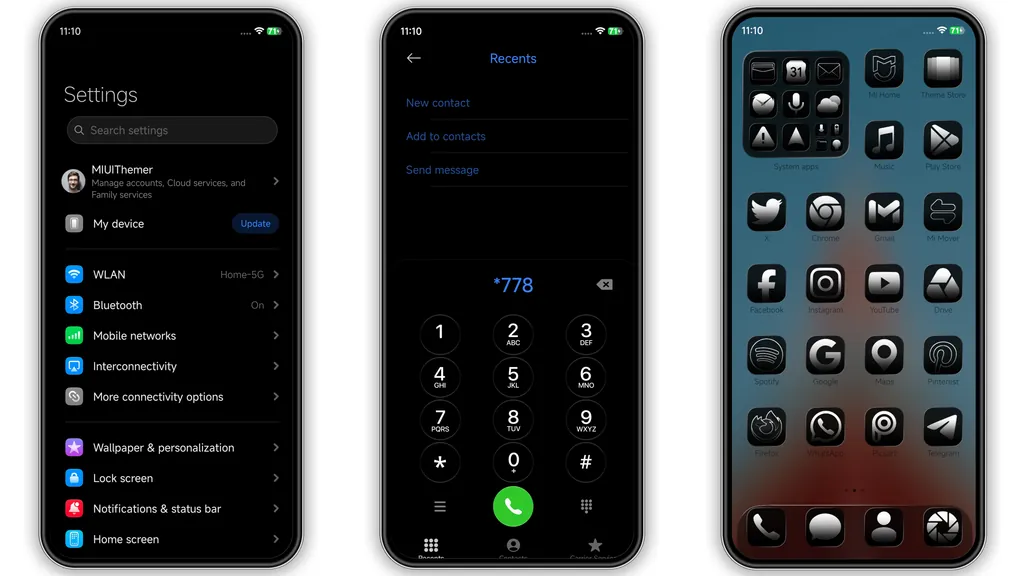
The central strength of s4u dark lies in its foundation: an uncompromising black palette designed specifically to optimize contrast and take advantage of modern OLED panels. Rather than settling for washed-out charcoal or muted gray tones, the core system UI embraces true hex-black backgrounds. System menus, notification shades, and native utility frames adopt this clean backdrop, minimizing ambient eye strain during late-night use.
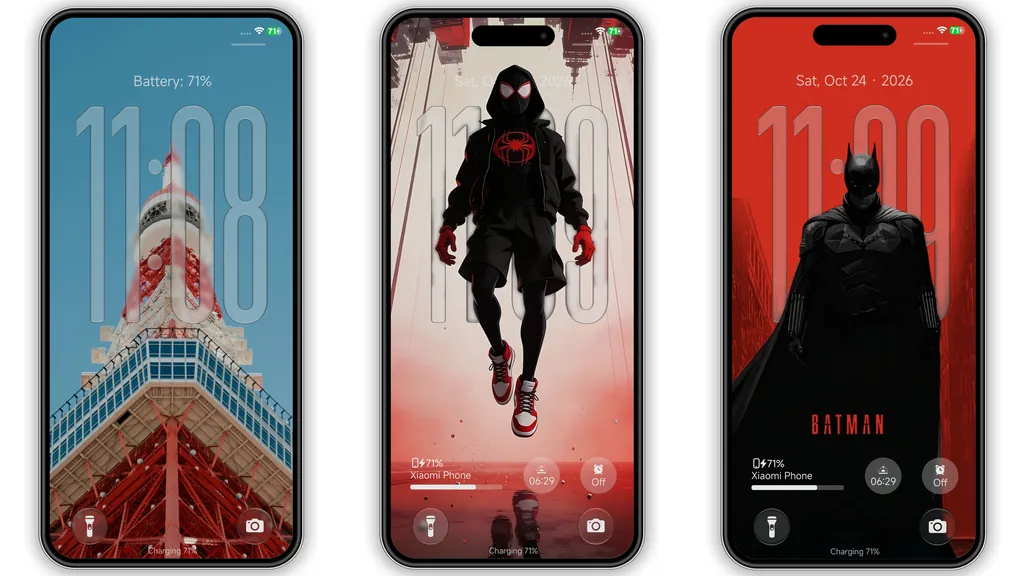
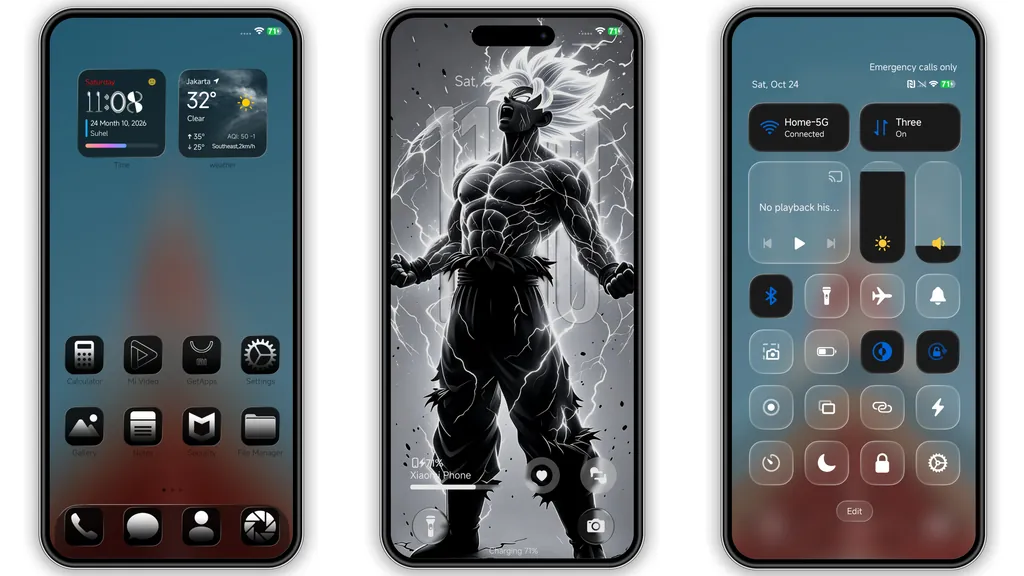
To keep the visual landscape energetic rather than monolithic, the designer incorporates stylized wallpaper variations featuring hero motifs and graphic artwork. Urban silhouettes lit by saturated crimson lighting sit alongside sharp black-and-white lightning sketches. These backdrops allow foreground text, widgets, and status toggles to stand out crisply without fighting for visual dominance.
Suggested Read: Sunset Parrot MTZ Theme – Detailed Archive for HyperOS & MIUI
Glossy Bespoke Iconography and Clean Typography
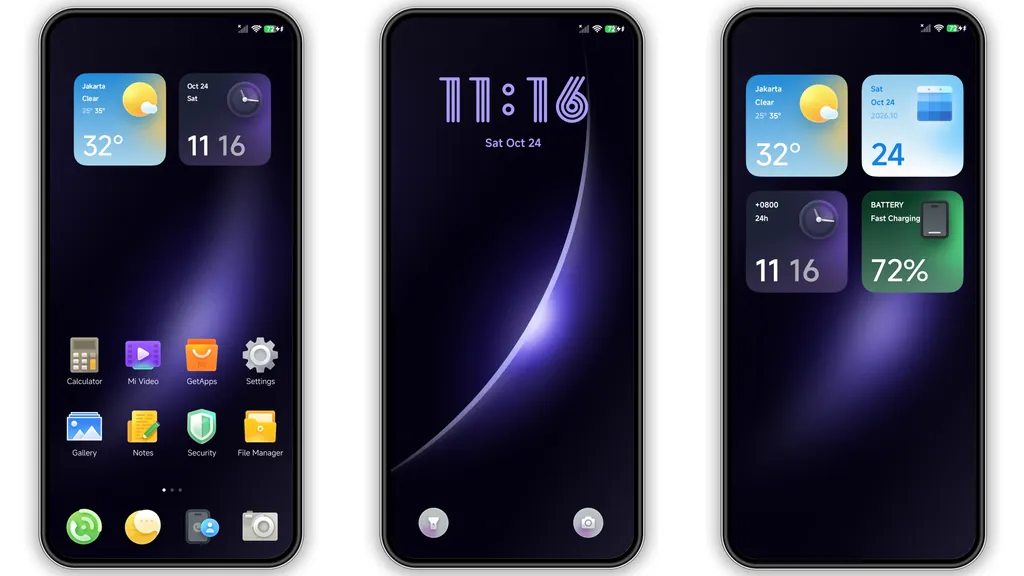
App icons represent the element of your phone you interact with most, and s4u dark completely revamps this touchpoint. Utilizing icon designs credited to ALIMUN, the package replaces stock system emblems with dark, sculpted icons framed by subtle specular highlights. Popular social media apps, utility folders, and stock system apps receive unified treatments featuring consistent dimensions, gentle rounded borders, and distinct color-coded logos centered on dark tiles.
This uniformity cleans up the typical visual clutter of an active home screen setup. The typography choices throughout the interface favor legibility at smaller scales. System settings labels, app names, and notifications appear crisp without excessive weight or awkward kerning, ensuring quick scanning through feeds and messages remains intuitive.
Frosted Control Center Setup and Translucent System Layers
The HyperOS Control Center receives notable refinements inside this theme. Toggles depart from standard flat surfaces in favor of a layered, frosted glass treatment. When pulled down, the notification tray and quick settings tiles blur background elements smoothly while retaining rapid touch responsiveness.
Active status states—such as enabled Wi-Fi, Bluetooth, or flashlight triggers—light up against the frosted dark framework, making quick checks effortless. Signal indicators, battery icons, and system status markers along the status bar are similarly reshaped into slim, geometric profiles that maintain an uncluttered top screen edge.
Dynamic Lockscreen Typography and Ambient Display Styling
The lockscreen layout, credited to Kronos, shifts away from generic digital readouts. A tall, modern, transparent clock widget occupies central real estate, framing background wallpaper elements without obscuring them. Essential metrics—such as battery percentage, date, and pedometer steps—are placed strategically across minimalist badges below the main clock readout.
Transitioning between the Always-on Display (AOD), lockscreen, and home screen feels cohesive. Unlocking animations flow smoothly without stutters or delayed layer renders. The lockscreen retains quick-access triggers for the camera and torch utilities at the bottom edges, keeping functionality intact while elevating daily usability.
Installation and System Performance Expectations
Clocking in at roughly 51 MB, s4u dark provides substantial visual changes while maintaining a lightweight footprint on memory. System animations, horizontal workspace paging, and app launch transitions remain snappy, even on mid-tier Redmi and POCO hardware. Memory overhead is negligible, ensuring that background apps are not aggressively purged by system managers.
If you apply this theme on a device running official HyperOS Global or MIUI stock ROMs, downloading through official channels guarantees automatic resource matching for your region. For users running custom firmware based on Xiaomi.eu or related custom ROMs, applying the theme via standard MTZ import in the built-in Themes manager works out of the box. A quick device reboot immediately after applying the theme is recommended to align cached status bar elements and lockscreen widgets cleanly.
Pros and Cons
Pros
- Authentic deep black palette optimized for battery efficiency on AMOLED screens.
- Cohesive dark glossy icon pack with high contrast and broad third-party app coverage.
- Sophisticated frosted control center styling with clear visual feedback for toggles.
- Sleek, high-legibility transparent clock typography on the lockscreen.
- Smooth day-to-day performance across both HyperOS and older MIUI builds.
Cons
- Graphic-heavy hero wallpaper style may not suit users seeking strictly neutral, corporate visuals.
- Some non-standard third-party apps may fall back to default icon masks.
Download Links
Use the buttons below to open the theme file and the supporting link.
s4u dark by suhel Theme mtz File
Helpful links
More Theme Updates
For more curated HyperOS and MIUI theme updates, visit Hyper OS x MIUI .


