Parameter · Value
Designer · VK
Size · 40.2 MB
Format · MTZ
Compatibility · HyperOS, MIUI
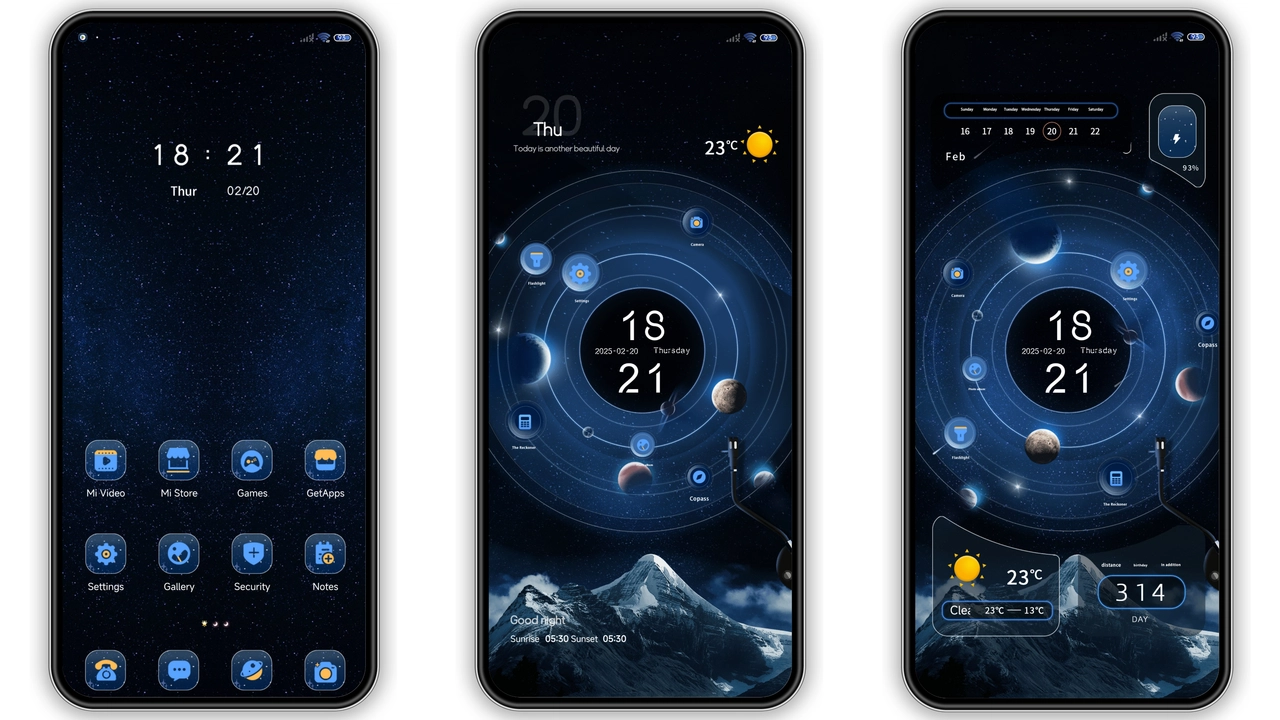
Midnight‑Blue UI Overhaul
Rat V drops a deep, midnight‑blue palette over every system app. Lockscreen adopts a gradient that fades into the notification shade, while the dialer receives glossy, rounded keys. Icons are re‑drawn in a flat‑but‑textured style, each stroke balanced for legibility on OLED panels. The theme also injects subtle motion: lock‑screen swipe‑up ripples, a faint vignette on the home screen, and a smooth fade when toggling the control centre. The overall vibe feels like a premium dark mode that never feels flat.
Suggested Read: Archive of 毛绒财神 诸事皆顺 MTZ Theme – Detailed Catalog
Who’ll Love Rat V’s Edge‑y Look
Power users who spend hours tweaking UI will appreciate Rat V’s attention to detail. The dark‑centric palette reduces eye strain for night‑time browsing, making it ideal for gamers and streamers. Fans of cyber‑punk aesthetics will enjoy the neon‑accented lock‑screen clock. Minimalists who still crave a touch of personality find the icons crisp without excess ornamentation. Conversely, users who prefer bright, pastel themes may find the darkness overwhelming.
Installation Walkthrough for Stock & Custom ROMs
Stock HyperOS / MIUI – Open the Themes app, tap the profile icon, select “Import” and browse to the downloaded MTZ file. After import, apply and reboot if any UI elements appear misaligned. Custom ROMs (Xiaomi.eu, MIUIRoom, etc.) – Launch the Themes app, choose “Import”, locate the MTZ file in your file manager, confirm import, then enable. A quick device restart clears residual caches. The theme reports zero conflicts with the default system fonts, so no additional patches are required.
Performance & Battery Impact
Because Rat V relies on static assets rather than heavy animation scripts, CPU usage remains negligible. Battery drain stays on par with stock dark mode; the OLED-friendly blacks actually save a few percent during prolonged use. Users have reported no lag when opening heavy apps like Games Turbo or Camera, indicating that the theme’s resource footprint is well‑optimized.
Pros and Cons
• Pros
• Cohesive dark aesthetic across system UI
• High‑resolution icons, no pixelation
• Minimal performance overhead
• Easy install on both stock and custom ROMs
• Cons
• No light‑mode variant
• Limited customization beyond lock‑screen wallpaper
• Might feel too dark for daylight use
Theme Preview


Download Links
Use the buttons below to open the theme file and the supporting link.
Download Rat V MTZ File
Helpful links
More Theme Updates
For more curated HyperOS and MIUI theme updates, visit Hyper OS x MIUI .