Theme details
- Designer
- Eto'mox / Poo-Max3
- Size
- 16.38 MB
- Compatibility
- HyperOS, HyperOS 2.0, MIUI 14
Format · .MTZ / Official Store
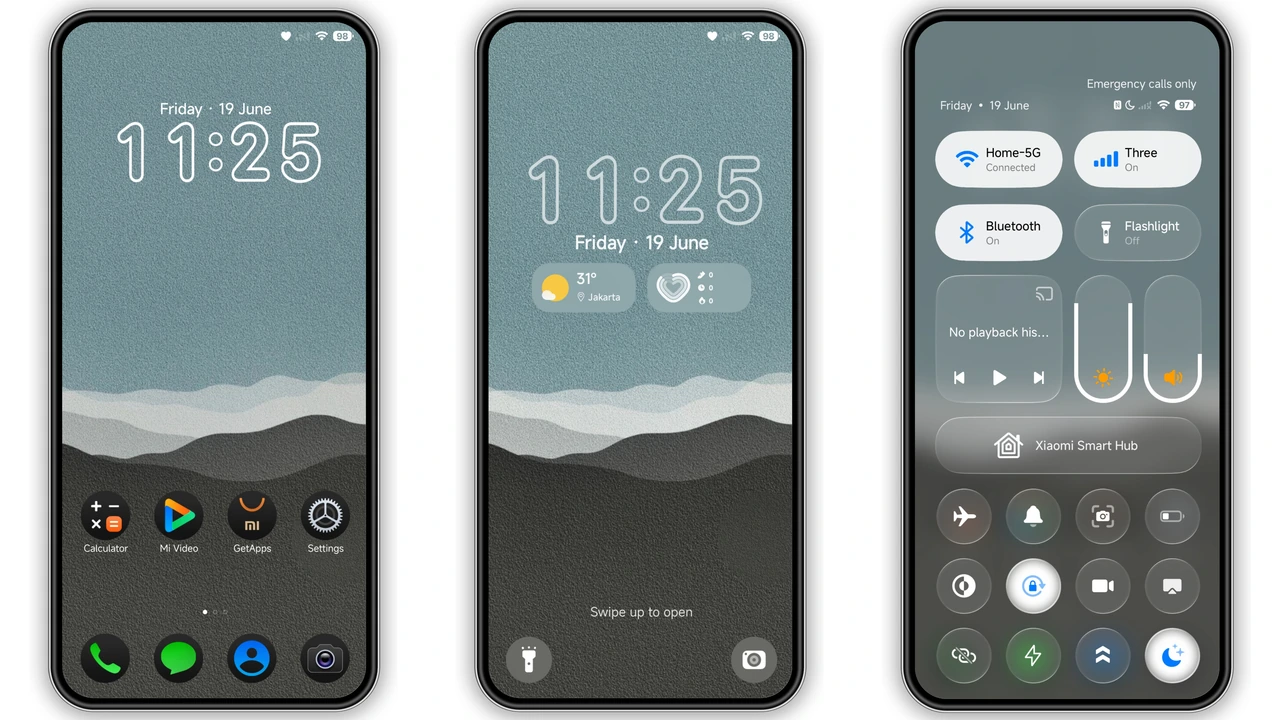
Personalizing a smartphone often turns into an arms race of neon accents, oversized widgets, and overbearing animations. If you want a calm, balanced workspace, the Poo-Max3 HyperOS theme provides a grounded alternative. Designed with an understated nature palette, crisp circular iconography, and extensive system skinning, it brings visual calm to modern Xiaomi, Redmi, and POCO handsets.
Earthy Palettes and Balanced Lockscreen Typography
The central visual anchor of Poo-Max3 is its layered teal, slate, and charcoal wallpaper. Instead of high-contrast photography or aggressive geometry, the background utilizes soft, organic contours that blend seamlessly into low-light environments. This approach reduces OLED glare without turning the interface into a lifeless sheet of absolute pitch black.
On the lockscreen, typography is clean and legible. The time display relies on modern, geometric sans-serif lettering that sits comfortably against the darker sections of the wallpaper. Directly below the clock, weather indicators and quick-glance date metrics remain legible without cluttering notifications. It provides an immediate sense of order: notifications get room to breathe, media playback widgets remain centered, and unlock gestures feel fluid.
Uniform Circular Dark Icon Pack Styling
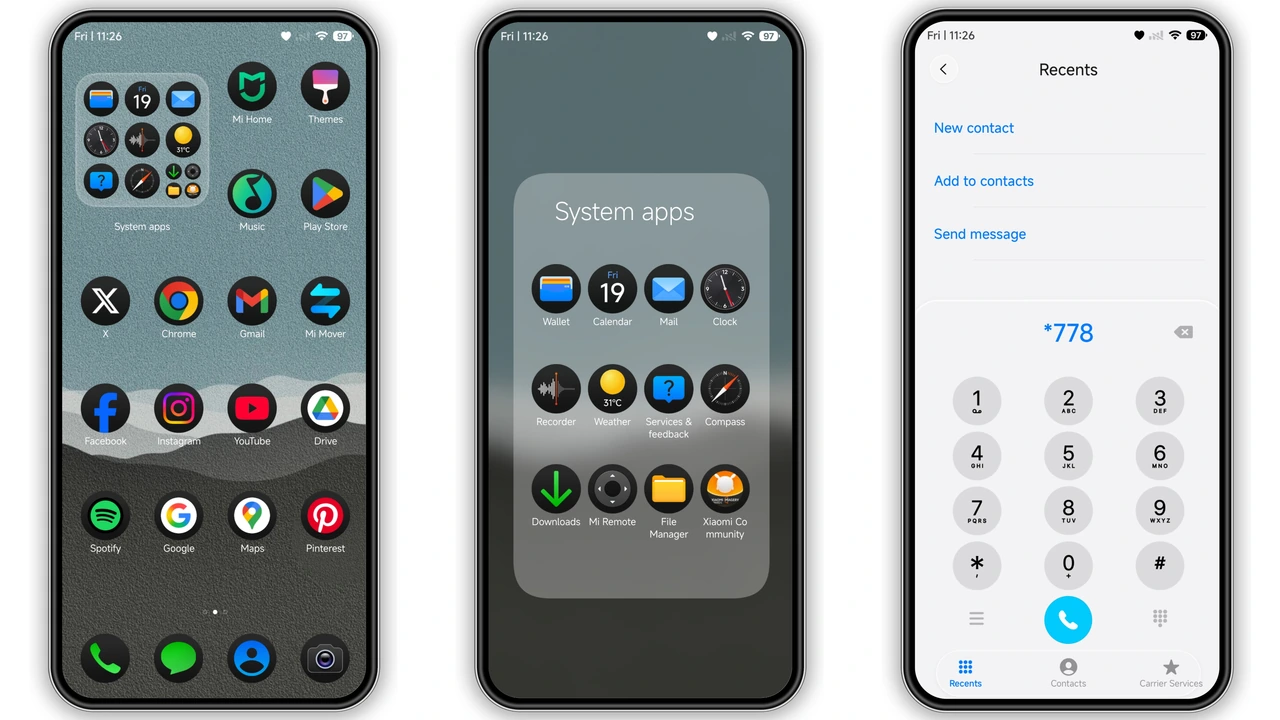
A theme lives or dies by its app icons. Poo-Max3 ships with a custom circular icon pack built on charcoal and deep matte bases, accented by muted white and pastel glyphs.
- Consistency across system tools: Core Xiaomi applications like Gallery, Security, File Manager, and Camera receive bespoke glyphs that match the overall palette.
- Third-party app masking: Non-themed icons sit inside a uniform dark circular container, avoiding jagged icon-shape mismatches on your homescreen.
- Visual balance: Circular iconography naturally prevents homescreen crowding, giving widgets and wallpaper details enough breathing space.
The resulting aesthetic works exceptionally well for users who favor grid layouts such as 4x6 or 5x6. The dark icons sink into the slate-teal wallpaper, creating depth while keeping application labels easy to read.
Deep System Customization: Control Center and System Apps
Poo-Max3 does not stop at surface-level wallpapers. The theme provides complete UI styling across major system frameworks:
- Control Center Setup: The toggles borrow from the primary palette, switching from subtle slate backgrounds in their inactive state to clean, soft teal accents when active. Brightness and volume sliders show refined rounded borders that fit standard HyperOS interaction models.
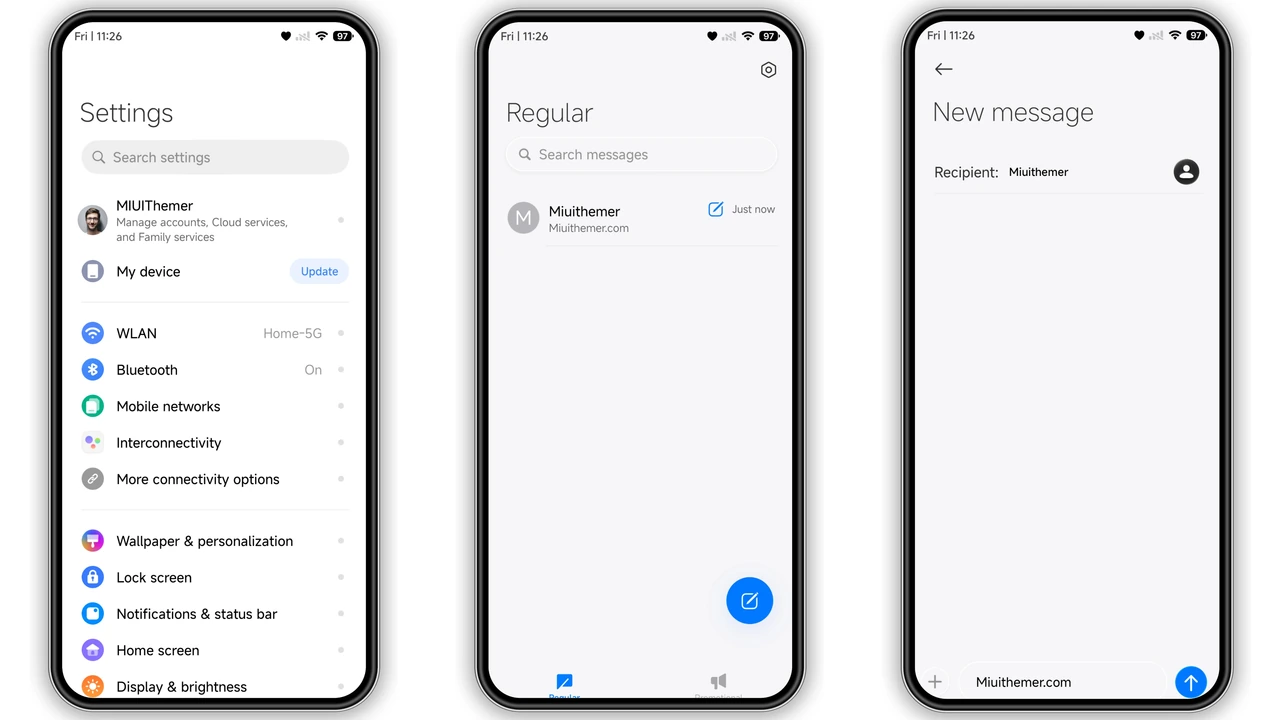
- Settings Interface: The Settings menu drops harsh white divider lines for low-contrast section breaks. Category icons match the dark circular theme found on the homescreen, giving the settings menu a cohesive, tailored feel.
- Dialer and Messages: Stock communication interfaces receive matching dark styling, ensuring you do not get hit with unstyled, high-contrast menus when opening your contacts or phone app.
Daily Performance and Battery Efficiency
At 16.38 MB, Poo-Max3 remains lightweight. Many themes with complex lockscreen scripts introduce micro-stutter when waking the device or navigating recent apps. Poo-Max3 avoids excessive script execution, allowing HyperOS's native rendering pipeline to maintain stable refresh rates on 90Hz and 120Hz displays.
The predominance of deep slate and muted grey tones also supports lower power draw on AMOLED panels compared to standard light themes. While not completely pure-black pitch, the low luminance across the UI helps curb battery drain throughout heavy daily use.
Pros and Cons
Pros:
- Cohesive earthy teal and slate visual design that reduces eye strain.
- Uniform circular dark icon pack with consistent masking for third-party apps.
- Well-themed Control Center with clean toggle states.
- Lightweight package size ensuring smooth 120Hz system navigation.
- Complete coverage across Settings, Dialer, and system dialogues.
Cons:
- The muted palette may feel too subdued for users who prefer vibrant accents.
- Does not include extensive lockscreen layout customization toggles.
- Stock dialer theming may not apply on regions using default Google Phone apps.
Installation and Compatibility Notes
Poo-Max3 runs cleanly across HyperOS and HyperOS 2.0 builds, alongside legacy compatibility on MIUI 14.
- Official Theme Store Method: When opening the download source on your device, use the built-in browser or Firefox. If prompted with an external theme preview page, use the options menu to select "Open in app" to trigger the native Xiaomi Themes Store directly. Once downloaded, tap Apply.
- Custom ROMs / MTZ Import: If you are running community firmware such as Xiaomi.eu or other MTZ-supporting custom builds, download the theme file, open your Themes app, navigate to your offline profile, select Import, and choose the
.mtzfile. - Post-Install Step: Always reboot your smartphone once after applying the theme. A quick restart clears the system UI cache, ensuring custom icon masks, Control Center blurs, and status bar icons render cleanly without visual glitches.
Suggested Read: Dopamine Joy Factor vs Midnight Minimalist on HyperOS & MIUI
Download Links
Use the buttons below to open the theme file and the supporting link.
Poo-Max3 Theme mtz File
Helpful links
More Theme Updates
For more curated HyperOS and MIUI theme updates, visit Hyper OS x MIUI .


