Theme details
- Designer
- SabriTN
- Size
- 56.52 MB
- Compatibility
- HyperOS, MIUI 14, MIUI 13
Format · MTZ / Official Store
Personalizing a smartphone interface often comes down to finding that sweet spot between functional readability and visually immersive design. The stock look of Xiaomi, Redmi, and POCO devices running HyperOS delivers dependable everyday utility, but it can feel sterile over time. For enthusiasts who appreciate pitch-black styling offset by rich, cinematic colors, the NOX_V3 HyperOS theme provides an exceptional overhaul that breathes premium life into every screen interaction.
Crafted by developer SabriTN, NOX_V3 is built around a luxury dark design language. Instead of presenting a basic flat-black slate, it weaves together vivid nature photography, subtle crimson accents, translucent glassmorphism, and depth-layered typography. Here is an in-depth breakdown of what makes this theme stand out, how its key visual elements perform, and what to expect during everyday usage.
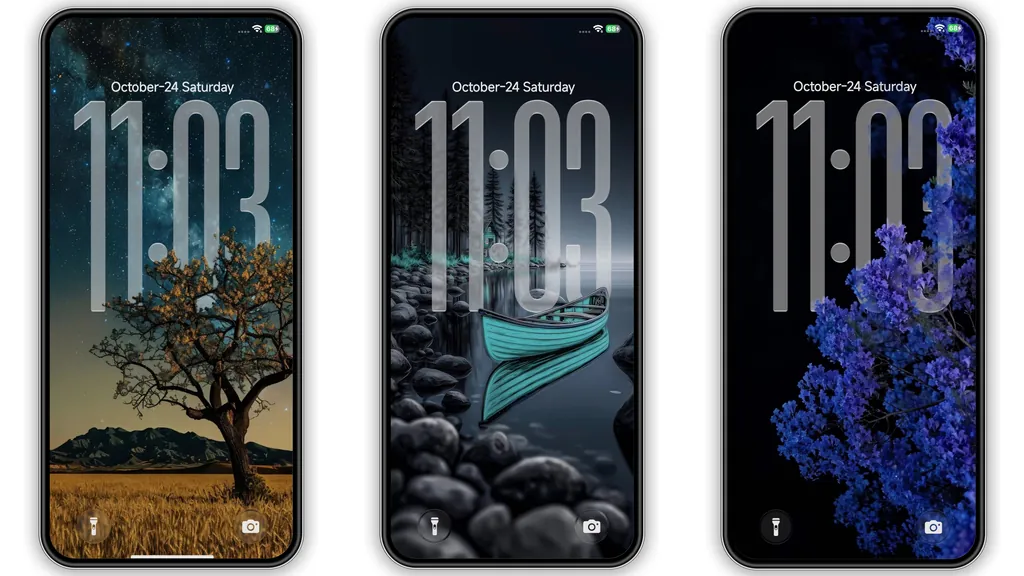
3D Depth-of-Field Lockscreen and Transparent Typography
The centerpiece of NOXV3 is undoubtedly its lockscreen configuration. Many dark-mode themes rely on static, flat clock widgets that fail to interact with the underlying wallpaper. NOXV3 takes a page from modern depth-mapping techniques by utilizing a tall, semi-transparent clock typeface that sits naturally inside the scenery.
Whether you select the starry night sky framing dark tree silhouettes, an autumn trail bathed in golden foliage, or a turquoise wooden rowboat drifting along misty waters, the lockscreen typography establishes an authentic 3D sense of depth. The clock digits slip behind key foreground elements, yielding an editorial, magazine-grade look every time your display lights up.
Beyond typography, the lockscreen handles notifications with soft, pill-shaped translucency. Quick shortcuts for the camera and flashlight maintain clean line-art iconography, preventing clutter while preserving instant utility when picking up the handset on the go.
Suggested Read: Cyan Glass vs Super18 Dark: Which HyperOS or MIUI Theme Wins?
Glossy Dark Iconography with Crimson Accents
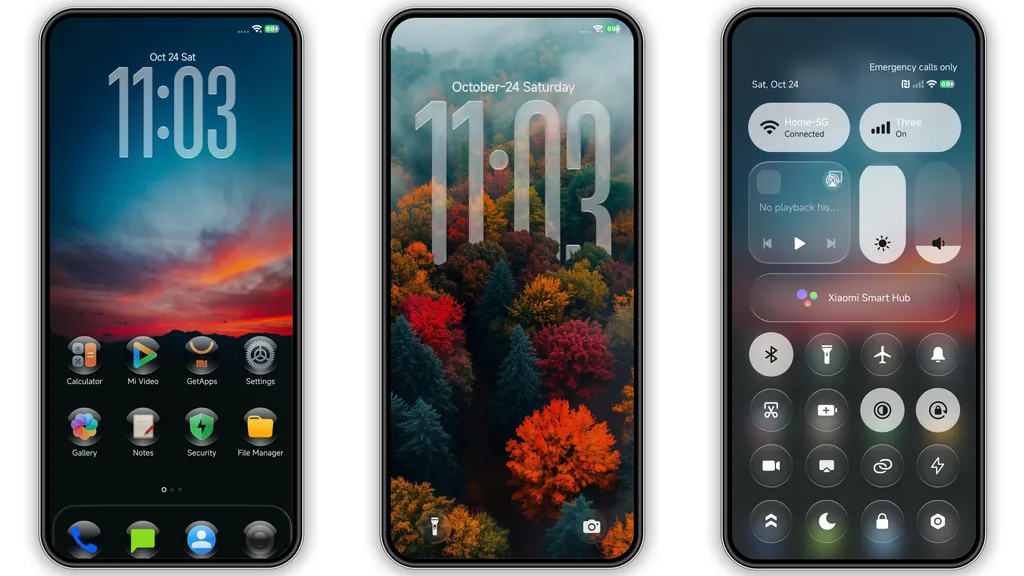
Transitioning past the lockscreen brings you to a meticulously redesigned application grid. Stock HyperOS icons lean heavily into bright squircles with saturated pastels. NOX_V3 strips away the cartoonish styling in favor of obsidian, polished app containers with subtle gradient borders.
System utilities—such as Phone, Messaging, Settings, Security, and File Manager—are completely reskinned. They feature sharp, minimalist glyphs set against dark, glossy bases with subtle red highlights that match the theme's core color palette. Third-party applications retain their distinct silhouettes while adapting smooth drop-shadow treatments, meaning your app drawer or home screen layout stays cohesive even if your installed collection includes hundreds of apps.
The folder view adopts an identical visual treatment: opening a grouping of apps blurs the backdrop with an obsidian frost, highlighting individual app icons without causing visual confusion.
Frosted Control Center and Streamlined Status Bar
The Control Center on modern HyperOS builds serves as the daily operational cockpit, and NOX_V3 gives it a tactile, executive treatment. The quick toggles—including Wi-Fi, Bluetooth, Mobile Data, and Flashlight—ditch standard cyan fills for high-contrast white and dark-crimson indicators enclosed within frosted glass cards.
Brightness and volume sliders are fine-tuned to show clear, responsive feedback when dragged. Text labels beneath individual toggles remain sharp and legible against the blurred background, eliminating the legibility issues that often plague poorly calibrated third-party skins.
Up top, the status bar receives subtle refinement. The battery indicator adopts an ultra-clean layout with readable percentages, while cellular signal bars and Wi-Fi glyphs are scaled down slightly to reduce visual weight along the top edge of your panel, especially on punch-hole screens.
Settings Architecture and Always-on Display Touches
A theme reveals its true build quality deep within secondary submenus. NOX_V3 changes the primary Settings interface to match the system-wide palette. Category cards are framed in muted grey and deep charcoal borders, paired with custom red-tinted indicator icons that make specific setting categories instantly identifiable at a glance.
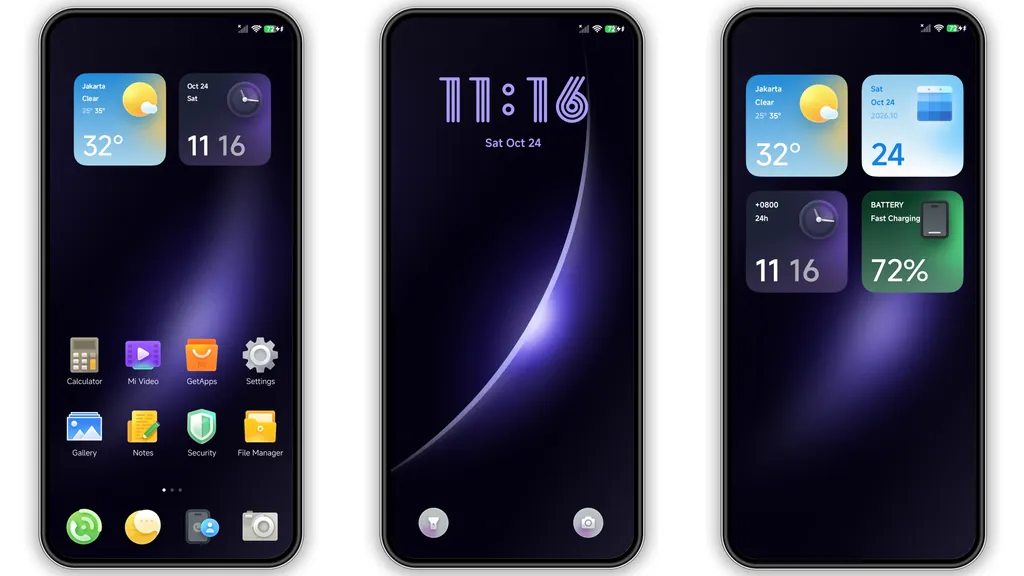
For devices equipped with AMOLED and OLED displays, NOX_V3 includes an Always-on Display (AOD) setup optimized for power conservation. The clock face mirrors the primary lockscreen design with condensed styling, showing essential metrics—time, date, battery level, and notification badges—while allowing the vast majority of display pixels to remain completely unlit.
Who Is NOX_V3 Best Suited For?
- AMOLED Display Owners: The extensive use of true blacks minimizes power consumption while delivering maximum display contrast.
- Minimalist Personalization Fans: Users who love high-contrast aesthetics without chaotic neon overlays or distracting visual clutter.
- Photography Enthusiasts: Anyone who enjoys natural landscape imagery paired with balanced, magazine-style clock typography.
Pros and Cons
Pros
- Striking 3D depth-of-field lockscreen clock effect.
- Refined, glossy dark icon pack with consistent system iconography.
- Frosted Control Center with readable, high-contrast quick toggles.
- OLED-friendly dark styling reduces battery draw on AMOLED panels.
- Comprehensive coverage extending across Settings, Phone, and Status Bar.
Cons
- Deep crimson accents may clash if you prefer pastel or neutral color palettes.
- Some third-party niche apps lack dedicated custom glyphs, falling back to container framing.
- 56 MB package size requires moderate local storage.
Installation Notes and Verification
Applying NOX_V3 is straightforward on both official Global builds and custom firmware installations:
- Official Store Pathway: When installing via the official theme link on Global Stable ROMs, open the reference page inside the browser, opt to launch in the native Themes app, and select Download followed by Apply.
- Custom ROM Pathway (MTZ): If you are running an unlocked device with custom software (such as Xiaomi.eu), place the downloaded
.mtzpackage in your internal storage, launch the Themes manager, navigate to Themes > Import, and select the file. - Post-Install Reboot: It is strongly recommended to restart your smartphone immediately after applying the theme. A fresh reboot allows the HyperOS graphics subsystem to clear cached asset overlays, ensuring that the Control Center blurs, status bar alignments, and lockscreen depth effects display properly without graphical artifacts.
Download Links
Use the buttons below to open the theme file and the supporting link.
NOX_V3 Theme mtz File
Helpful links
More Theme Updates
For more curated HyperOS and MIUI theme updates, visit Hyper OS x MIUI .


