Theme details
- Designer
- SabriTN
- Size
- 45.99 MB
- Compatibility
- HyperOS, MIUI 14
Format · MTZ / Official Store
If you appreciate pure dark setups that make full use of AMOLED displays without overwhelming your screen with garish colors, Nebula NoirV3 deserves your attention. Built with a sleek, brooding identity, this theme strips away the excessive bright whites of standard system skins and replaces them with deep cosmic shadows, translucent glass surfaces, and subtle, tasteful crimson highlights.
Personalizing a Xiaomi, Redmi, or POCO phone often turns into a search through dozens of flashy, unfinished skins. Nebula NoirV3 stands apart by prioritizing restraint, visual legibility, and refined layout symmetry.
Deep Cosmic Backdrops and Translucent Glass UI
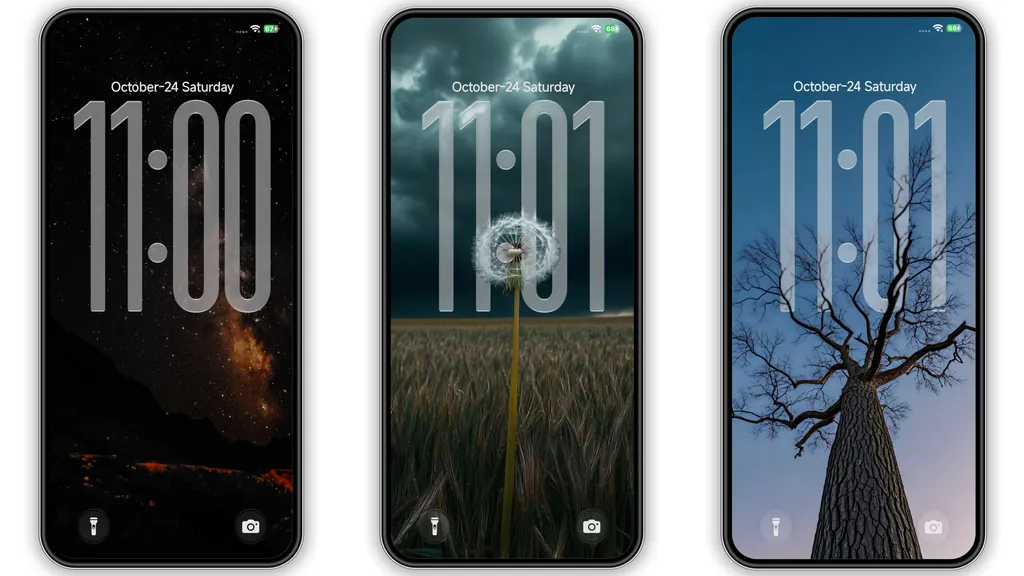
The visual anchor of Nebula NoirV3 is its ambient photography and dark space motif. Instead of flat, boring charcoal textures, the wallpaper rotation draws inspiration from twilight landscapes, solitary dandelions beneath misty skies, and vast starry expanses. The deep black base acts as an ideal backdrop for OLED and AMOLED panels, significantly reducing screen glare during nighttime use while conserving battery power.
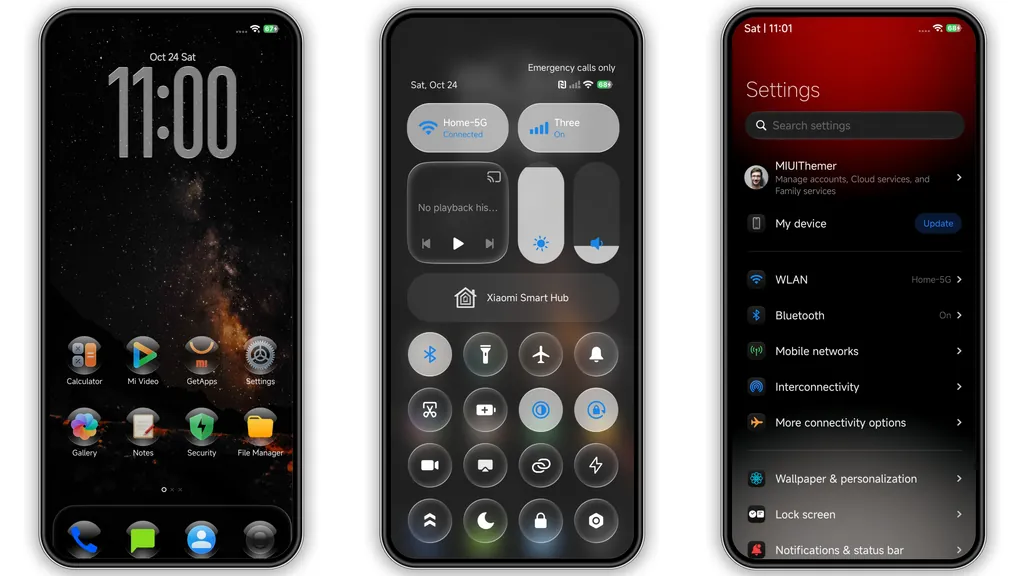
Layered over these moody backdrops are frosted, glassmorphic UI elements. Dialog menus, notification cards, and the control center adopt a smoky, translucent finish. Blur strength feels natural rather than muddy, allowing whatever background artwork you choose to gently peek through system panes without rendering body text illegible.
Suggested Read: Trending MTZ Theme “重感 爱而无畏” – A Fresh Look for HyperOS & MIUI
Translucent Iconography and Tall Lockscreen Typography
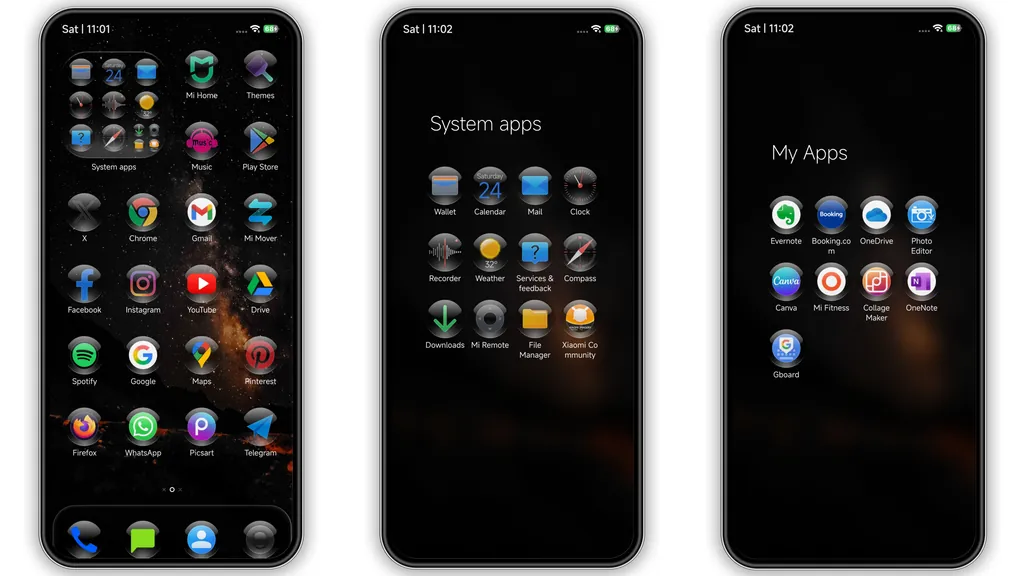
Stock app icons often feel disconnected from the overall aesthetic of custom setups. Nebula NoirV3 resolves this imbalance with uniformly styled, dark rounded icons encased in subtle glass borders. Standard system apps like Settings, Gallery, File Manager, and Security receive custom glyphs that seamlessly blend into the dark universe vibe.
The lockscreen serves as another standout element. Dominated by a tall, sleek clock typography with translucent masking, the phone immediately projects a boutique look when woken. The lock interface stays practical: quick-access toggles sit neatly at the base, keeping notification cards organized underneath the clock without cluttering the lock wallpaper.
Refined Status Bar Accents and Control Center Tint
Many themes fail when handling HyperOS's quick settings and status bar badges. Nebula NoirV3 integrates crimson accents into its toggles, replacing standard electric blues with an understated wine-red glow when features like Wi-Fi, Bluetooth, or Flashlight are engaged.
The battery icon, cellular indicators, and Wi-Fi readouts adopt thinner lines that declutter the top bar. The frosted effect across the quick settings panel prevents quick toggles from appearing visually separate from the notification stream, resulting in a cohesive experience across everyday system navigation.
Everyday Usability and Practical Installation
Nebula NoirV3 suits daily drivers well because it avoids unreadable dark-on-dark font mistakes that frequently plague third-party dark themes. Text contrast remains crisp across system menus, sub-settings, and standard messaging notifications. The Always-on Display implementation remains clean and minimalist, displaying vital notifications and battery percentage without draining extra juice.
When applying this theme, verify your system platform. Devices running official HyperOS or MIUI Global ROMs can load the theme directly or via local MTZ import using supported theme utilities. For custom firmware users running EU or regional builds, direct MTZ imports through the built-in Theme Store app work reliably.
Always perform a quick device restart immediately after applying the theme to clear cached UI assets. This prevents occasional visual bugs, such as overlapping status bar glyphs or delayed control center blur effects.
Pros and Cons
Pros:
- True pitch-black backdrops optimized for OLED battery efficiency.
- Cohesive frosted glass UI across control center and system menus.
- Distinctive tall typographic clock on the lockscreen.
- Crisp icon styling with wide coverage for default system apps.
- Tasteful crimson toggle accents that avoid eye strain.
Cons:
- Third-party app icons without custom masks may clash with the glass style.
- Extremely dark visual profile may feel too muted for users who prefer bright palettes.
- Requires a manual restart post-installation to fix minor initial blur glitches.
Download Links
Use the buttons below to open the theme file and the supporting link.
Nebula NoirV3 Theme mtz File
Helpful links
More Theme Updates
For more curated HyperOS and MIUI theme updates, visit Hyper OS x MIUI .


