Theme details
- Designer
- NEAR
- Size
- 87.21 MB
- Compatibility
- HyperOS, MIUI
Diving into the world of HyperOS and MIUI customization is always an adventure, and every now and then, a theme emerges that truly captures the imagination. Today, we're spotlighting NEAR, a premium HyperOS theme that redefines personalization with its stunning visuals and thoughtful design. If you're looking to elevate your Xiaomi, Redmi, or POCO device beyond the ordinary, NEAR promises a refreshing, distinctive aesthetic powered by cutting-edge AI artistry and deep customization.
Format · MTZ
A Canvas of AI-Generated Wonders
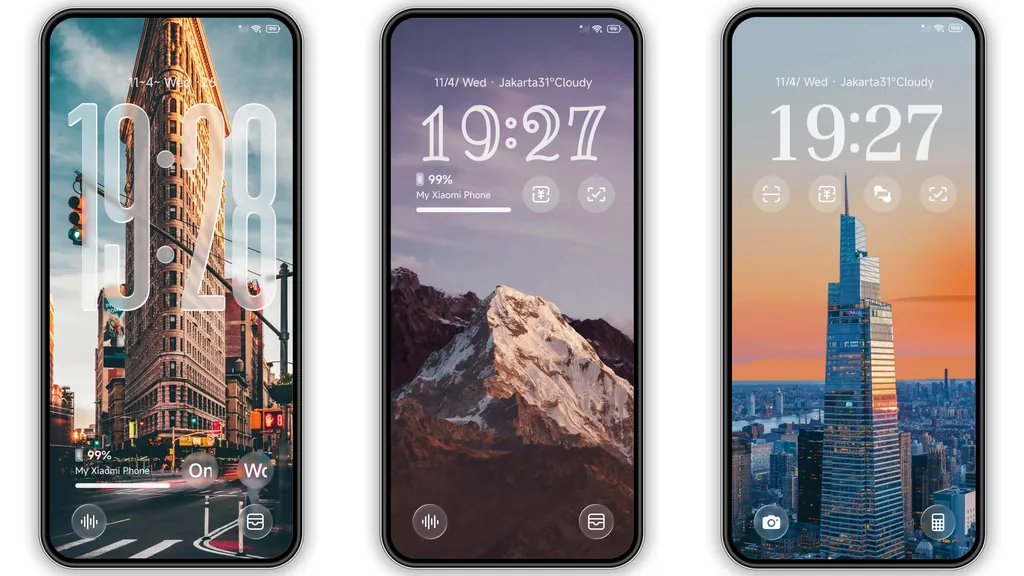
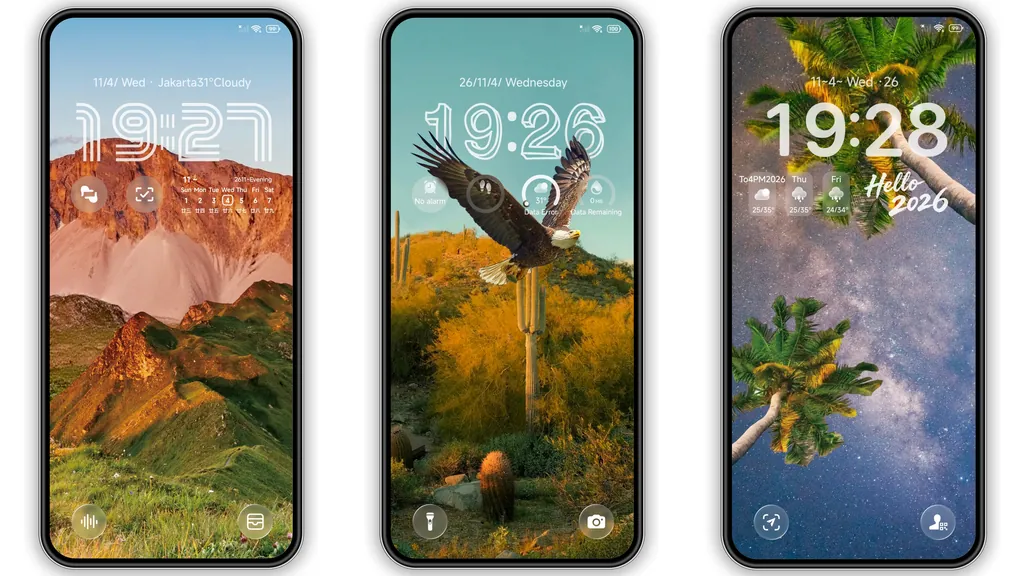
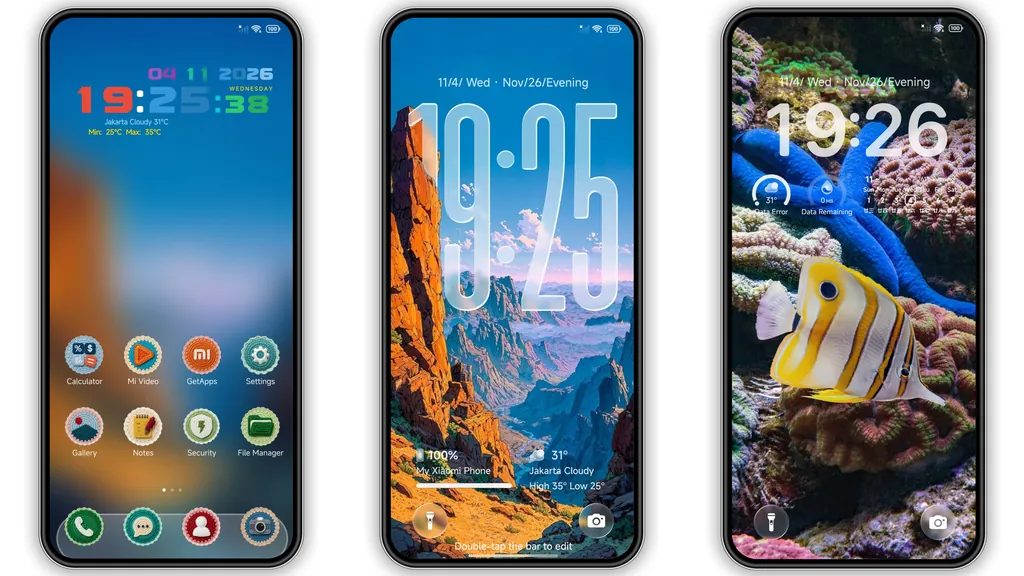
The true star of the NEAR HyperOS theme is undoubtedly its collection of AI-generated wallpapers. Forget generic landscapes; NEAR brings a gallery of breathtaking digital art directly to your home and lock screens. Imagine the majestic silhouette of city towers piercing a vibrant, twilight sky, or the serene beauty of snowy peaks reflecting the first light of dawn. The theme doesn't stop there; it transports you to diverse environments with visuals of a soaring eagle captured in mid-flight, the tranquil allure of palm trees under a star-studded Milky Way, and the mesmerizing kaleidoscope of a colorful coral reef teeming with life. Each wallpaper is a testament to the power of artificial intelligence in crafting visually rich, immersive backdrops that feel both otherworldly and deeply familiar. These aren't just static images; they are high-definition pieces designed to add depth, character, and a touch of premium artistry to your device. This curated selection ensures that whether you prefer urban grandeur, natural serenity, or vibrant underwater scenes, there's an AI-generated masterpiece waiting to transform your device's visual identity. The quality and variety of these backgrounds alone make NEAR a standout option for anyone seeking a truly unique and visually stimulating experience on their HyperOS or MIUI device.
Suggested Read: Archive Entry: HyperF1 HyperOS Theme – Blue Minimalist for Xiaomi & Redmi
Dynamic Lockscreen & Intuitive Interface Refinements
Beyond its captivating wallpapers, the NEAR theme shines with its dynamic and highly customizable lock screen. This isn't just a static display; it's an interactive canvas where you can truly make your device your own. Users gain the flexibility to choose from a variety of lock screen clock styles, allowing for a personalized touch that matches your aesthetic preference, whether you lean towards minimalist digital displays or more intricate, classic analog looks. The attention to detail extends beyond the clock; the overall lock screen layout feels modern and clean, ensuring that essential information is readily accessible without clutter.
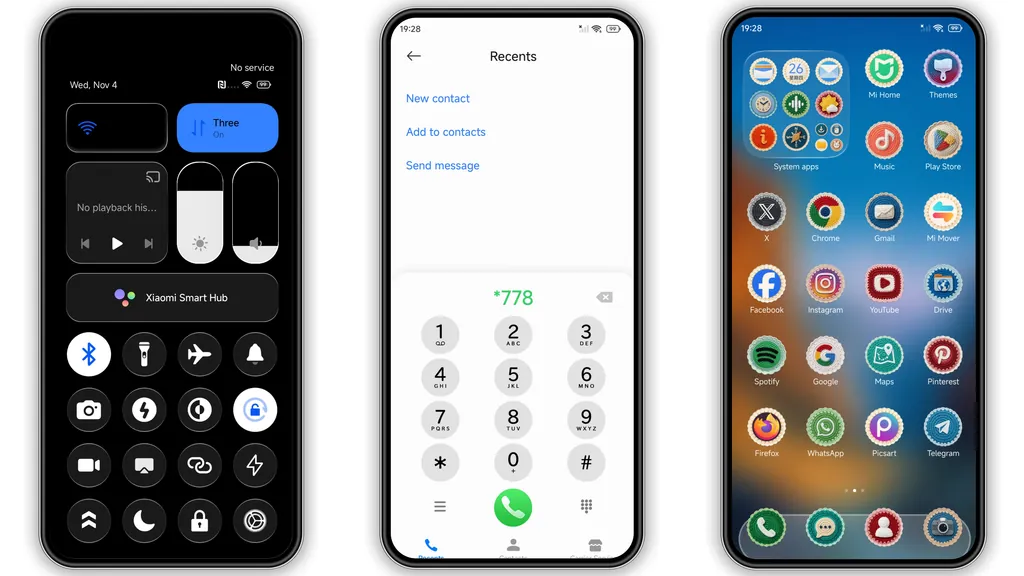
The refinements don't stop at the lock screen. NEAR also introduces a fresh, updated status bar that integrates seamlessly with the theme's overall dark aesthetic. Icons for Wi-Fi, battery, and signal are subtly redesigned, offering a cohesive and polished appearance that enhances readability and visual harmony. Furthermore, for devices that support it, the theme includes a stylish Always-on Display (AOD) that continues the theme's visual language, providing essential information at a glance with elegance. This holistic approach to interface design means that from the moment you glance at your locked screen to navigating through your device, the NEAR theme maintains a consistent, premium feel that elevates the entire user experience.
Sleek Icons & a Unified Dark Control Center
A theme's character is often defined by its icons, and NEAR doesn't disappoint. It features distinctive scalloped badge-style icons that immediately set it apart from the more common square or round designs. These icons strike a perfect balance between uniqueness and recognition, ensuring that while your app drawer looks fresh and personalized, you can still easily identify your favorite applications. The scalloped edges add a subtle touch of sophistication and depth, contributing to the theme's overall premium feel. This consistent icon pack extends across system apps and many popular third-party applications, creating a unified and polished appearance throughout your device.
Complementing these stylish icons is a beautifully executed dark control center. For those who appreciate the aesthetic and practical benefits of dark mode, NEAR delivers a control center that is both visually appealing and highly functional. The dark background not only reduces eye strain, especially in low-light conditions, but also makes the toggles and sliders pop with clarity. The layout is intuitive, ensuring quick access to Wi-Fi, Bluetooth, flashlight, and other essential controls. This unified dark UI philosophy extends to other system elements, fostering a cohesive experience where every interaction feels deliberate and refined. The combination of unique icons and a well-designed dark control center ensures that the NEAR theme is not just about pretty wallpapers, but a comprehensive visual overhaul.
Tailoring Your HyperOS Experience
The NEAR HyperOS theme is an ideal choice for smartphone personalization enthusiasts who are eager to infuse their device with a distinctive, premium look. If you're tired of the default themes and crave something that truly stands out, NEAR offers a compelling alternative. It caters to users who appreciate high-quality visual art, particularly those intrigued by AI-generated aesthetics. The theme's minimalist yet sophisticated dark mode elements, combined with its vibrant, customizable lock screen, make it versatile enough to appeal to a wide range of tastes. Whether you're a fan of urban chic, serene nature, or a blend of modern design with artistic flair, NEAR provides a rich canvas for your daily digital interactions. It’s perfect for those who want their phone to reflect a sense of style and individuality, moving beyond mere functionality to embrace a device that is also a personal statement. The theme doesn't just change colors; it subtly alters the mood and feel of your device, making every swipe and tap a more enjoyable experience.
Compatibility & Installation Insights
One of the great advantages of the NEAR HyperOS theme is its broad compatibility. Designed to work seamlessly across HyperOS and MIUI, it ensures that a vast number of Xiaomi, Redmi, and POCO smartphone users can enjoy its premium features. Whether your device is running the latest HyperOS iterations or an earlier version of MIUI, the theme is engineered to provide a consistent and polished experience.
For HyperOS/MIUI Global Stable ROM Users (Official Theme Store Method):
Applying themes from the official Theme Store can sometimes involve a minor workaround, especially for global users, as some themes might initially appear in the Chinese store.
- Begin by opening the theme page using a browser like Firefox.
- Look for a link that directs you to the official Theme Store. Clicking this link should ideally open a Xiaomi theme page, which might be in Chinese.
- Once on this page, locate the three-dot menu (usually in the top right corner) and select 'Open in app.' This action should redirect you to the native Theme Store application on your device.
- From within the Theme Store app, you can then proceed to download and apply the NEAR theme.
Note: If you encounter issues, try opening the initial link in Chrome or the default Xiaomi browser, as some browsers handle these redirects differently.
For Custom ROM Users (MTZ File Import Method):
If your device is running a custom ROM based on MIUI (such as Xiaomi.EU ROM, MIUIRoom, or similar), applying the theme via its MTZ file is often the most straightforward approach.
- First, obtain the NEAR theme's MTZ file.
- Open your device's Theme Store application.
- Navigate to the 'Themes' option, usually found by swiping to the bottom or through a profile menu.
- Look for an 'Import' option. Select it.
- Browse your device's storage and select the downloaded NEAR MTZ file.
- Once imported, the theme will appear in your list of local themes. Select it and apply.
Important Post-Installation Tip: After applying any new theme, especially one as comprehensive as NEAR, it's always a good practice to restart your device. This helps to ensure all theme elements, from icons to system UI changes, are properly loaded and applied without any overlaps or visual glitches, providing you with the smoothest possible experience right from the start. This simple step can resolve minor display inconsistencies and ensure the theme's full potential is realized.
Pros and Cons of the NEAR HyperOS Theme
Like any comprehensive customization, NEAR offers a distinct set of advantages and a few considerations:
Pros:
- Stunning AI-Generated Wallpapers: A truly unique and premium collection that offers diverse aesthetic choices.
- Highly Customizable Lockscreen: Multiple clock styles allow for significant personal expression.
- Unique Icon Design: Scalloped badge-style icons provide a fresh, distinctive look.
- Unified Dark UI: A well-implemented dark control center and system elements reduce eye strain and enhance aesthetics.
- Broad Compatibility: Works across a wide range of HyperOS and MIUI devices.
- Free to Use: Offers premium features without a cost.
Cons:
- Relatively Large File Size: At 87.21 MB, it's larger than some minimalist themes, which might be a minor consideration for limited storage or slower downloads.
- Theme Store Workaround: Global users might need to follow specific steps to access and apply the theme via the official Theme Store, which can be slightly less direct than a one-tap install.
The NEAR HyperOS theme stands out as a remarkable option for anyone looking to personalize their Xiaomi, Redmi, or POCO device. Its blend of cutting-edge AI-generated art, dynamic customization features, and a cohesive dark aesthetic creates an experience that is both premium and deeply personal. If you're ready to transform your smartphone into a canvas of modern artistry and enjoy a truly distinctive interface, NEAR is undoubtedly a theme worth exploring. Give your device the visual upgrade it deserves and immerse yourself in the art of personalization.
Download Links
Use the buttons below to open the theme file and the supporting link.
NEAR Theme mtz File
Helpful links
More Theme Updates
For more curated HyperOS and MIUI theme updates, visit Hyper OS x MIUI .


