Theme details
- Designer
- 老男孩DESIGN
- Compatibility
- HyperOS 1.0 / 2.0, MIUI 14 / 13
File Size · 64.87 MB
Format · .MTZ / Backup File
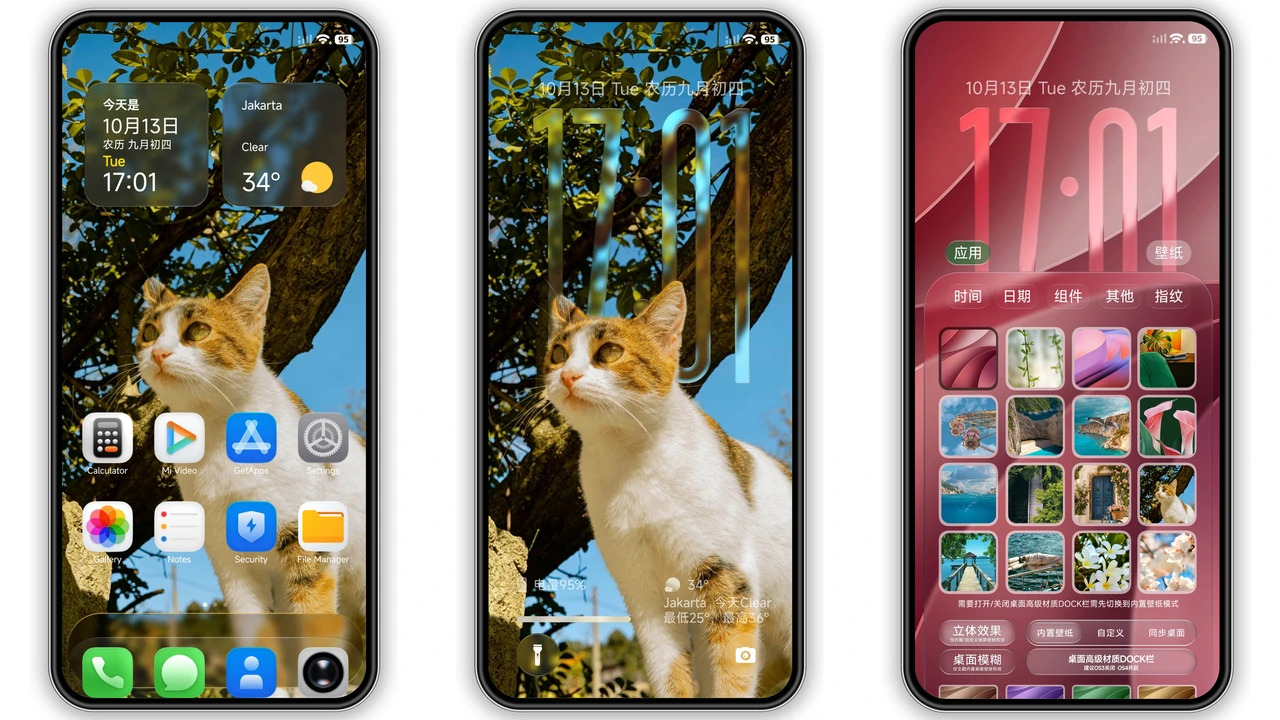
Personalizing a Xiaomi, Redmi, or POCO device often involves choosing between two extremes: complex layouts packed with information or stark, flat minimalist setups. Liquid Beauty X bridges that gap by implementing a fluid glassmorphism aesthetic inspired by modern iOS typography and blur effects. It pairs rounded iconography with transparent interface layers, giving your device a lighter, airy look while keeping everyday system operations readable and smooth.
Designed primarily for users on HyperOS and modern MIUI builds, this theme re-engineers core system touchpoints—from lockscreen interactions to quick-settings toggles—using dynamic optical blur and disciplined spacing.
---
Fluid Glass Lockscreen and Dynamic Typography
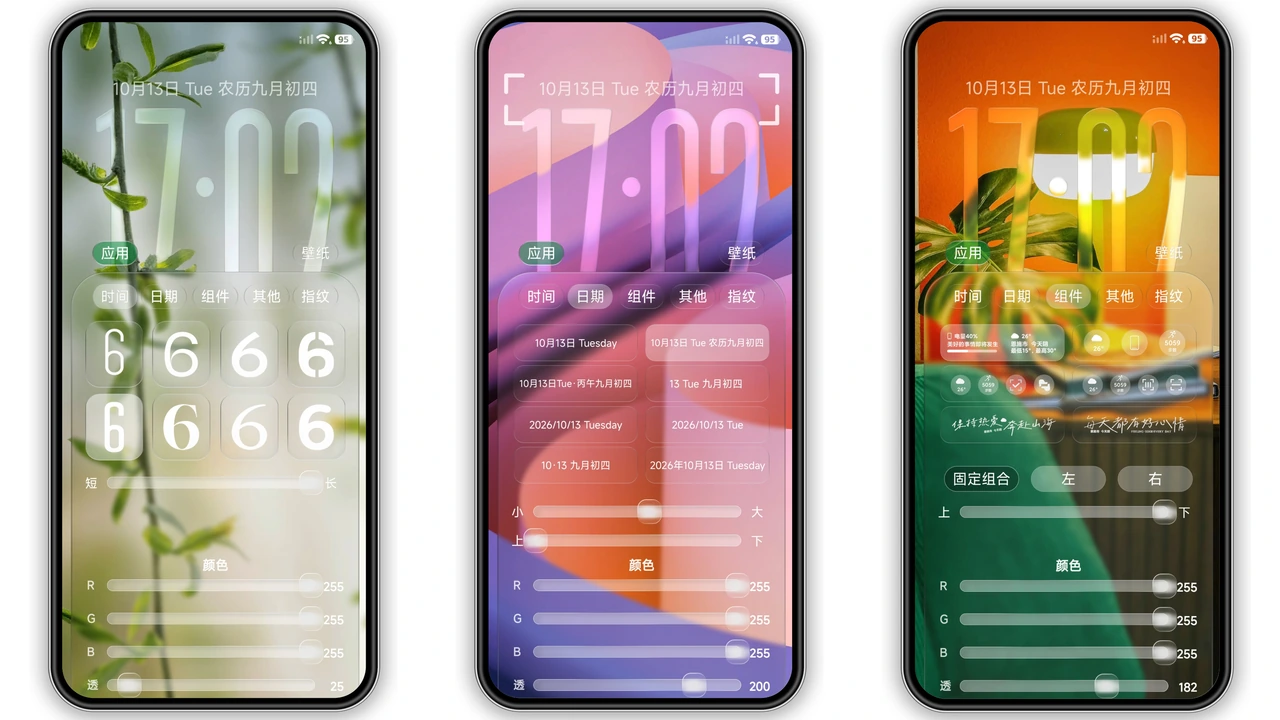
The centerpiece of Liquid Beauty X is its lockscreen architecture. It moves away from rigid stock clocks toward a customizable glass stack. The digital time readout uses heavy, rounded Apple-style typography rendered with subtle drop shadows to maintain high legibility across light and dark backgrounds.
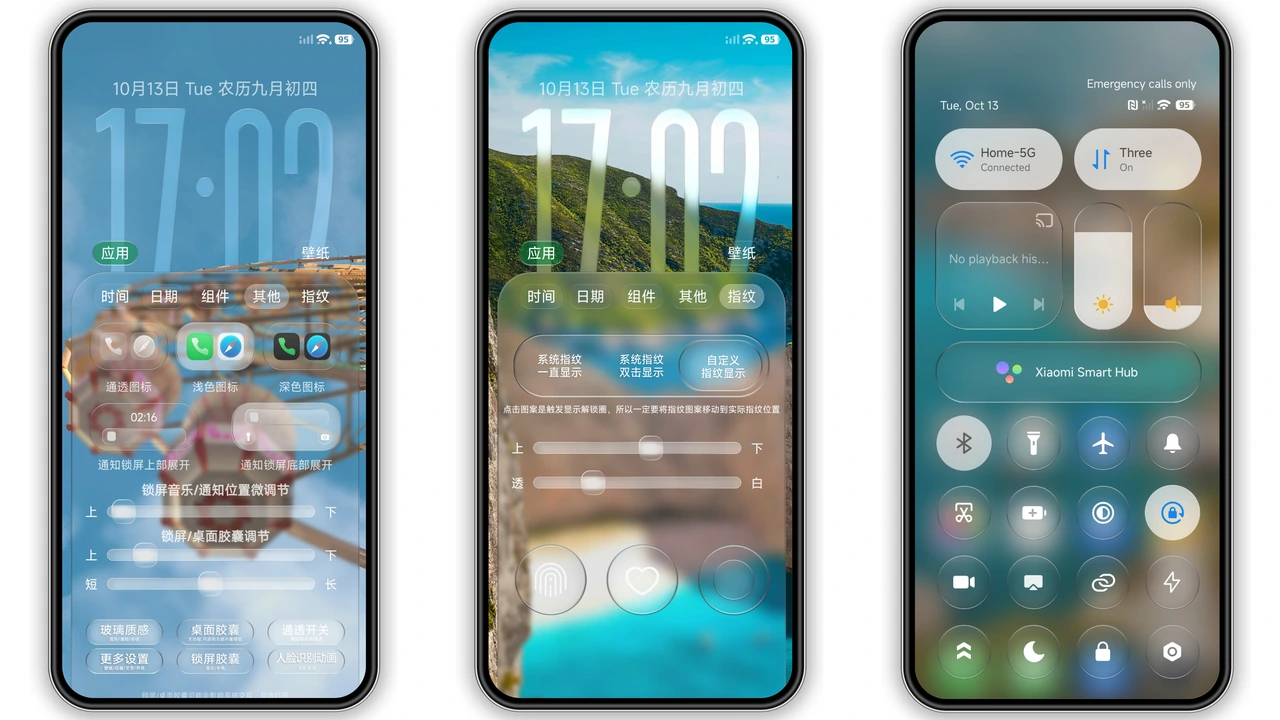
Beneath the clock, modular widgets sit inside frosted capsule containers. These capsules reveal subtle details of your wallpaper beneath an artificial depth-of-field layer. You get dynamic elements such as date indicators, step trackers, and current battery health styled as glass lozenges. The theme also includes quick shortcuts for the camera and flashlight, encased in translucent circular bubbles that react visually when pressed, matching the tactile feel of proprietary flagship operating systems.
Suggested Read: Encounter Beautiful vs Moonlit Serenity: Which Theme Wins on HyperOS & MIUI
Frosted Dock and iOS-Inspired Icon Suite
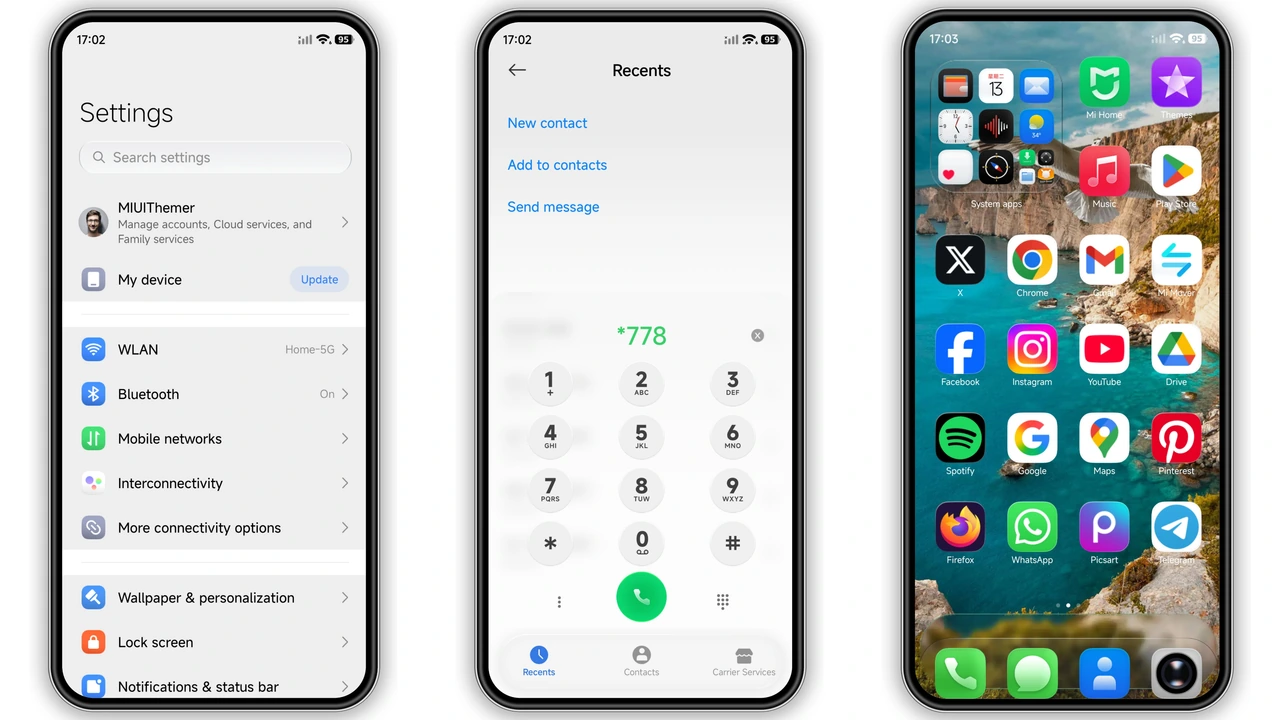
Moving to the homescreen, Liquid Beauty X introduces a custom icon grid styled after the standard squircle silhouette. Key visual elements include:
- Multi-Layered Icon Depth: System applications (Settings, Gallery, Dialer, File Manager) feature multi-toned gradients and soft inner glow highlights.
- Third-Party App Symmetry: Masking templates smooth out non-system app shapes to ensure your app drawer avoids mismatched square and circle icons.
- Floating Glass Dock: The bottom application row rests atop an elongated, frosted-glass shelf with a subtle border highlight that separates persistent tools from your main widget area.
This balance keeps your main screen looking intentional rather than cluttered, especially when paired with nature, macro, or abstract architectural wallpapers.
Translucent Control Center and Notification Blur
Stock HyperOS control interfaces already utilize background Gaussian blur, but Liquid Beauty X adjusts the opacity and saturation curves for a more refined look. Active toggles glow with an icy blue tint, while inactive buttons use a semi-transparent gray glass pill design.
Volume and brightness sliders feature pill-shaped handles that track smoothly under thumb swipes. The notification cards feature curved edges, light ambient separation borders, and higher background transparency, allowing subtle hints of your homescreen backdrop to show through without sacrificing the contrast of incoming text alerts.
Who Will Appreciate Liquid Beauty X?
This theme suits smartphone enthusiasts who prioritize fluid design over busy graphic skins. It works particularly well for:
- iOS Switchers: Users who miss the fluid curves, heavy typography, and frosted glass dock of iOS, but prefer Xiaomi hardware and customization flexibility.
- Aesthetic Customizers: Personalization fans who regularly change backgrounds. The translucent layout naturally adapts to ocean scenes, moody cityscapes, and bright floral wallpapers.
- OLED Panel Users: The combination of pure white typography with frosted dark UI elements creates exceptional contrast on AMOLED displays.
Installation Notes and System Compatibility
Liquid Beauty X runs smoothly on standard HyperOS builds as well as legacy MIUI versions. Depending on your software distribution, installation procedures vary:
- Stock Global ROMs: If applying through standard official routes, use the browser-to-theme-store handoff method. Open the destination link in a browser, confirm the system prompt, and allow your phone's built-in Theme Store to finish the import sequence.
- Custom ROMs (Xiaomi.eu / EliteROM / Unofficial Builds): You can bypass store validation entirely by sourcing the raw
.mtzpackage or restoring the theme via your phone's backup tool. Navigate directly toTheme Store > My Account > Themes > Import, point the file picker to the.mtzarchive, and apply. - System Cache Refresh: After applying the theme, restart your phone. A quick reboot clears the legacy system icon cache and fixes minor graphical overlaps in the status bar or control center.
---
Pros and Cons
Pros
- Beautiful glassmorphic lockscreen with modular capsule widgets.
- Consistent iOS-style squircle iconography with clean masking.
- Balanced control center transparency that preserves text readability.
- Broad compatibility across HyperOS and modern MIUI updates.
Cons
- Heavy system blurs may cause minor frame drops on lower-tier entry chips.
- Some non-standard regional lockscreen shortcuts require manual remapping.
Download Links
Use the buttons below to open the theme file and the supporting link.
Liquid Beauty X Theme mtz File
Liquid Beauty X Theme Backup File
Helpful links
More Theme Updates
For more curated HyperOS and MIUI theme updates, visit Hyper OS x MIUI .


