Parameter · Value
Designer · moscreen
Size · 5.14 MB
Format · MTZ
Compatibility · HyperOS / MIUI
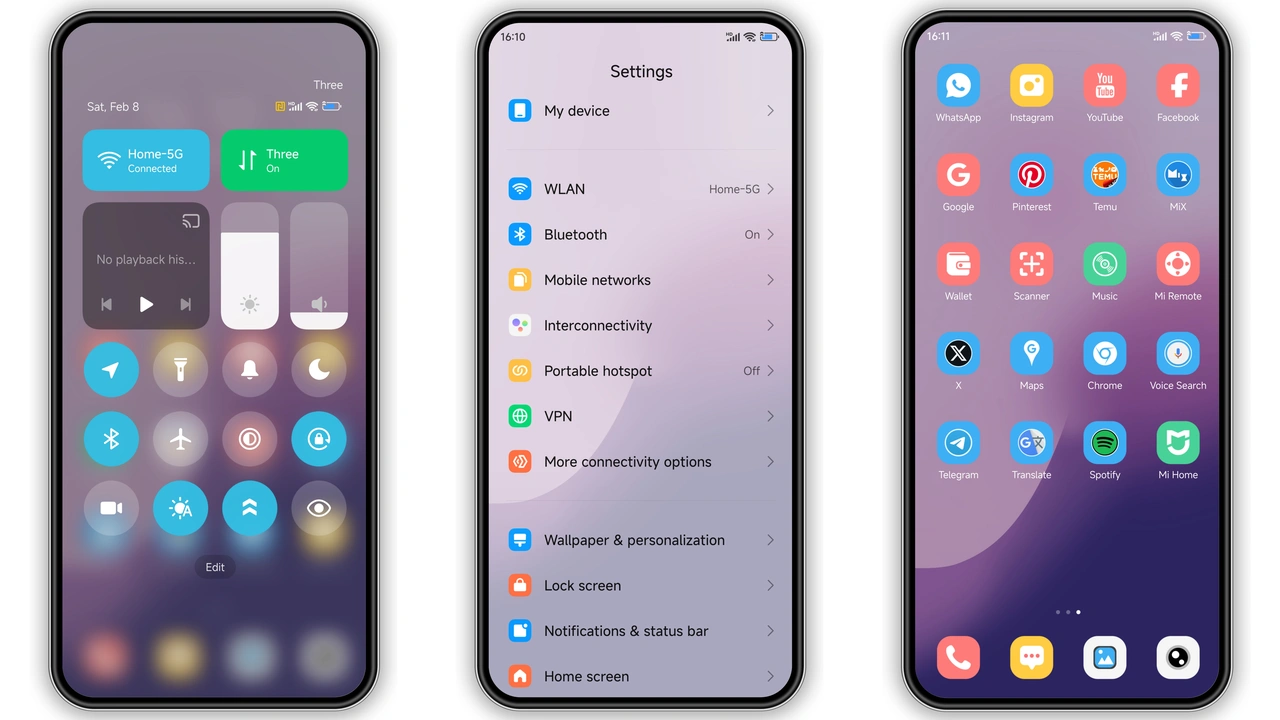
Lavender‑Tinted Interface That Soothes the Eye
The theme drenches every UI element in a gentle purple hue. Home‑screen icons adopt a subtle gradient that shifts from lilac to deeper violet as you scroll. Wallpapers feature abstract light‑burst motifs that echo the color scheme without overwhelming content. The lock screen animates a soft pulse, turning the usual wake‑up moment into a brief visual treat. Even the status bar adopts a translucent lavender, letting background colors peek through while keeping icons crisp.
Suggested Read: Trending ‘Heavy‑Hearted Sunburst’ MTZ Theme Shines on HyperOS & MIUI
Who’ll Love This Soft‑Purple Aesthetic
Fans of pastel tech gravitate toward this theme. If you enjoy a calm, non‑aggressive palette that still feels premium, the light purple design hits the sweet spot. It suits users who personalize their phone for daily joy rather than aggressive flair. Creatives who use their device as a sketchbook appreciate the muted backdrop that lets photos and notes stand out. Likewise, anyone switching from a stark dark theme to something lighter yet colorful will find this a comfortable middle ground.
Seamless Compatibility Across HyperOS Devices
Moscreen built the package for HyperOS and MIUI alike. The MTZ file installs without extra patches on Xiaomi, Redmi and POCO models that run the latest HyperOS build. Because the theme respects system‑level UI flags, you won’t see missing icons or misaligned widgets after a reboot. The dynamic lock‑screen animation works on devices that support HyperOS‑level lock‑screen effects, and the Always‑On Display (AOD) tweaks appear only where the OS exposes AOD customization. In short, the theme behaves like a native skin rather than a forced overlay.
Installation Steps & What to Expect
1. Open the official Theme Store app on your device.
2. Navigate to My Themes → Import.
3. Select the downloaded MTZ file (named Light purple color.mtz).
4. Confirm the import; the store will parse the package and list preview images.
5. Tap Apply. The system may prompt a quick restart – approve it.
6. After reboot, check the home screen, lock screen and AOD. All elements should reflect the lavender palette.
Expect a brief loading period while the OS swaps icons and wallpapers. No data loss occurs; the theme only changes visual assets. If any element looks out of place, a second reboot usually resolves it. Should you decide the look isn’t for you, revert to the default theme via the same Theme Store menu.
Pros and Cons
• Pros
• Cohesive color scheme from home screen to lock screen.
• Low‑impact file size; quick download and install.
• Works on HyperOS and MIUI without extra tweaks.
• Dynamic lock‑screen animation adds subtle flair.
• AOD customization stays readable in low light.
• Cons
• Limited to purple palette; not ideal for users seeking multicolor themes.
• Some older Xiaomi models may lack lock‑screen animation support.
• No built‑in dark‑mode variant; you must switch manually if you prefer dark UI.
Overall, the Light Purple HyperOS Theme delivers a polished, calming aesthetic that integrates smoothly with Xiaomi’s ecosystem. Its modest size and straightforward installation make it a low‑commitment way to freshen up any compatible device.
Theme Preview
Download Links
Use the buttons below to open the theme file and the supporting link.
Light purple color Theme mtz File
Helpful links
More Theme Updates
For more curated HyperOS and MIUI theme updates, visit Hyper OS x MIUI .