Parameter · Value
Designer · suhel
Size · 9.9 MB (theme) / 3.2 MB (wallpaper)
Format · MTZ, PNG
Compatibility · HyperOS 3.0 / MIUI
Pastel Playfulness in Every Corner
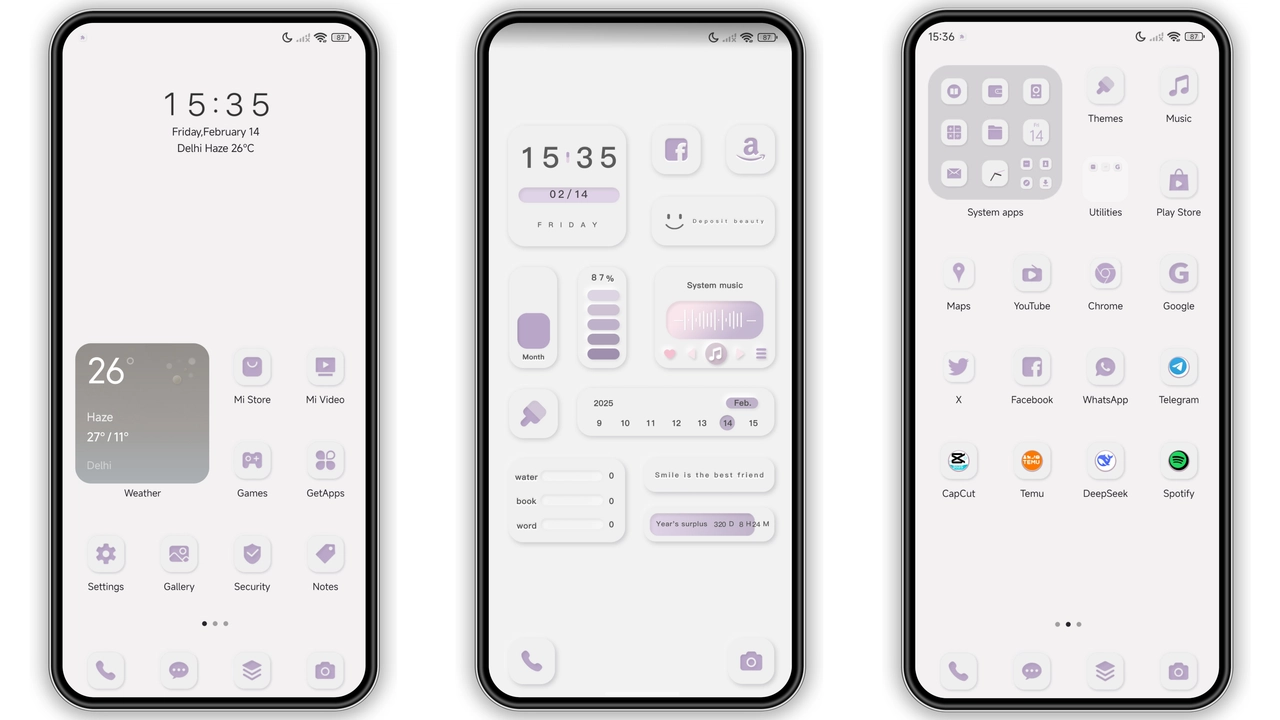
Soft pinks, muted blues, gentle lavender dominate the palette. Backgrounds use subtle gradients that fade into each other, reducing eye strain while keeping the screen lively. Lock screen adopts a semi‑transparent overlay, letting the depth‑effect wallpaper peek through. Animations are snappy, not over‑the‑top; swipes trigger a brief ripple that matches the pastel hue. Overall vibe feels like a mobile diary entry rather than a corporate UI overhaul.
Suggested Read: Macaron Style Kit – Fresh Look for Redmi Note & Poco Series
Iconography That Pops on Redmi Screens
Icons receive a full redesign. Rounded corners, thin outlines, and a hint of gloss give each app a distinct silhouette. Popular apps—Messages, Phone, Camera—gain unique accent colors that still belong to the overall pastel scheme. Even system folders adopt the same treatment, ensuring visual consistency. The icon set remains legible at small sizes, crucial for Redmi’s compact displays.
Widget Suite That Adds Real‑World Utility
Home screen widgets go beyond a clock. Weather widget blends the same pastel gradient, showing temperature with a minimalist icon. Calendar widget displays upcoming events in a clean list, using the theme’s typeface. Music widget mirrors the lock‑screen style, offering play/pause controls without breaking the aesthetic. All widgets respect the system’s dark‑mode toggle, automatically switching to deeper shades when needed.
Installation Flow for Global & Custom ROMs
Global stable ROM users tap the official Theme Store link, select “Import”, and apply the MTZ file. The process finishes in under a minute, then a quick reboot ensures every element loads correctly. Custom ROM fans follow a similar path: open Theme Store, choose “Import”, locate the MTZ file via file manager, confirm import, then activate. The theme works flawlessly on HyperOS 3.0, MIUI 14 and later builds. No additional patches required. If a device shows missing icons, clearing Theme Store cache resolves the issue.
Pros and Cons
• Pros
• Cohesive pastel aesthetic
• Fully redesigned icon pack
• Useful widgets with minimal footprint
• Smooth animations, low battery impact
• Compatible with both stock and custom ROMs
• Cons
• No dark‑mode‑only variant
• Limited customization beyond provided assets
• Wallpaper size fixed; cannot replace without external editor
Theme Preview


Download Links
Use the buttons below to open the theme file and the supporting link.
Download Knock Cute MTZ File
Download Knock Cute Wallpaper
Helpful links
More Theme Updates
For more curated HyperOS and MIUI theme updates, visit Hyper OS x MIUI .