
Theme details
- Designer
- Ali.ZR
- Size
- 18.35 MB
- Compatibility
- HyperOS, HyperOS 2.0, HyperOS 3.0, MIUI
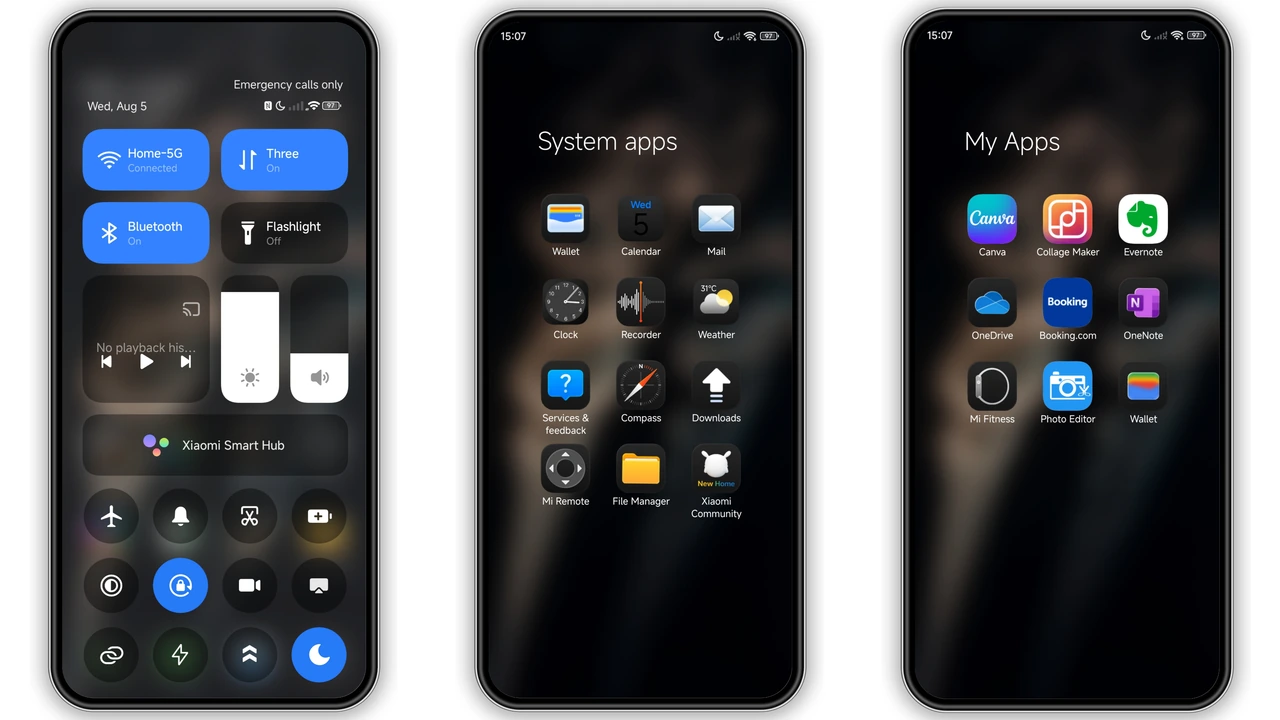
Stock Xiaomi interfaces often lean toward bright gradients and busy visual layers, which leaves fans of dark, distraction-free setups searching for something sharper. kiyumta answers that demand with an understated, art-first Minimalist Dark Theme built for HyperOS Global and MIUI devices. Instead of overwhelming your home screen with loud widgets or neon accents, designer Ali.ZR pairs a moody dual-tone smoke backdrop with oversized lockscreen typography and a pitch-black system shell.
At just 18.35 MB, the package delivers complete visual cohesion across your lockscreen, Always-on Display, status bar, and application drawer without weighing down system animations. Whether you carry a flagship Xiaomi phone, a Redmi daily driver, or a POCO device, kiyumta brings quiet confidence to your everyday phone setup.
Format · MTZ
Atmospheric Smoke Backdrop and Bold Lockscreen Typography
The defining centerpiece of kiyumta hits the moment you wake your screen. Rather than relying on flat black wallpaper that can feel lifeless, the theme introduces a textured smoke illustration balanced between warm amber undertones and cool slate highlights. That subtle temperature contrast gives the dark canvas real depth while keeping notification cards readable at a glance.
Resting over the smoke backdrop is bold, minimal lockscreen typography. The thick, high-contrast clock numerals act as a graphic anchor, turning your lockscreen into something closer to an editorial poster than a standard utility screen. Because the surrounding space remains uncluttered, the typography breathes naturally. Pair the lockscreen with the matching Always-on Display styling and your AMOLED panel gets a seamless visual handoff from ambient standby straight into your active wallpaper.
Suggested Read: Archive Entry: HyperF1 HyperOS Theme – Blue Minimalist for Xiaomi & Redmi
Minimalist Black Interface, Dynamic Icons, and Status Bar
Unlocking the phone carries that same dark discipline into the rest of the interface. kiyumta strips away heavy background tints in favor of a clean, all-black aesthetic that feels right at home on OLED displays. True black surfaces let the screen blend into thin display bezels while cutting glare during late-night scrolling.
Beyond the fresh wallpapers, the theme swaps out stock visuals for well-proportioned dynamic icons that maintain clean silhouettes across system apps. Nothing clashes or pulls focus away from your layout. Up top, a redesigned status bar sharpens battery, signal, and Wi-Fi indicators so they match the crisp geometry of the icons below. When paired with a streamlined Control Center Setup, the entire system feels unified from the top bezel down to the gesture bar, giving stock HyperOS a calmer, more deliberate rhythm.
Who Gets the Most Out of This Minimalist Dark Theme
Not every personalization pack suits every user, and kiyumta clearly knows its audience. If you love saturated cartoon icon packs, animated live wallpapers, or bright pastel palettes, this theme will likely feel too restrained. It shines brightest for users who value restraint, visual hierarchy, and clean dark mode ergonomics.
AMOLED smartphone owners stand to benefit immediately, as the dark backgrounds look richer on high-contrast panels and help curb display eye strain in dim rooms. Minimalist home screen builders who prefer sparse widget grids, monochrome icon rows, and clean folders will also appreciate how effortlessly kiyumta frames custom layouts. Even if you usually stick close to stock HyperOS, this theme offers an approachable upgrade that refreshes the look of your Xiaomi, Redmi, or POCO handset without breaking muscle memory.
Compatibility, Practical Download Notes, and Install Expectations
kiyumta supports Global region servers across HyperOS, HyperOS 2.0, and HyperOS 3.0, alongside legacy MIUI builds. Because Xiaomi handles theme installation differently depending on your firmware, knowing what to expect before downloading saves plenty of frustration.
On an unmodified Global Stable ROM, direct MTZ file imports are restricted inside the stock Themes app. Instead, stock ROM users should rely on the official Theme Store route: open the theme store link inside Firefox, Chrome, or the default Xiaomi Browser, tap the browser menu to open the page directly in the Themes app, then download and apply it from there. Keep in mind that regional servers occasionally require switching browsers if the redirect stalls.
If you run a custom ROM—such as Xiaomi.EU, MIUIRoom, or modified MIUI and HyperOS builds—you can grab the lightweight 18.35 MB MTZ package directly. Open the Themes app, head to your local Themes tab, scroll to the bottom, tap Import, and select the downloaded MTZ file from your device storage. Once applied, give your phone a quick reboot. A fresh restart clears cached system UI layers and prevents overlapping status bar icons or misaligned lockscreen elements.
Pros and Cons
Pros
- Crisp all-black dark aesthetic tailored for OLED screens and low-light use
- Striking warm-and-cool smoke wallpaper paired with bold lockscreen typography
- Includes matching Always-on Display, redesigned status bar, and dynamic icons
- Compact 18.35 MB footprint installs fast without slowing down HyperOS
- Completely free across Xiaomi, Redmi, and POCO devices
Cons
- Stock Global ROM users cannot import the MTZ file directly without custom ROM tools
- Minimalist all-black styling offers little appeal for fans of bright or colorful themes
- Post-install device reboot is recommended to ensure clean UI rendering
Download Links
Use the buttons below to open the theme file and the supporting link.
kiyumta Theme mtz File
Helpful links
More Theme Updates
For more curated HyperOS and MIUI theme updates, visit Hyper OS x MIUI .


