Theme details
- Designer
- iPhone
- Size
- Full 4K Collection
- Compatibility
- HyperOS / MIUI
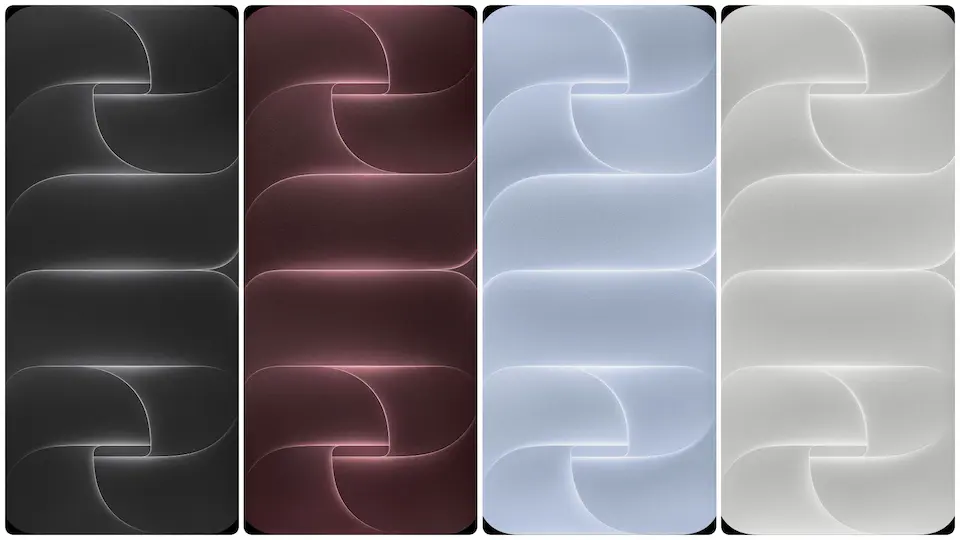
Stock Apple backdrops consistently set the benchmark for smartphone home screen aesthetics, and the iPhone 18 Pro collection keeps that standard sharp on Android hardware. Designed to highlight edge-to-edge AMOLED panels, these crisp 4K backgrounds bring understated depth to any HyperOS Global or MIUI build. Instead of loud textures or distracting noise, each image pairs smooth geometry with controlled highlights, giving your iOS Style layout a clean foundation right out of the box.
Format · High-Res Image Files
Abstract Curves, Subtle Lighting, and Refined Tones
Every frame in this pack relies on sculpted, abstract shapes layered with soft gradients. Rather than flat color fills, the artwork uses gentle light falloff along curved ridges so the display feels three-dimensional without cluttering app labels. The palette spans four distinct moods: deep obsidian black, muted blush pink, cool slate blue, and crisp porcelain white.
On high-refresh AMOLED screens common across Xiaomi, Redmi, and POCO phones, the deep black variant behaves like a true Minimalist Dark Theme anchor. Pixels around the dark perimeter blend right into slim display bezels, making status bar icons pop cleanly. Meanwhile, the soft pink and cool blue editions bring warmth and calm contrast for daytime setups. The clean white option works best with dark icon packs or bold monochrome widgets where maximum legibility matters. Because every file ships at full 4K resolution, fine gradient transitions stay smooth with zero ugly color banding when cropped for tall aspect ratios.
Suggested Read: Hands-On: s4u Dark HyperOS Theme Setup Guide for Xiaomi Phones
Dynamic Lockscreen Pairing and Control Center Setup
A strong stock wallpaper does half the heavy lifting when building a cohesive Dynamic Lockscreen. Because the central curves leave generous breathing room near the upper third of the frame, HyperOS depth effects and oversized lockscreen typography sit naturally above the focal curves without colliding with bright highlights.
Pair the dark obsidian or cool blue wallpaper with thin, crisp clock fonts and minimal bottom shortcuts for an effortless iOS Style lockscreen. Once unlocked, the muted background brightness keeps home screen folders and stacked widgets readable even without heavy blur overlays. If you run a custom Control Center Setup with translucent glass tiles, the soft pink and slate blue gradients shine directly through the frosted blur layer, adding subtle tint variations behind quick toggles. Swapping between light and dark system modes also becomes seamless—keep the porcelain white variant for bright daytime schedules and switch to the deep black curve after sunset.
Who Should Grab This Wallpaper Pack
Not every user wants full system theme packages that alter dialers, system fonts, and notification shades. This pack suits anyone who prefers stock HyperOS Global speed and stability while refreshing their visual setup in under two minutes.
Minimalists who keep only one clean row of icons and a weather widget on their main page get the biggest visual payoff here. The sculptural shapes act as focal art rather than busy clutter. It also fits customization fans building hybrid Android-meets-Apple home screens alongside rounded icon packs or classic grid layouts. Even if you switch launchers frequently or bounce between MIUI and newer HyperOS releases, standalone 4K images remain universally portable—no theme store region locks, no broken status bar icons after an update, and zero background battery overhead.
Compatibility, Install Expectations, and Download Tips
Since these are standalone high-resolution image files rather than a packaged system theme, compatibility stretches across every version of HyperOS and MIUI, regardless of global, China, or EEA ROM builds. No third-party theme editor, root access, or extra Theme Store account is required.
Expect a straightforward manual setup rather than an automatic one-tap icon overhaul. After downloading from the folder link below, save your preferred color variant directly to your Gallery app. Open the image, tap the menu button, and choose Set as wallpaper. On newer HyperOS builds, apply it to both the lockscreen and home screen first, then open the Lockscreen Customization editor to align clock sizing and depth layering over the curves.
For practical download hygiene, check that your browser downloads the full-resolution image file rather than saving a compressed preview thumbnail. If you use Google Drive inside an in-app browser, open the link in Chrome or your system browser so all 4K files download cleanly without preview scaling. Keep the folder bookmarked if you like rotating tones weekly—each color variant covers a completely different mood without changing your icon layout.
Download iPhone 18 Pro Stock Wallpaper
Pros and Cons
Pros
- Sharp 4K resolution prevents blur and gradient banding on tall AMOLED screens
- Works across all HyperOS Global and MIUI builds with zero region restrictions
- Balanced upper-frame negative space fits Dynamic Lockscreen clocks cleanly
- Four versatile color tones cover dark mode, soft pastel, and bright setups
Cons
- Wallpapers only; does not change system icons, fonts, or Control Center layout
- Manual cropping needed on ultra-tall screens to center the curves properly
- Requires opening the Drive folder in a full browser for fastest multi-file downloads

Download Links
Use the buttons below to open the theme file and the supporting link.
Download iPhone 18 Pro Stock Wallpaper
Helpful links
More Theme Updates
For more curated HyperOS and MIUI theme updates, visit Hyper OS x MIUI .


