Theme details
- Designer
- 苏哥suger
- Size
- 46.93 MB
- Compatibility
- HyperOS, HyperOS 2.0, MIUI
Format · .MTZ / Backup File
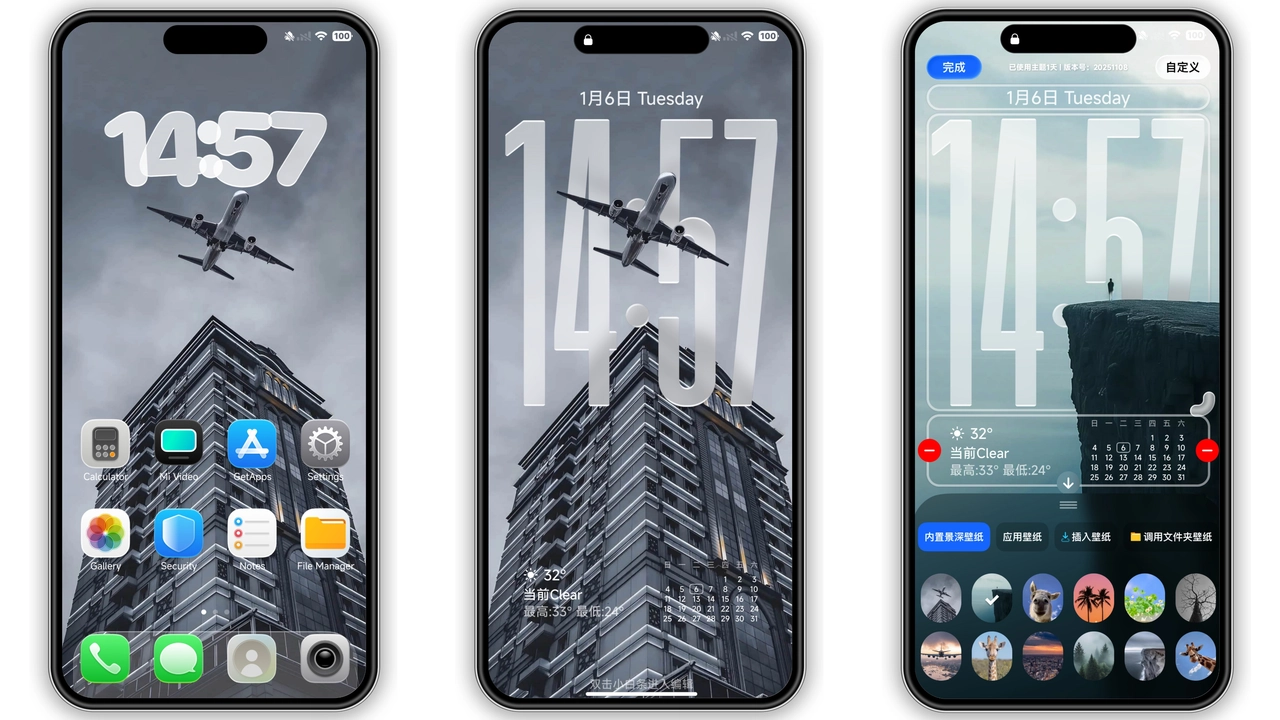
Personalizing a smartphone home screen often comes down to balancing utility with visual punch. The iP26 Super 3D Depth of Field theme delivers an aesthetic overhaul inspired by modern spatial UI concepts, layering visual elements to give flat glass panels a striking illusion of physical dimension. Designed primarily for modern Xiaomi, Redmi, and POCO handsets running HyperOS, this setup pairs clean typography with dynamic wallpaper depth, giving everyday interactions a polished, contemporary feel.
Whether you want an iOS-inspired lockscreen layout or desire smoother system accents across everyday system menus, this theme reworks the stock layout without compromising navigation speed.
Multilayered 3D Depth and Spatial Lockscreen Design
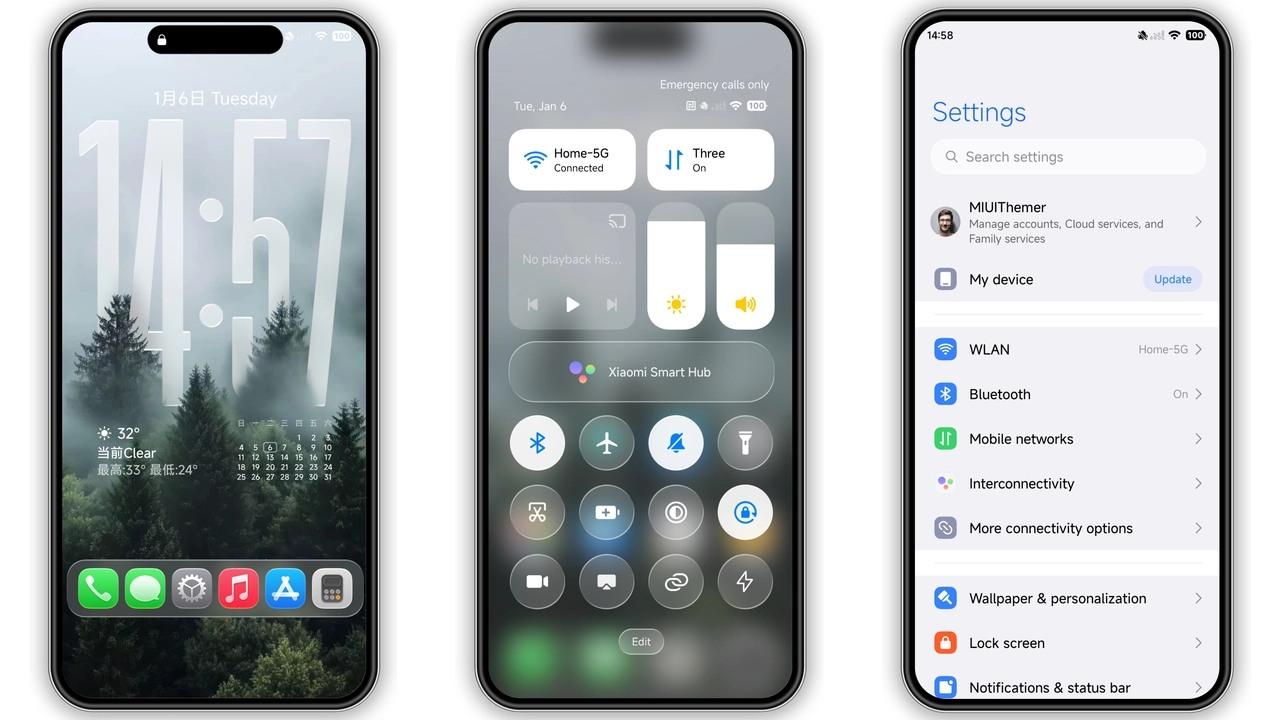
The centerpiece of this theme lies in its lockscreen architecture. Utilizing high-resolution visual cutouts, the system clock slips subtly behind foreground subjects in the wallpaper, creating the coveted depth-of-field effect popularized by high-end mobile operating systems. The visual hierarchy places essential information front and center without masking the artistic details of your backdrop.
Typography choices here lean heavily into clean, bold sans-serif numerals. Time readouts remain instantly legible across harsh outdoor lighting conditions or dim nighttime settings. Beneath the clock module, customizable secondary widgets display weather statistics, battery percentages, and step metrics inside minimal rounded badges. Unlocking your phone triggers fluid micro-animations, transitioning wallpaper planes smoothly into the main launcher environment without noticeable jitter.
Suggested Read: Sleek Dual‑Mode MTZ Theme for Redmi Note & Poco – A Practical Review
Curated Iconography and Unified Interface Accents
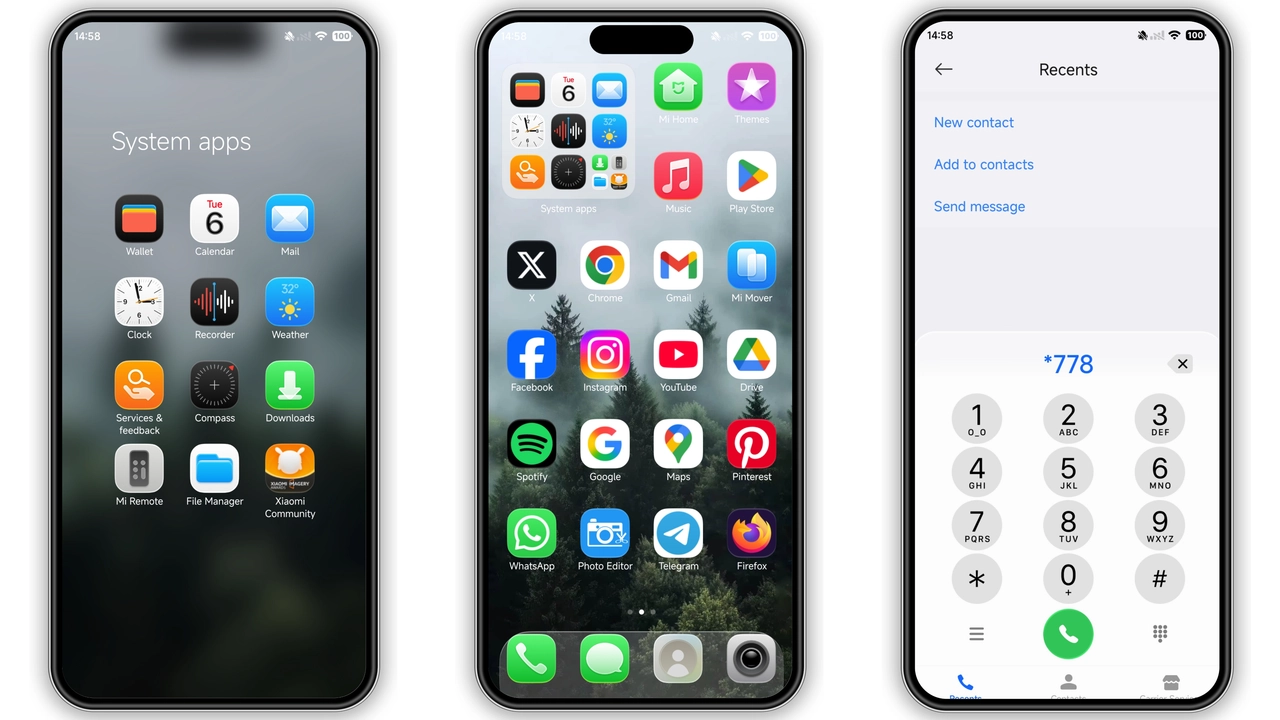
Moving past the lockscreen, the theme applies a complete visual reset across stock and third-party application icons. The icon pack relies on rounded squircles with balanced internal padding, subtle outer gradients, and tactile inner glows that simulate gentle ambient light hitting physical tiles.
System utilities like Phone, Messages, Settings, and Security feature bespoke vector glyphs that blend seamlessly into dark mode palettes. Popular global applications fit cleanly inside matching container frames, eliminating the visual clutter of mismatched icon shapes. The dock section incorporates a translucent glass-shelf effect, visually anchoring core shortcuts above system navigation bars or gesture indicators.
Refined Control Center and Notification Ergonomics
Control Center changes in HyperOS can make or break a custom setup. The iP26 layout embraces a frosted blur aesthetic, coating the backdrop in soft translucency while elevating quick-toggle tiles. Active states shift from muted slates into rich, saturated highlights, making connectivity toggles like Wi-Fi, Bluetooth, and Flashlight immediately obvious at a glance.
Volume and brightness sliders gain slightly wider touch targets, making one-handed adjustments easier on larger displays. The notification shade mirrors this glassmorphism approach, separating individual alert banners with clean spacing and subtle dividing lines. This reduces screen density during heavy notification spikes, allowing you to dismiss or expand alerts without accidental mis-taps.
Status Bar Minimalism and Everyday Usability
Small system details define long-term usability. The status bar icons receive a complete tune-up: battery indicators switch to a clean horizontal capsule format with sharp inner percentage readouts, cellular signal bars adopt tight vertical steps, and Wi-Fi icons use lightweight line weights that preserve screen real estate.
These adjustments prevent status bar crowding, which frequently affects punch-hole display cutouts on modern Redmi and POCO phones. Inside system menus, setting headers display subtle icon badges and simplified divider lines, creating a cohesive, distraction-free environment across default utility screens.
Who Is This Theme For?
If you appreciate the structural polish of minimalist interfaces but prefer the deep customizability of HyperOS, this theme sits squarely in your sweet spot. It appeals to:
- Enthusiasts seeking a clean, Apple-inspired depth effect on their lockscreen.
- Users running AMOLED screens who want deep blacks paired with high-contrast text.
- Minimalists tired of cluttered stock themes filled with over-saturated accents.
- Personalization fans who value clean status bar indicators and balanced icon grids.
Installation Notes and Practical Expectations
Applying complete theme packages to modern Xiaomi devices varies depending on your software build. For official stock Global HyperOS environments, theme files are generally handled through official channel importing or backed-up restoration workflows. If you run custom community builds (such as Xiaomi.eu), applying direct MTZ packages through the native Theme manager requires just a few taps via the local import option.
After applying the package, perform a fast reboot of your device. A system restart clears out old cached interface assets, ensuring that notification cards, dialer pads, and status bar toggles load with proper icon assets and text alignments. If you notice any visual overlap on third-party widgets, re-applying the default stock wallpaper once and then re-selecting the iP26 lockscreen layout resolves layout quirks instantly.
Pros and Cons
Pros
- Eye-catching 3D depth-of-field wallpaper integration on the lockscreen.
- Cohesive icon mask library that unifies stock and downloaded app shapes.
- Beautiful frosted glass aesthetic applied to the HyperOS Control Center.
- High contrast and sharp typography improve everyday outdoor readability.
- Lightweight resource usage without noticeable home screen lag or frame drops.
Cons
- Full depth effects look best with specific, pre-formatted portrait wallpapers.
- Third-party app icons without dedicated vector assets receive generic framed borders.
- Requires a device reboot after initial setup to guarantee complete asset rendering.
Download Links
Use the buttons below to open the theme file and the supporting link.
iP26 Super 3D Depth of Field Theme mtz File
iP26 Super 3D Depth of Field Theme Backup File
Helpful links
More Theme Updates
For more curated HyperOS and MIUI theme updates, visit Hyper OS x MIUI .


