Parameter · Value
Designer · jayesh Nimbara
Size · 28.07 MB
Format · .mtz
Compatibility · HyperOS, HyperOS 2.0, HyperOS 3.0, MIUI
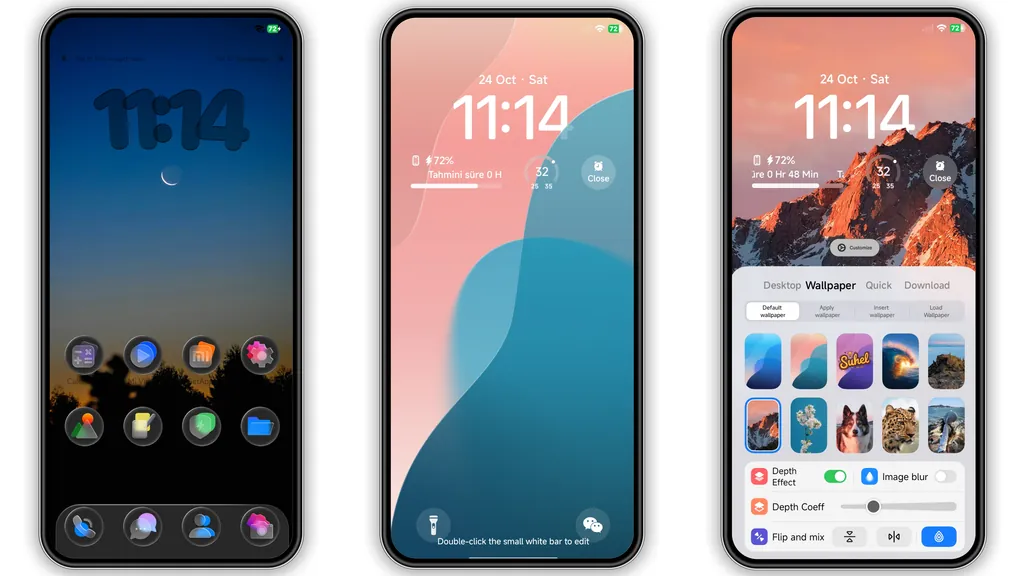
Cool Blue Minimalist Visuals
Blue hue dominates palette. Simplicity guides layout. Icons shrink to essential shapes. Shadows disappear. Status bar adopts flat tones. Lock screen showcases subtle gradient. Wallpapers feature soft sky tones. AOD glows with muted blue. Animations stay light. Overall feel remains airy.
Suggested Read: 光栅壁纸 雪花序章 MTZ Theme Archive – HyperOS & MIUI
Who Will Love This Look
Minimalists gravitate here. Users craving low‑key UI find comfort. Fans of blue aesthetics feel at home. Redmi owners appreciate size efficiency. POCO power users notice battery lift. Developers enjoy uncluttered navigation. Those avoiding heavy graphics benefit. Anyone seeking fresh yet subtle change fits.
Installation Flow & Expectations
Download mtz file. Open Theme Store app. Tap Import. Select file. Confirm apply. Restart device. Observe icons swap. Check wallpaper load. Verify AOD transition. Watch for missing overlays. If glitch appears, clear cache. Re‑apply theme. Expect smooth performance. No lag reported. Battery impact stays minimal.
Pros and Cons
• Pros
• Light footprint, under 30 MB.
• Consistent blue scheme across UI.
• Minimal icons reduce visual clutter.
• Smooth AOD, low battery draw.
• Compatible with HyperOS 2.0 and 3.0.
• Cons
• Limited color options, only blue.
• No custom font bundle.
• AOD may hide notification count on some devices.
• Minor alignment issues on older Redmi models.
Theme Preview

Download Links
Use the buttons below to open the theme file and the supporting link.
H UI 0.1 Theme mtz File
Helpful links
More Theme Updates
For more curated HyperOS and MIUI theme updates, visit Hyper OS x MIUI .