Theme details
- Designer
- Ali.ZR
- Size
- 11.14 MB
- Compatibility
- HyperOS, HyperOS 2.0, HyperOS 3.0, MIUI
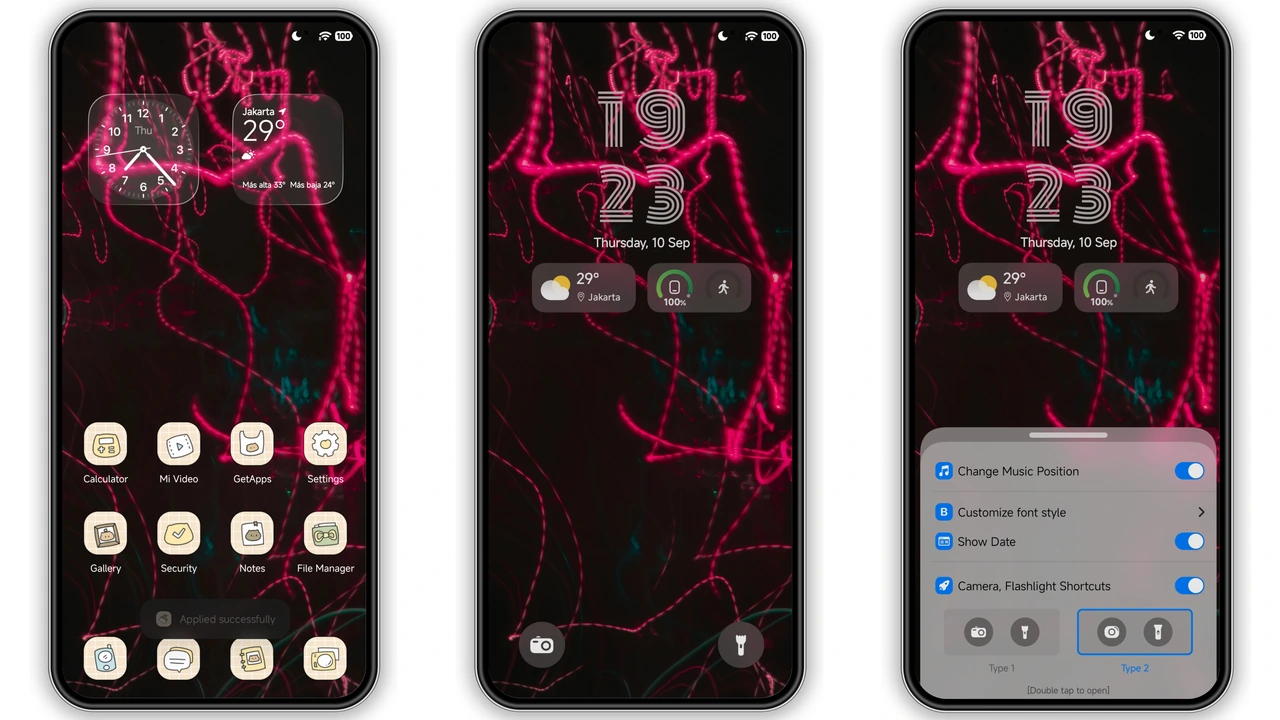
Stock smartphone interfaces often feel sterile after a few weeks of daily use, especially when bright system backgrounds wash out the richness of an OLED screen. Grade A, crafted by designer Ali.ZR, flips that experience upside down by pairing deep AMOLED darkness with electric red neon accents. Designed for Xiaomi, Redmi, and POCO handsets running HyperOS Global and MIUI, this setup leans into a sharp cyberpunk mood without sacrificing everyday readability or battery efficiency.
Format · MTZ & Official Theme Store
Dark AMOLED Canvas and Cyberpunk Neon Trails
At the heart of Grade A is restraint. Rather than flooding every menu with noisy sci-fi graphics, the theme anchors itself as a Minimalist Dark Theme built around true black backgrounds. Streaks of glowing red neon cut across the wallpaper like high-speed light trails, creating dramatic depth on modern OLED displays. Because true black pixels remain switched off on AMOLED hardware, the dark surfaces help conserve battery during heavy screen-on sessions while reducing eye strain in dim rooms.
This visual direction hits a sweet spot for users who want personality without chaos. Mobile gamers, late-night readers, and fans of clean dark setups will appreciate how the crimson highlights draw attention strictly where it matters. If you dislike overly bright pastel packs or cluttered futuristic widgets, Grade A keeps the atmosphere calm, focused, and intentionally moody.
Suggested Read: Dopamine Joy Factor vs Midnight Minimalist on HyperOS & MIUI
Lockscreen Controls, Always-On Display, and Typography
First impressions happen before you even unlock your phone, and Grade A makes those seconds count. The Dynamic Lockscreen layout introduces custom lock screen controls framed neatly against the dark neon backdrop. Clock typography stays crisp and legible, ensuring you never squint to check the time or incoming alerts in bright daylight.
When the screen rests, a matching Always-on Display carries the aesthetic seamlessly from standby to active use. Instead of jumping from a generic stock AOD to a completely unrelated lock screen, the transition feels cohesive and deliberate. Notifications, status indicators, and quick lockscreen triggers sit cleanly within reach, giving one-handed users practical convenience alongside sharp styling.
Retro-Styled Icons and Status Bar Refinement
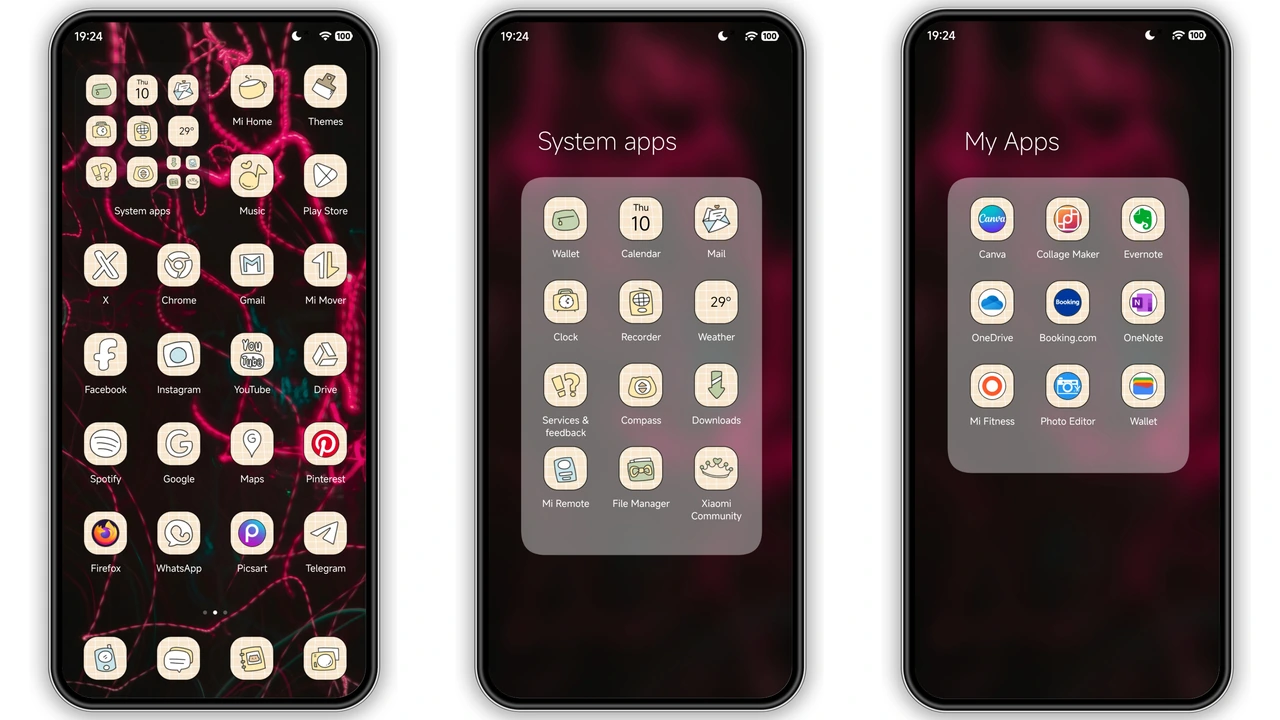
One of the most interesting surprises inside Grade A is its icon pack. Rather than relying on predictable flat monochrome glyphs, the designer pairs the sleek cyberpunk backdrop with playful, retro-styled custom icons. That contrast keeps the home screen lively and approachable, preventing the dark red palette from feeling overly sterile or repetitive.
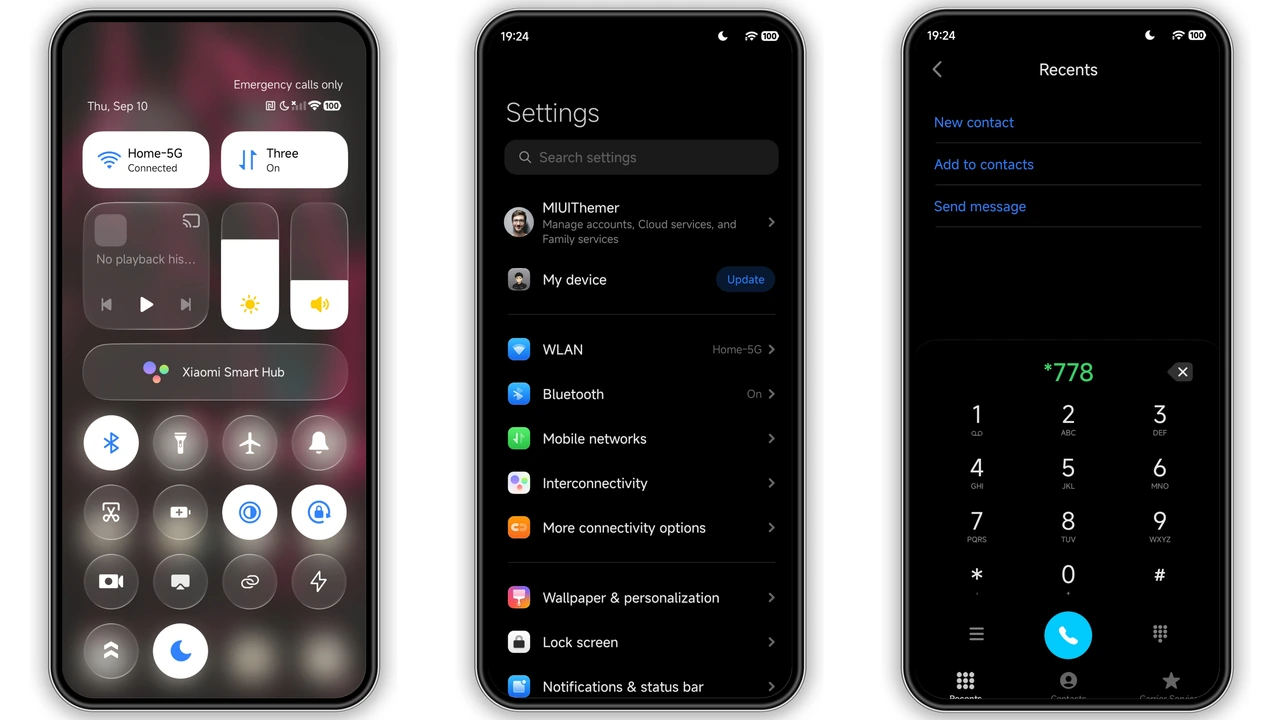
System-wide refinements extend well beyond app shortcuts. The updated status bar sharpens battery, signal, and network indicators so they blend naturally with the dark header area. Paired with your Control Center Setup, quick toggles and brightness sliders feel right at home inside a dark-first ecosystem. Everything stays clean and balanced—no bloated visual overlays or sluggish animations slow down app switching.
Compatibility, Installation, and Download Expectations
Grade A weighs in at a compact 11.14 MB, making it quick to grab even over mobile data. Compatibility spans HyperOS, HyperOS 2.0, and HyperOS 3.0, alongside MIUI builds across supported Xiaomi, Redmi, and POCO models.
How you install it depends on the software running on your phone:
- Stock ROM (HyperOS or MIUI Global Stable): Official devices do not support direct third-party
.mtzimports out of the box. Instead, access the theme through the official Xiaomi Theme Store on the Global server. If opening a store link from your mobile browser lands on a web preview, switch to Firefox, Chrome, or the default Mi Browser, tap the menu button, and choose Open in app to launch the Theme Store and apply it cleanly. - Custom ROMs (Xiaomi.eu, MIUIRoom, and MIUI 11–14/HyperOS ports): Devices unlocked for custom firmware can use the standalone
.mtzfile directly. Download the 11.14 MB package, open the Themes app, scroll to the bottom of your local themes list, tap Import, select the downloaded file, and hit Apply.
Regardless of which method you use, give your smartphone a quick reboot right after applying the theme. A fresh restart clears cached system UI layers and resolves minor icon or status bar overlaps immediately.
Pros and Cons
Pros
- True AMOLED black backgrounds help save battery and reduce glare at night
- Crisp red neon trails deliver standout cyberpunk flair without visual clutter
- Playful retro-styled icons add character to a minimalist dark layout
- Includes matching Always-on Display, custom lockscreen controls, and updated status bar
- Lightweight 11.14 MB download with broad HyperOS and MIUI compatibility
Cons
- Bold red-and-black palette offers little appeal if you prefer light or colorful themes
- Direct
.mtzfile installation requires a custom ROM rather than stock Global firmware - May need a quick device restart after applying to refresh every UI element cleanly
Download Links
Use the buttons below to open the theme file and the supporting link.
Grade A Theme mtz File
Helpful links
More Theme Updates
For more curated HyperOS and MIUI theme updates, visit Hyper OS x MIUI .


