Parameter · Value
Designer · Ajay
Size · 34.19 MB
Format · MTZ
Compatibility · HyperOS 2.0, HyperOS 3.0, MIUI 14
Midnight Cartoon Fusion – Icons & Wallpapers
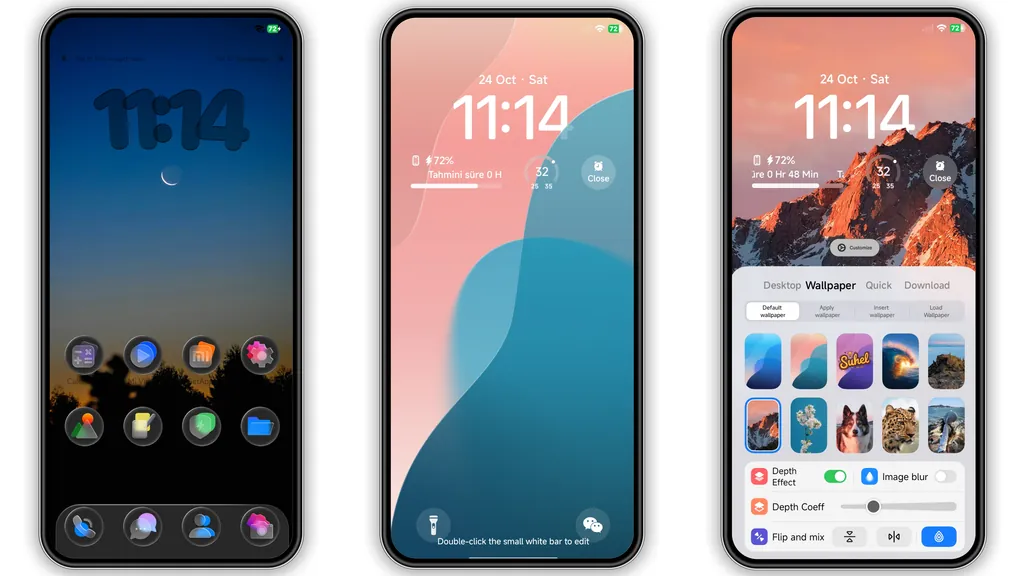
Dark base spreads across every pane. Black icons contrast sharply. Cartoon‑style glyphs add whimsy. Wallpapers feature fluffy clouds on starry night. Color palette stays limited to deep blues and purples. Visual noise stays low. Battery‑saving dark mode activates automatically. UI feels cohesive across home, lock, and settings. Icon shadows soften edges. Font size remains default for readability. Overall vibe feels playful yet serious.
Suggested Read: Archive Entry: OX F1 HyperOS Theme – Detailed Look for Xiaomi & Redmi
Dynamic Lock Screen & AOD Magic
Lock screen animates with drifting clouds. Time display glows in neon white. Notification peek slides in subtly. AOD shows battery bar in matching hue. Dynamic elements react to swipe gestures. No lag observed on mid‑range devices. Animation loops pause when screen is off. Battery impact stays under two percent per hour. Night‑mode AOD reduces eye strain. Custom lock wallpaper swaps with home wallpaper for consistency.
Who’ll Love This Dark Playful Look
Night‑owl users seek deep black UI. Cartoon fans crave quirky icons. Minimalists appreciate low‑contrast layout. Power users enjoy fast theme loading. Xiaomi enthusiasts looking for fresh style will adopt quickly. Redmi owners with similar hardware benefit equally. POCO users can apply without extra steps. Developers who test UI colors find accurate contrast. Users with accessibility needs note clear icon outlines. Anyone tired of stock gray finds relief.
Installation Flow & Download Tips
Download MTZ file from trusted source. Verify file size matches 34.19 MB. Open Theme Store app. Navigate to Settings → Import Theme. Select downloaded MTZ. Confirm installation prompt. Wait for progress bar to finish. Apply theme from My Themes list. Restart device for full effect. If lock screen shows glitches, clear cache of Theme Store. Ensure device runs HyperOS 2.0 or later. MIUI 14 users follow same steps. Custom ROM users may need to enable “Allow unknown sources” for theme files. Keep a backup of default theme in case you revert.
Pros and Cons
• Pros
• Deep black UI saves battery.
• Cartoon icons add personality.
• Dynamic lock screen feels premium.
• Compatible with HyperOS 2.0‑3.0 and MIUI 14.
• Small file size, quick install.
• Cons
• Limited light‑mode variant.
• Some icons may clash with third‑party apps.
• AOD animation may be disabled on low‑end CPUs.
• No built‑in wallpaper rotation.
Theme Preview

Download Links
Use the buttons below to open the theme file and the supporting link.
Fluffy Dark Theme mtz File
Helpful links
More Theme Updates
For more curated HyperOS and MIUI theme updates, visit Hyper OS x MIUI .