Theme details
- Designer
- mydul
- Size
- 22.33 MB
- Compatibility
- HyperOS, HyperOS 2.0, MIUI 14
Personalizing a Xiaomi phone often boils down to a balance between flashy novelties and everyday functionality. Many custom themes look stunning in screenshots, yet fall apart the moment you open the dialer or pull down the quick settings shade. The Ethereum theme for HyperOS takes a different route, prioritizing stark contrast, lightweight assets, and deep OLED-friendly blacks. Designed for users who appreciate an edgy crimson-and-charcoal visual palette, this theme reshapes the visual rhythm of HyperOS and MIUI without sacrificing speed or clarity.
Here is a breakdown of the technical specifications before diving into the styling elements.
Format · .MTZ
Bold Contrast: The Dark Minimalist AMOLED Philosophy
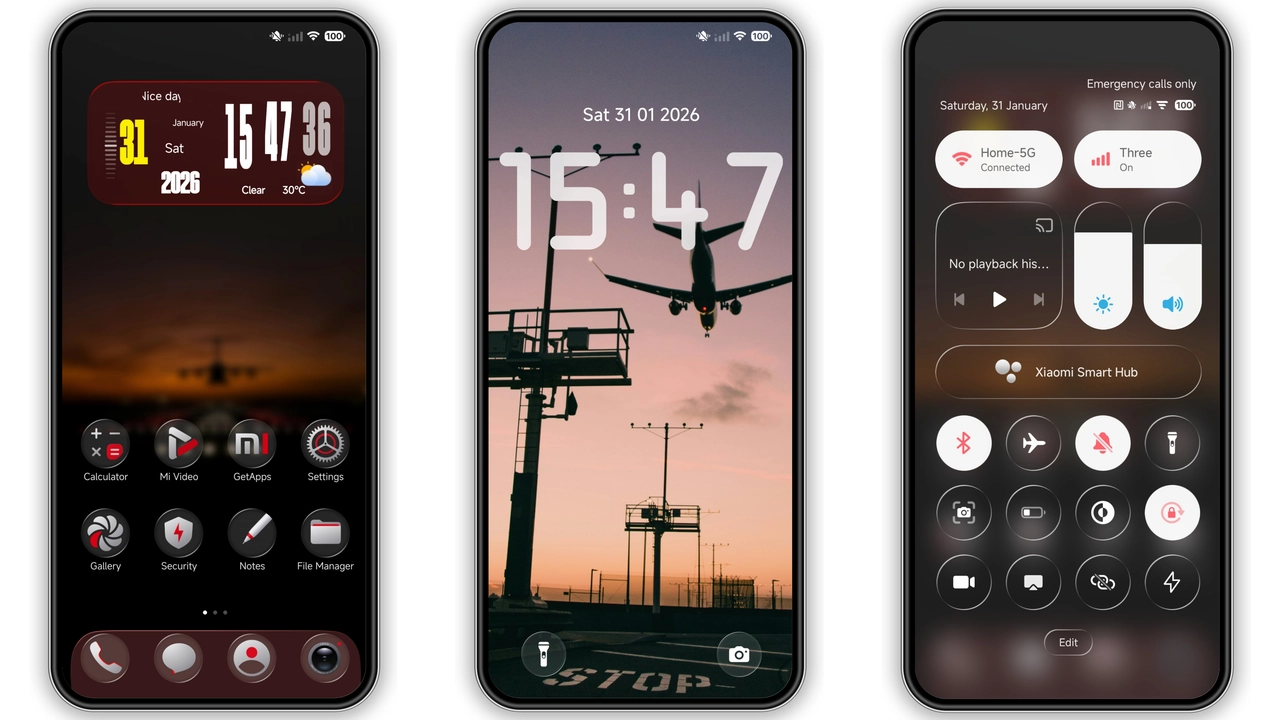
Stock HyperOS interface design leans heavily into subtle blurs, frosted glass, and light gray surfaces. While modern, it rarely takes full advantage of high-contrast AMOLED panels. Ethereum changes this dynamic completely. The primary canvas shifts to true pitch black, framed by surgical red highlights that pull key UI elements forward.
This aesthetic choice serves two clear purposes: battery conservation on OLED hardware and instant visual hierarchy. Instead of wandering through faint gradients, your eyes immediately find sliders, toggle buttons, and notification cards. It is an assertive look that avoids feeling messy or overcooked. Fans of clean, cyber-inspired setups will feel right at home with the restrained use of crimson neon against deep shadow.
Suggested Read: Moon Glass HyperOS Theme: Trending Dark Teal Setup with Glass Dock
Dynamic Lockscreen and Status Bar Overhaul
Your lockscreen handles your very first interaction with your device dozens of times a day. Ethereum replaces standard system typography with a punchy, sharp time-and-date layout that complements high-contrast wallpapers. The clock widget anchors the top half of the screen cleanly, leaving plenty of breathing room for notifications without creating unwanted clutter.
The status bar receives an equally thoughtful refresh. Battery indicators, Wi-Fi bars, and cellular network icons ditch the rounded, generic stock outlines in favor of sharper, geometric silhouettes. Small details like the charging icon and mute indicators pick up the theme's signature red tone, creating unified visual feedback across every screen. The design maintains strict alignment, so edge cutouts and hole-punch cameras do not overlap critical glyphs.
Bespoke Icon Pack and Elevated Floating Dock
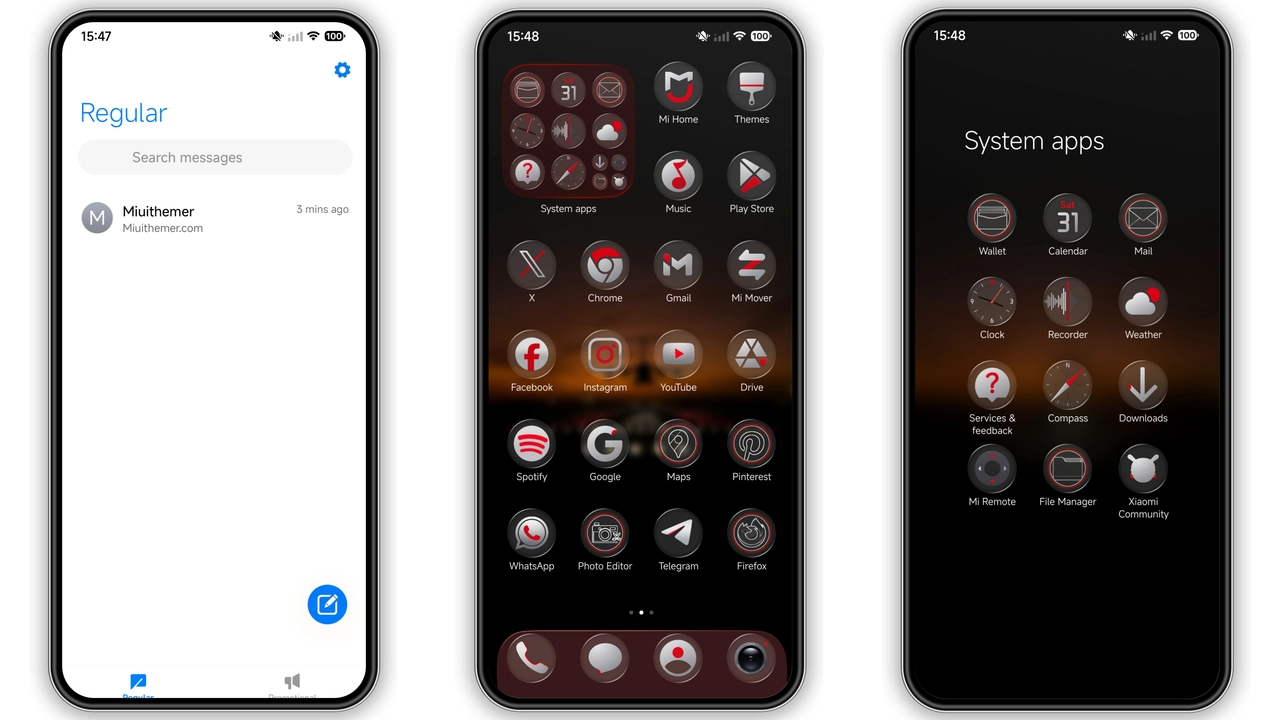
A custom theme stands or falls on its icon craftsmanship. Ethereum provides a comprehensive set of custom-drawn app glyphs. Rather than boxing existing artwork inside generic rounded squares, the designer chose uniform circular and freeform shapes backed by a dark, metallic sheen.
Popular system utilities—including Settings, Security, File Manager, and Gallery—feature distinctive red-line accents that set them apart from standard third-party apps. On the home screen, an understated floating dock separates your primary productivity apps from the rest of your layout. The dock effect adds subtle depth without feeling heavy, ensuring your setup looks intentional and balanced whether you prefer a single-page minimalist layout or an app-heavy grid.
Everyday Usability and System UI Tweaks
A common issue with community themes is unreadable text caused by low-contrast font colors on top of custom notification backgrounds. Ethereum avoids this pitfall. Submenus, toast messages, and settings dividers remain legible thanks to bright white and light-gray typography positioned over dark surfaces.
The volume sliders and Control Center tiles swap out standard blue fills for a vivid red accent. Tapping toggles feels responsive, and active buttons provide instant feedback. Because the package sits at just over 22 megabytes, animations stay fluid. You will not notice dropped frames when pulling down the notification panel or swiping between multitasking cards, which often plagues larger, heavily animated modifications.
Pros and Cons
Pros
- True pitch-black backgrounds optimize battery usage on AMOLED screens.
- Striking red accent palette provides outstanding visual contrast.
- Lightweight package size ensures smooth system animations.
- Crisp status bar icons that maintain alignment across different notch styles.
- Polished, cohesive custom icon pack for primary system tools.
Cons
- Unthemed third-party apps may disrupt the uniform red-and-black aesthetic.
- Strong high-contrast theme styling may feel aggressive for users who prefer pastel or light layouts.
Installation Insights and Compatibility Check
Ethereum is built to run smoothly across HyperOS, HyperOS 2.0, and modern MIUI versions running on Xiaomi, Redmi, and POCO handsets. For the best visual stability, apply the theme and immediately restart your phone. A quick reboot clears the HyperOS interface cache, ensuring that status bar icons, volume sliders, and custom dock outlines render cleanly without visual glitches.
If you prefer running a stock-like experience with personalized accents, you can also mix and match. The HyperOS customization engine lets you apply the Ethereum icon pack or lockscreen while retaining your preferred system control center. This versatility makes the theme an easy addition to any personalization enthusiast's daily driver rotation.
Download Links
Use the buttons below to open the theme file and the supporting link.
Ethereum Theme mtz File
Helpful links
More Theme Updates
For more curated HyperOS and MIUI theme updates, visit Hyper OS x MIUI .


