Theme details
- Designer
- SabriTN
- Size
- 55.31 MB
- Compatibility
- HyperOS, MIUI 14, MIUI 13, MIUI 12, MIUI 11
Tired of the same old look on your Xiaomi, Redmi, or POCO device? The world of HyperOS and MIUI themes offers a vibrant escape, allowing you to completely transform your smartphone's aesthetic. Today, we're diving deep into a theme that promises a dramatic, yet sophisticated overhaul: Crimson ObsidianV3. This isn't just a simple wallpaper change; it's a meticulously crafted experience that blends luxurious black with striking red accents, promising to make your device truly stand out. If you're seeking a theme that exudes modern elegance with a bold edge, Crimson ObsidianV3 might just be your next digital obsession.
Format · MTZ
A Symphony of Crimson and Obsidian: The Visual Core
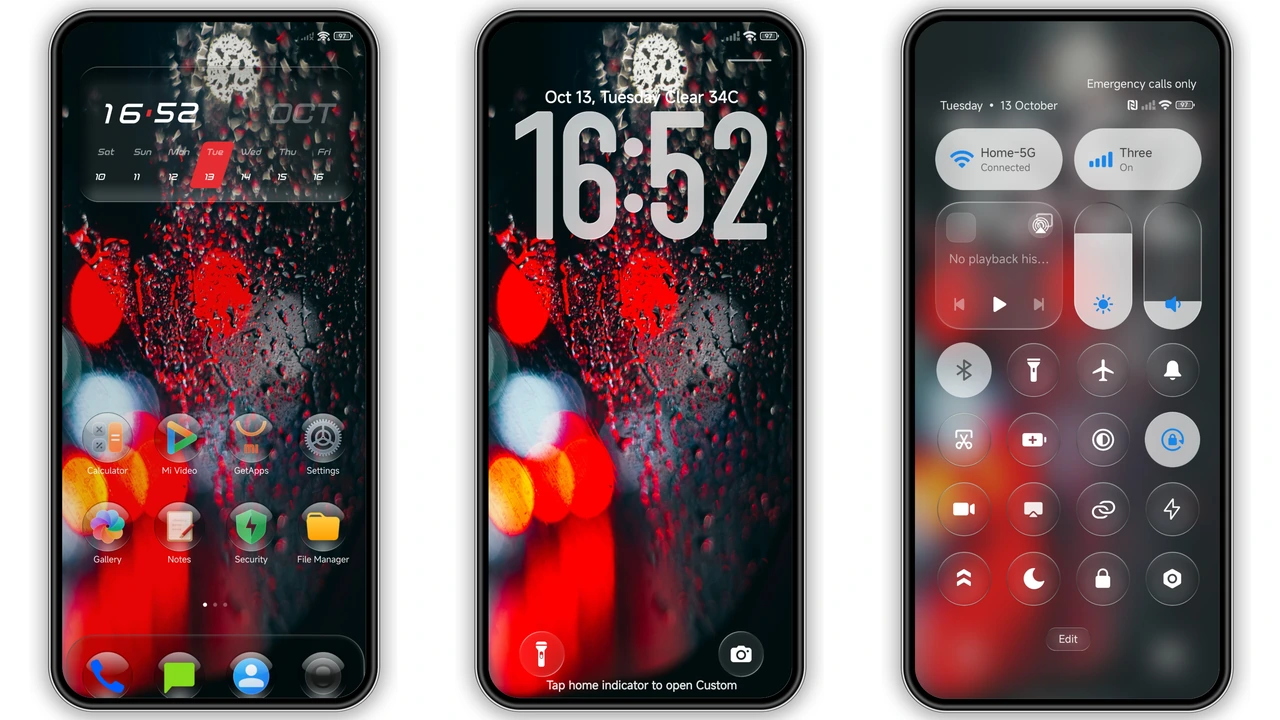
Crimson ObsidianV3 immediately captivates with its namesake blend of deep, luxurious black and vibrant, energetic red. This theme doesn't shy away from making a statement; it embraces a dramatic aesthetic that feels both powerful and refined. The overall mood is one of sophisticated darkness, punctuated by glowing bokeh lights and subtle rain effects that adorn the wallpaper. Imagine your screen coming alive with these dynamic elements, creating a sense of depth and movement that goes far beyond a static background. This isn't just a dark theme; it's a moody dark theme, designed to evoke a sense of premium quality and unique style. The red accents are strategically placed, drawing the eye without overwhelming the senses, ensuring a balanced and visually engaging interface. Every element, from the notification panel to the settings menu, is re-imagined through this striking color palette, creating a cohesive and immersive user experience. It’s a bold choice for those who appreciate a strong visual identity for their device.
Suggested Read: Hyper Glass Theme: Sleek Translucent UI for HyperOS
Dynamic Lockscreen & Iconic Glass Bubbles
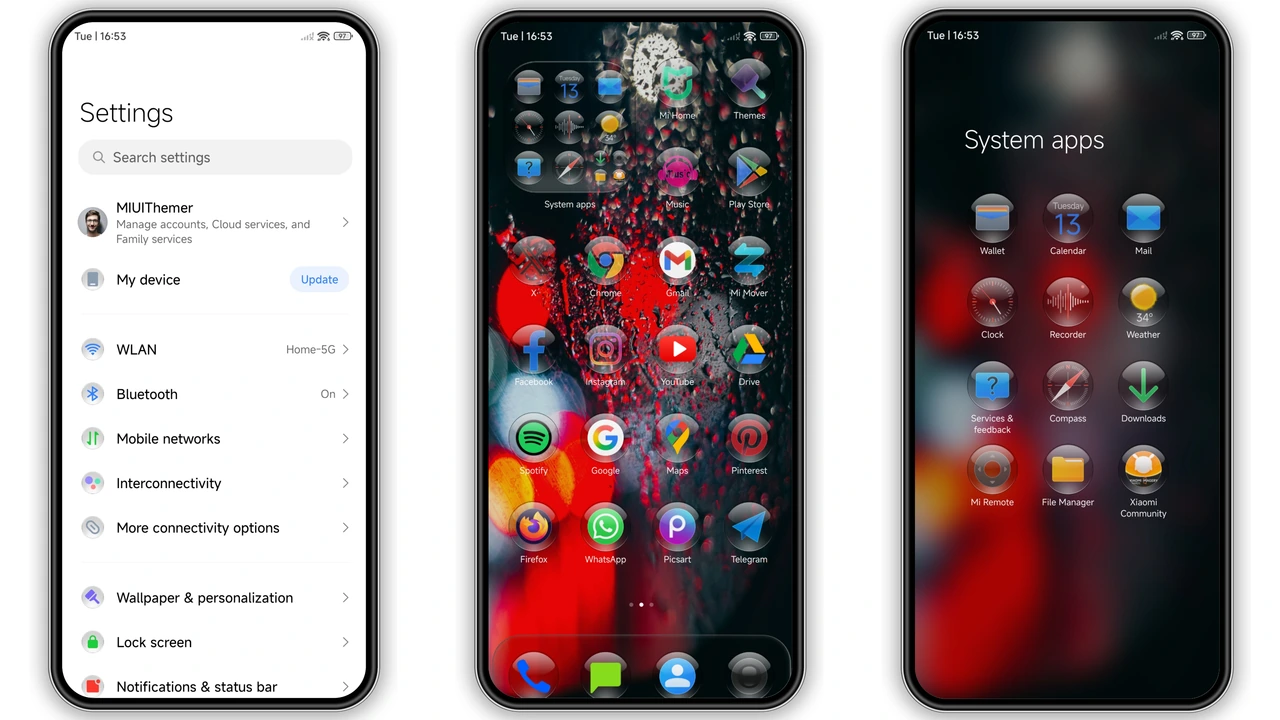
One of the standout features of Crimson ObsidianV3 is its incredibly stylish lock screen. Here, a bold, custom-designed clock takes center stage, ensuring that checking the time is not just functional, but an aesthetic pleasure. The lock screen isn't merely a gateway to your phone; it's an interactive canvas, often featuring the glowing bokeh and raindrop effects that define the theme's immersive wallpapers. Beyond the lock screen, the app icons are a true highlight. Crimson ObsidianV3 introduces stunning, transparent glass bubble icons that float gracefully over your chosen background. These aren't just generic icons; their unique design adds a layer of modern sophistication, making your app drawer and home screen feel incredibly polished and distinct. The transparency allows glimpses of the underlying wallpaper, creating a harmonious blend between foreground and background. This attention to detail in icon design elevates the entire user interface, offering a fresh, clean, yet incredibly stylish visual language.
Seamless Control, Frosted Elegance: UI Refinements
The thoughtful design of Crimson ObsidianV3 extends far beyond the lock screen and app icons, permeating every corner of your HyperOS or MIUI experience. The control center, a frequently accessed hub, receives a sleek frosted treatment. This subtle transparency effect adds a layer of depth and modernity, making your quick toggles and sliders appear as if they're floating elegantly above your content. This frosted glass aesthetic is consistently applied, creating a unified and premium feel across the entire system. The status bar is also meticulously redesigned, ensuring that essential information like battery life, network signal, and notifications are presented clearly and stylishly, aligning perfectly with the theme's overall dark and red palette. Even the Always-on Display (AOD) gets a stylish makeover, offering a visually engaging way to keep track of crucial information without fully waking your device. Every system element, from dialer to messages, is imbued with this luxury black aesthetic, ensuring a cohesive and immersive personalization journey. It's these subtle yet impactful changes that truly make Crimson ObsidianV3 a comprehensive transformation.
Who Will Love Crimson ObsidianV3?
This theme is an absolute must-try for anyone looking to inject a dose of dramatic elegance into their Xiaomi, Redmi, or POCO device. If you're a fan of dark modes but crave something more than just a simple black background – something with character, depth, and a touch of luxury – then Crimson ObsidianV3 is tailored for you. It appeals to users who appreciate a bold aesthetic, those who want their smartphone to reflect a modern, sophisticated style. If you're tired of the generic stock themes and yearn for a personalized look that stands out in a crowd, the unique combination of glowing bokeh, transparent glass icons, and striking red accents will resonate deeply. It's perfect for individuals who value meticulous design and a cohesive visual experience across their entire smartphone interface.
Compatibility & Installation Guidance
One of the greatest strengths of Crimson ObsidianV3 is its broad compatibility, ensuring that a wide range of Xiaomi, Redmi, and POCO users can enjoy its stunning aesthetics. This theme is fully compatible with HyperOS, and also works seamlessly across various MIUI versions, including MIUI 14, MIUI 13, MIUI 12, and even MIUI 11. This extensive support means that whether you're on the latest HyperOS Global ROM or an older MIUI iteration, you're likely to experience this theme without a hitch.
Applying Crimson ObsidianV3 is straightforward, but the method depends on your device's software:
For HyperOS/MIUI Global Stable ROM (Stock ROMs):
- Use the official Theme Store link. This is the recommended and safest method.
- Open the link: Sometimes, clicking the official link might lead to a Chinese page or an error if opened in certain browsers. If this happens, try opening the page in your default Xiaomi browser or Chrome.
- Open in app: Once the theme page loads (even if in Chinese), look for an option to "Open in app" or a similar prompt. This will launch the theme directly within your device's native Theme Store application.
- Download and Apply: From within the Theme Store app, you can easily download and apply Crimson ObsidianV3.
For Custom ROMs (e.g., Xiaomi EU ROM, MIUIRoom) or if the Theme Store link doesn't work:
- Download the MTZ file: Obtain the Crimson ObsidianV3 MTZ theme file.
- Open Theme Store App: Navigate to your device's Theme Store application.
- Import the theme: Look for an "Import" option within the Themes section (often found by swiping to the bottom or in the settings menu).
- Select the MTZ file: Browse to where you saved the downloaded MTZ file and select it.
- Apply the theme: Once imported, the theme will appear in your local themes list, ready to be applied.
Important Tip: After applying any new theme, especially one as comprehensive as Crimson ObsidianV3, it's always a good practice to restart your device. This helps ensure all elements load correctly and prevents any potential overlaps or display issues, giving you the best possible experience right from the start.
Pros and Cons
Pros:
- Dramatic and luxurious black and red aesthetic.
- Unique transparent glass bubble icons.
- Dynamic lock screen with bokeh and raindrop effects.
- Sleek frosted control center and status bar.
- Wide compatibility across HyperOS and multiple MIUI versions.
- Comprehensive system-wide visual overhaul.
Cons:
- The bold red accent might not appeal to everyone.
- Might be too dark for users who prefer brighter interfaces.
- Applying via Theme Store link can sometimes be finicky with browser compatibility.
Conclusion
Crimson ObsidianV3 offers a compelling vision for personalizing your Xiaomi, Redmi, or POCO device. It’s a theme that refuses to blend in, instead opting for a dramatic yet sophisticated blend of black and red, enhanced by unique glass icons and dynamic visual effects. Whether you're running HyperOS Global or an older MIUI iteration, this theme promises a fresh, high-value aesthetic that transforms your everyday smartphone interaction. If you're ready to embrace a darker, more luxurious, and undeniably stylish look, Crimson ObsidianV3 is definitely worth adding to your theme collection. Dive in and let your device reflect a truly unique personal style.
Download Links
Use the buttons below to open the theme file and the supporting link.
Crimson ObsidianV3 Theme mtz File
Helpful links
More Theme Updates
For more curated HyperOS and MIUI theme updates, visit Hyper OS x MIUI .


