Theme details
- Designer
- Eto'o
- Size
- 15.77 MB
- Compatibility
- HyperOS 1.0, HyperOS 2.0, MIUI 14
Finding a clean, distraction-free aesthetic for your everyday handset can feel impossible amid vibrant, saturated themes. The Black-3 HyperOS Theme cuts through the visual noise by embracing a strictly restrained monochrome design language. Tailored for Xiaomi, Redmi, and POCO handsets running HyperOS and modern MIUI builds, this personalization pack proves that deliberate contrast and typographic discipline can transform your smartphone into a sleek design piece.
Built for enthusiasts who prize legibility and refined elegance over flashy animations, Black-3 strips unnecessary color accents down to an intentional balance of jet black, soft charcoal, and stark white.
Theme Name · Black-3
Format · MTZ / Official MTZ
---
Dramatic Monochrome Visuals and Editorial Wallpapers
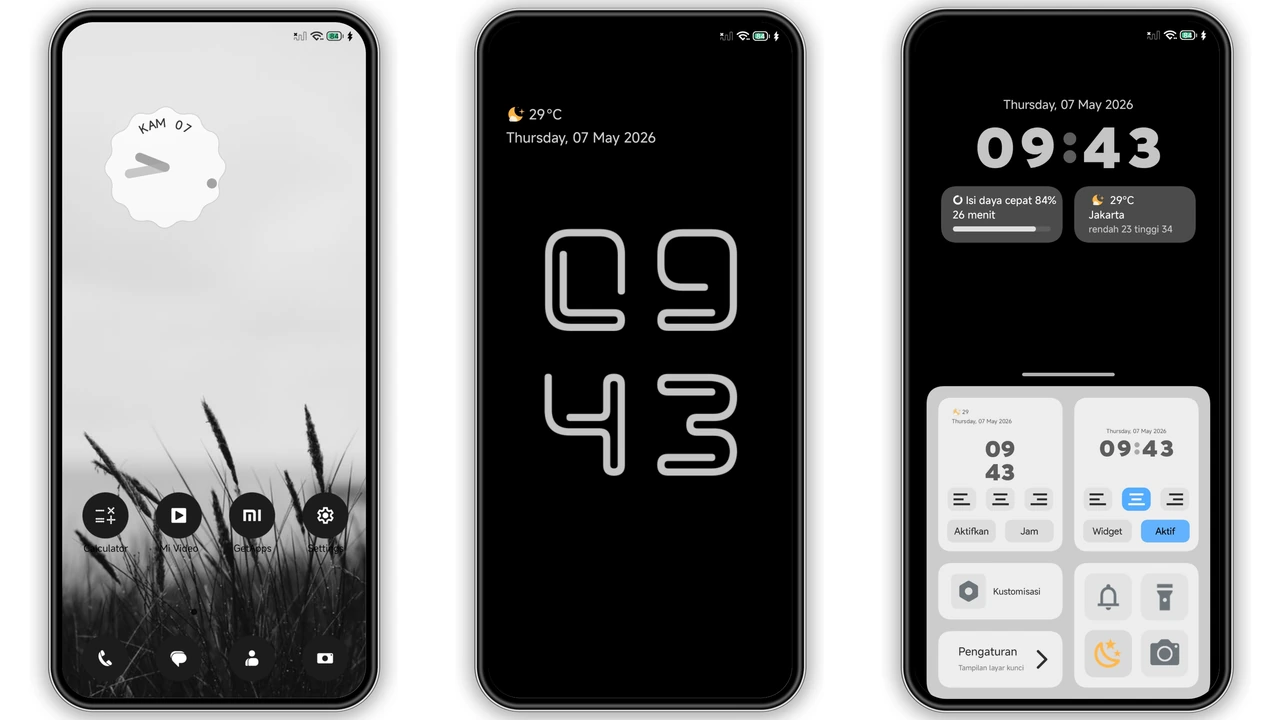
The visual foundation of Black-3 relies on sharp contrast rather than complex gradients. Right on the home screen, you are greeted by an artistic black-and-white grass landscape that provides depth without cluttering your app grid. Because the backdrop utilizes deep black tones, it takes full advantage of AMOLED displays to save battery and reduce eye fatigue in low-light environments.
Resting atop the wallpaper is an editorial-style analog clock widget. Featuring a delicate, handwritten layout, it looks more like a spread in an architectural magazine than a default Android interface. The overall composition makes every unlock feel deliberate, framing your daily setup with crisp sophistication.
Suggested Read: Lucky Cat Chime MTZ Theme for Redmi Note Series
Expressive Lockscreen Typography and Functional Clock Variations
The lockscreen is easily the centerpiece of the Black-3 interface. It abandons traditional, generic clock layouts in favor of an assertive, oversized rounded-rectangle clock outline that stretches across the display. The sheer scale creates an architectural look, giving your phone an instantly recognizable profile when picked up from a desk.
For users who lean toward pure practicality over experimental layouts, Black-3 includes alternate clock styles. Swapping configurations brings up a sharp digital time display coupled with dedicated information cards for battery status, date, and local weather conditions. Both arrangements preserve the monochrome rule: white data lines on deep black canvases, ensuring instant visibility in harsh sunlight.
Custom Circular Icon Pack and Integrated System Accents
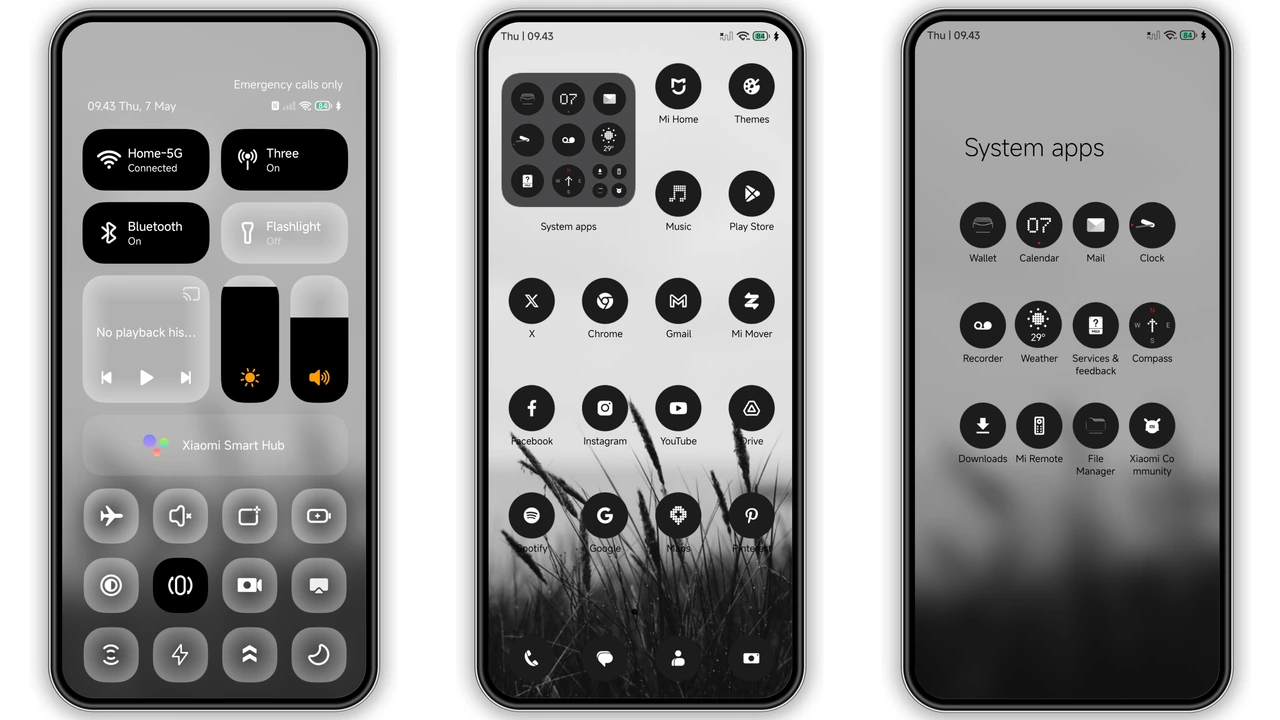
Consistency often makes or breaks custom mobile themes. Black-3 addresses this with a cohesive, dark circular icon set across all native apps and widely used third-party services. System folders, the app drawer, and primary desktop screens retain uniform geometry and unified contrast levels, avoiding the disjointed mismatched-icon problem common to custom setups.
Beyond your launcher, the theme touches primary interface layers:
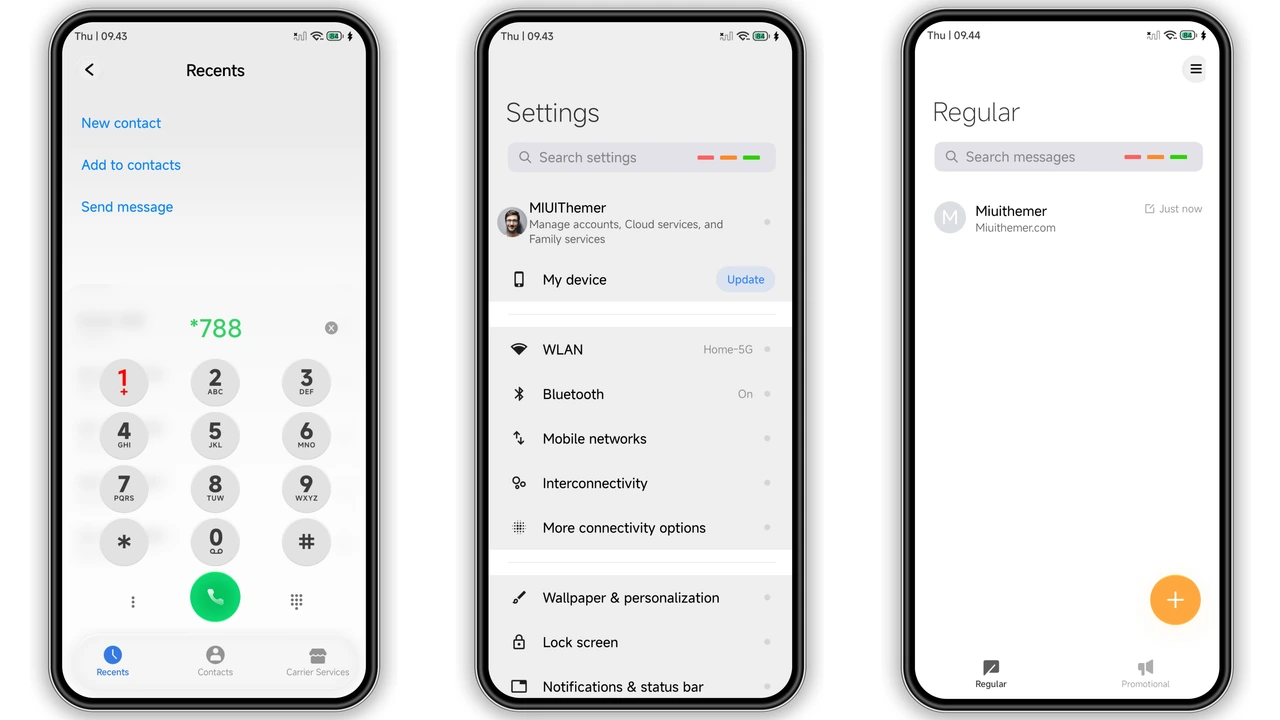
- Settings Interface: Replaces colored icon tiles with subdued grey and monochrome line badges, organizing system menus neatly.
- Dialer and Contacts: Features clean numeric spacing with distinct divider lines for fast one-handed calling.
- Status Bar & Control Center: Replaces stock colorful quick toggles with precise, monochrome glyphs that seamlessly blend with system-wide dark mode.
Everyday Performance and Battery Efficiency
Heavy themes often bog down system responsiveness or trigger micro-stutters when pulling down notification shades. Black-3 maintains a lightweight footprint at just 15.77 MB. It preserves system fluidity on entry-level Redmi devices while taking full advantage of the high refresh rate panels on flagship Xiaomi and POCO handsets.
Because the interface relies on genuine black backgrounds rather than dark grey tones, OLED and AMOLED panels turn off individual pixels across large swaths of the interface. Over a full workday, this stark presentation delivers noticeable power savings while maintaining high text legibility throughout emails, messaging, and system navigation.
Installation and Setup Notes
Black-3 supports standard installation paths depending on your device's ROM configuration:
- Stock Global / EEA ROMs: Apply the theme directly via the native Themes app link. If the regional link opens blank, paste it into your device's native browser and choose the option to open the content directly in the official Theme Store app.
- Custom ROMs (Xiaomi.eu, EliteROM): Download the official MTZ package. Open the Theme Store app, navigate to your local profile, select Import, choose the
.mtzfile from your local storage, and tap Apply. - Post-Install Tip: Reboot your handset immediately after applying the theme. A quick restart clears the UI cache, ensuring custom fonts, lockscreen components, and status bar icons render cleanly without overlapping.
Pros and Cons
Pros
- True black elements reduce power draw on AMOLED screens.
- Cohesive circular icon pack maintains aesthetic balance across apps.
- Bold typographic lockscreen designs stand out from generic layouts.
- Fast, lightweight system operation without interface lag.
Cons
- Strict black-and-white palette may feel too sterile for color lovers.
- Certain third-party app icons retain original branding, disrupting uniformity.
- Stock Global ROMs require opening links via the official app store interface.
Final Verdict
Black-3 is tailor-made for minimalists who value clean lines, strong typography, and disciplined design. If you want a setup that feels quiet, looks sophisticated, and cuts down screen fatigue, this theme delivers a polished, premium upgrade for your daily driver.
Download Links
Use the buttons below to open the theme file and the supporting link.
Black-3 Theme mtz File
Helpful links
More Theme Updates
For more curated HyperOS and MIUI theme updates, visit Hyper OS x MIUI .


