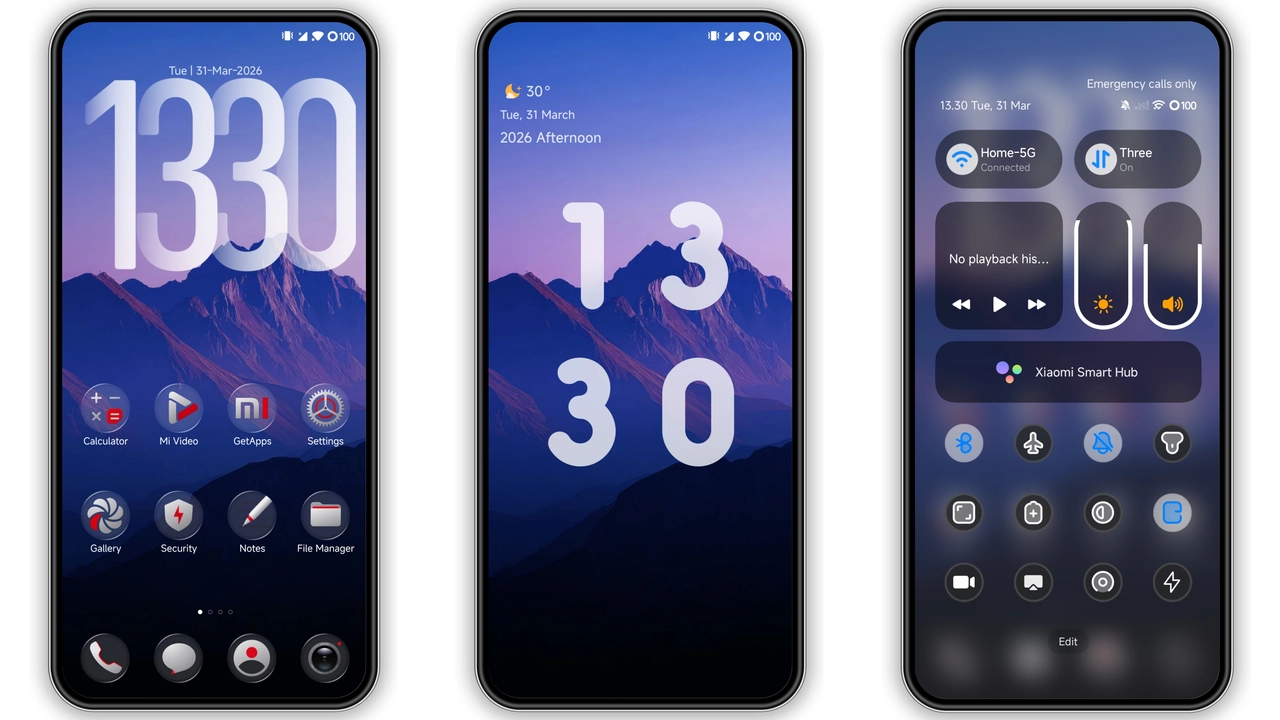
Theme Overview
Parameter · Value
Designer · Piyush KPV
Size · Approx. 12 MB (MTZ file)
Format · MTZ (MIUI Theme Package)
Compatibility · HyperOS / MIUI
Playful Balloon‑Inspired Palette
The Ballons MTZ Icons set bursts with soft gradients and subtle shadows, echoing a sky full of floating balloons. Each icon adopts a rounded silhouette, pastel base colors, and a gentle gloss that catches ambient light. The design balances whimsy with readability—labels remain crisp, and contrast stays within accessibility thresholds. Icons scale cleanly from home screen to widget view, preserving detail without pixelation.
Ideal Audience: Casual Creators & Minimalist Fans
If you enjoy a lighthearted UI without sacrificing sleekness, this pack hits the sweet spot. Graphic designers, social media creators, and anyone who prefers a non‑intrusive yet joyful interface will find the theme inviting. The subdued pastel scheme also suits users who shy away from stark neon or heavy dark‑mode palettes, offering a middle ground that feels fresh on both light and dark system themes.
Compatibility & System Requirements
Ballons MTZ Icons are built for HyperOS and MIUI, leveraging the native MTZ format. The pack works on all devices that support MIUI 12+ and HyperOS 1+, meaning most recent Xiaomi, Redmi, and POCO models are covered. No additional launcher is required; the system theme engine handles the icon swap seamlessly. Users on older MIUI versions may encounter missing assets or fallback to default icons.
Installation Walkthrough
1. Download the MTZ file from the MTZFILE repository. The file is named Ballons … ICONS.mtz and sits at roughly 12 MB.
2. Open the file directly on your device. MIUI/HyperOS will prompt you to apply the theme.
3. Confirm the installation. The system will verify compatibility and then apply the icons.
4. Reboot (optional). A quick restart ensures the new icons render across all UI components.
During installation, expect a brief progress bar. The process does not modify system partitions, so it can be reverted at any time via the theme manager. If you use a custom launcher, ensure it respects the system theme; otherwise, you may need to clear the launcher cache to see the new icons.
Pros and Cons
Pros
• Vibrant yet soft color scheme
• High readability across light/dark modes
• Seamless integration with native theme engine
• Lightweight file size
Cons
• Limited to devices supporting MTZ format
• No dedicated dark‑mode variant (relies on system overlay)
• Minor icon mismatches on very new third‑party apps
Final Thoughts
Ballons MTZ Icons deliver a cheerful visual lift without overwhelming the user’s workflow. Their balanced design makes them suitable for both personal expression and professional environments where a touch of color is welcome. Installation is straightforward, and the theme respects the underlying HyperOS/MIUI architecture, ensuring stability. For anyone seeking a fresh look that stays true to the sleek aesthetic of Xiaomi’s ecosystem, this pack is a worthwhile addition.
Suggested Read: SU Custom vs Minimalist Dark: Which Fits Your HyperOS/MIUI?
Download Links
Use the buttons below to open the theme file and the supporting link.
Download File
Helpful links
More Theme Updates
For more curated HyperOS and MIUI theme updates, visit Hyper OS x MIUI .