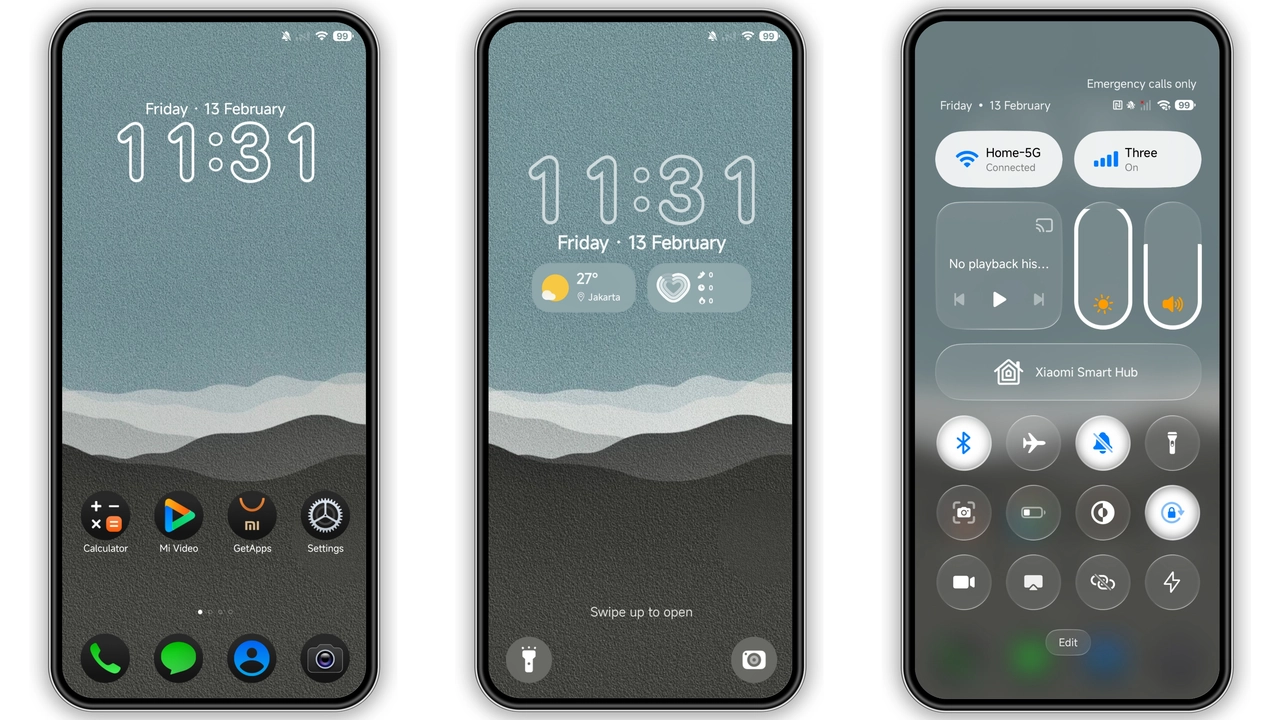
jDN 01 HyperOS Theme – Elegant Dark Icons for Xiaomi & Redmi

Elegant dark theme with refined icons, seamless HyperOS integration, easy install. Transform Xiaomi/Redmi UI instantly.

jDN 01 HyperOS Theme – Elegant Dark Icons for Xiaomi & Redmi

Theme Metadata

Parameter · Value

Designer · jayesh Nimbara

Size · 31.4 MB

Format · MTZ

Compatibility · HyperOS (MIUI)

Sleek Dark Elegance

Deep charcoal backdrop. Subtle gradients. Minimal glare. Text crisp. Status bar muted. Navigation bar smooth. Overall vibe sophisticated. No harsh contrast. Eye‑comfort priority. Works across apps. Consistent feel.

Suggested Read: Water Porcupine Probe MTZ Theme vs Minimalist Dark: Which Fits Your HyperOS?

Icon Pack Harmony

Icons redesigned. Rounded corners. Uniform weight. Glyphs clear. Colors desaturated. Accent teal highlights. Launcher icons align. System app icons match. Notification icons refined. Consistency evident.

Lock Screen Overhaul

Lock screen receives custom wallpaper slot. Clock style modern. Date format clean. Swipe gestures unchanged. Unlock animation subtle. Security overlay untouched. Battery indicator sleek.

System UI Tweaks

Dialer colors adapted. Settings panels darkened. Messages bubbles softened. Control Center icons updated. Quick settings tiles re‑styled. Volume slider dark. No lag introduced.

Ideal Audience

Dark‑mode enthusiasts. Minimalist lovers. Users seeking premium feel without bloat. Fans of subtle neon accent. Those wanting iOS‑like polish on Xiaomi devices.

Compatibility Notes

Runs on HyperOS devices. Supports MIUI‑based builds. Works with official Theme Store. Compatible with custom ROMs that accept MTZ files. No conflict with standard launcher. No root required.

Install Expectations

Open Theme Store. Search "jDN 01". Tap download. Apply theme. Restart optional. For MTZ file: open Theme Store → Import → select file. Wait import. Apply. Device may flash briefly. No data loss.

Custom ROM Tips

Use file manager with root access. Place MTZ in internal storage. Launch Theme Store → Import. Confirm import success. If icons misalign, clear cache of Theme Store. Re‑apply theme.

Post‑Install Tweaks

Check overlapping elements. Toggle "Restart UI" in settings if needed. Adjust accent color in Theme Store for personal taste. Disable auto‑dark mode if prefer constant look.

Pros and Cons

Pros

• Cohesive dark aesthetic

• High‑resolution icons

• Lightweight package

• Seamless HyperOS integration

Cons

• No light variant

• Limited color accent options

• Requires manual restart for some UI glitches

Final Thoughts

jDN 01 delivers premium dark experience. Minimal effort required. Install once, enjoy instantly. Ideal for users craving elegance on Xiaomi/Redmi hardware.

Theme Preview

jDN 01 HyperOS Theme – Elegant Dark Icons for Xiaomi & Redmi preview 2
jDN 01 HyperOS Theme – Elegant Dark Icons for Xiaomi & Redmi preview 3
jDN 01 HyperOS Theme – Elegant Dark Icons for Xiaomi & Redmi preview 4

Download Links

Use the buttons below to open the theme file and the supporting link.

Download jDN 01 MTZ File

Download File

Open Alternate Download

Helpful links

More HyperOS themes

How to install a theme

How to download safely

More Theme Updates

For more curated HyperOS and MIUI theme updates, visit Hyper OS x MIUI .