Parameter · Value
Designer · Falesh
Size · 9.70 MB
Format · MTZ
Compatibility · HyperOS / MIUI
Cool Blue Pebble Icons
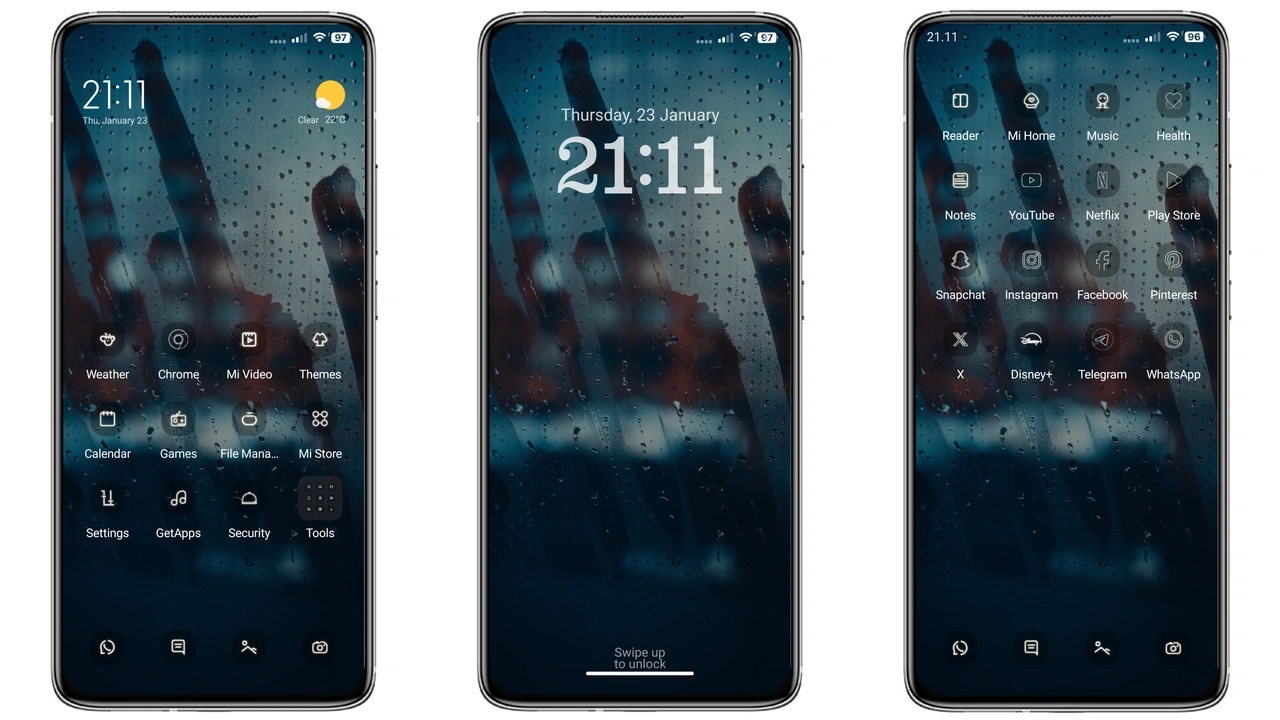
Flat Pebble replaces stock icons with rounded pebble shapes. Each icon carries a subtle blue hue. The palette stays consistent across apps. No jarring color clashes. Icons retain recognizability. Users notice smoother visual flow. The design feels modern yet familiar. Battery, Wi‑Fi, Bluetooth icons follow the same language. Even system shortcuts adopt the pebble silhouette. This uniformity reduces visual noise.
Suggested Read: HyperColor16 Theme Review: Bold Colors and Custom Lock Screen for HyperOS
Fresh Minimalist Wallpaper Suite
Theme ships with three high‑resolution wallpapers. All feature soft gradients and abstract pebble patterns. Wallpapers adapt to dark mode automatically. They scale without distortion on any screen size. The images avoid busy details. They keep focus on home‑screen widgets. Users can switch wallpapers from the theme settings. No extra download needed.
Seamless Lock Screen & Always‑On Display
Lock screen adopts the same blue accent. Clock font matches the icon style. Notification icons inherit pebble outlines. AOD mirrors the lock‑screen layout. Battery percentage appears in the same font weight. The transition between lock and home is fluid. No lag reported on supported devices. Theme respects system animations, preserving battery life.
Who’ll Love This Pebble Look
Minimalist enthusiasts find the theme appealing. Users who prefer a cool color scheme gravitate toward the blue tones. Fans of flat design appreciate the lack of shadows. Xiaomi, Redmi, POCO owners seeking a fresh look benefit most. Developers who customize UI for demos may use it as a base. Casual users who want a quick visual upgrade without tinkering also enjoy it.
Compatibility Notes
Theme declares compatibility with HyperOS and MIUI. It works on devices running the stock HyperOS UI. It also applies to MIUI versions that support MTZ files. Users on custom ROMs can import the MTZ via the Theme Store app. The theme respects regional settings; no language lock‑in. No root required. Ensure the device has enough storage for the 9.70 MB package.
Install Expectations
Download the MTZ file from the provided link. Open the Theme Store app. Navigate to Themes → Import. Select the downloaded file. The app validates the package. After validation, tap Apply. The system may restart the UI layer. Expect a brief flicker. Post‑install, check the lock screen for proper icon rendering. If any element appears missing, reboot the device. The theme includes a fallback for older UI components.
Pros and Cons
• Pros
• Cohesive blue pebble icon set
• Lightweight, 9.70 MB
• Seamless lock screen and AOD integration
• Works on HyperOS and MIUI stock ROMs
• No root required
• High‑resolution wallpapers included
• Cons
• Limited color variants; only blue tone
• No animated icons
• AOD customization limited to theme defaults
• Requires manual import on custom ROMs
Final Thoughts
Flat Pebble delivers a polished, minimalist aesthetic without sacrificing performance. Its uniform icon language and subtle blue palette create a calming UI experience. Compatibility with both HyperOS and MIUI broadens its reach. Installation is straightforward via the Theme Store. While the theme lacks color options and animation, its lightweight nature and visual consistency make it a solid choice for users seeking a fresh look. Upgrade your Xiaomi, Redmi, or POCO device today and enjoy a cleaner, cooler home screen.
Theme Preview
Download Links
Use the buttons below to open the theme file and the supporting link.
Flat Pebble Theme mtz File
Helpful links
More Theme Updates
For more curated HyperOS and MIUI theme updates, visit Hyper OS x MIUI .