Parameter · Value
Designer · moscreen
Size · 14.36 MB
Format · .mtz
Compatibility · HyperOS / MIUI (12‑14)
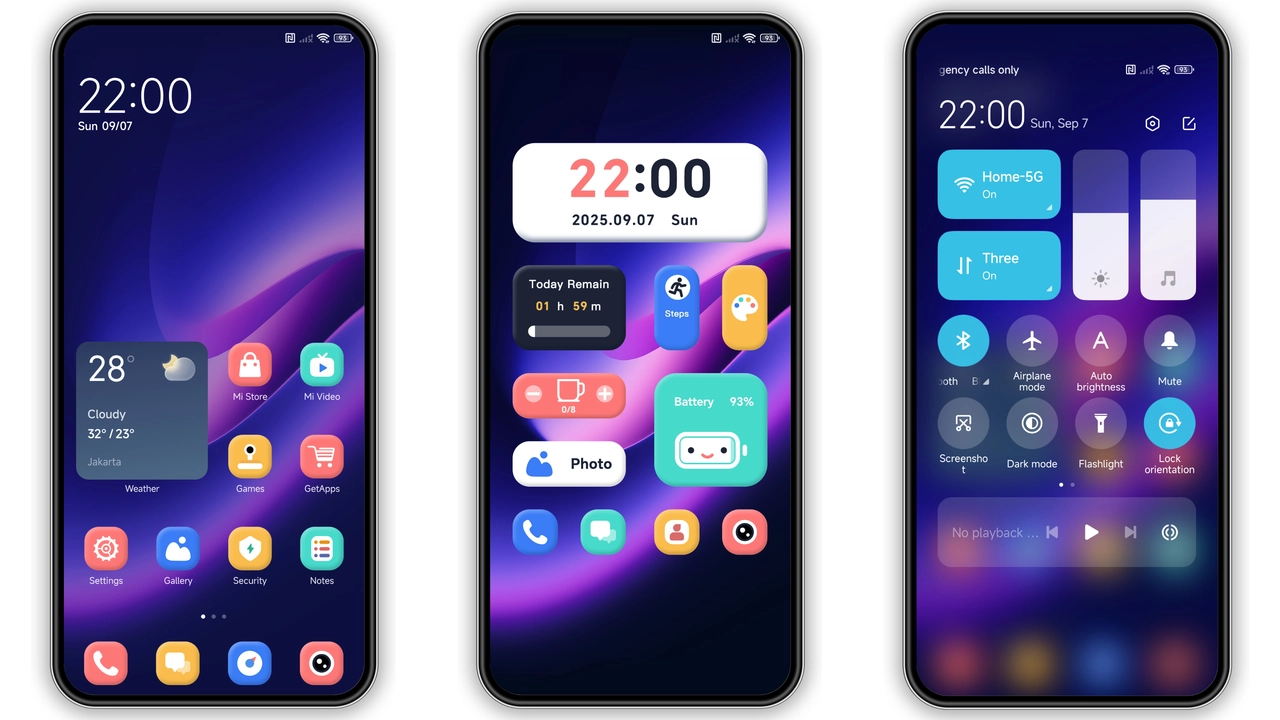
Deep‑Sea Color Palette and Gradient Flow
Violet Mirage leans into a cool blue‑purple gradient. Backgrounds fade from midnight indigo at the top to soft lavender near the status bar. Widgets inherit the gradient, creating a seamless visual bridge. Text remains white, ensuring readability against the dark hues. The gradient isn’t just decorative; it guides the eye toward the center of the screen, making notifications pop.
Suggested Read: 光栅壁纸 雪花序章 MTZ Theme Archive – HyperOS & MIUI
Icon Set and Animation Touches
Icons receive a custom overhaul. Rounded corners replace sharp edges. Each icon carries a subtle inner glow that matches the theme’s primary hue. Tap an icon and watch a quick slide‑in animation—an effect that feels modern without draining battery. The animation speed is calibrated for smoothness; no jarring pauses. App folders adopt the same gradient border, reinforcing the cohesive look.
Lock Screen and Always‑On Display Revamp
Lock screen receives a new wallpaper that mirrors the gradient theme. Clock digits are rendered in a thin sans‑serif typeface, colored in a light violet that contrasts well with the dark background. Swipe‑up unlock animation slides the lock screen upward, revealing the home screen in a single fluid motion. Always‑On Display (AOD) inherits the same color scheme, showing time and date in violet while keeping battery impact minimal.
Installation Steps and Compatibility Checklist
1. Open Theme Store app on your device. 2. Search for “Violet Mirage”. 3. Tap Download, then Apply. 4. Restart to ensure all elements load correctly.
If you prefer manual installation, copy the .mtz file to internal storage, open Theme Store, go to “Import”, select the file, and apply. The theme works on MIUI 12‑14 and HyperOS builds that support .mtz files. Devices from Xiaomi, Redmi, and POCO are covered. Ensure your ROM is a stock or globally stable version; custom ROMs may require a manual import.
Pros and Cons
Pros
• Cohesive blue‑purple gradient that feels premium.
• Custom icon set with subtle glow.
• Smooth lock‑screen animation.
• Low battery impact on AOD.
• Compatible across multiple MIUI generations.
Cons
• No dark‑mode toggle; theme is fixed.
• Limited widget redesign; some stock widgets retain original look.
• Requires restart for full effect.
• No built‑in wallpaper rotation.
Theme Preview

Download Links
Use the buttons below to open the theme file and the supporting link.
Violet Mirage Theme mtz File
Helpful links
More Theme Updates
For more curated HyperOS and MIUI theme updates, visit Hyper OS x MIUI .


