Parameter · Value
Designer · KIEN BUI
Size · 59.46 MB
Format · MTZ
Compatibility · HyperOS, MIUI (Xiaomi, Redmi, POCO)
Immersive 3‑D Depth and Icon Redesign
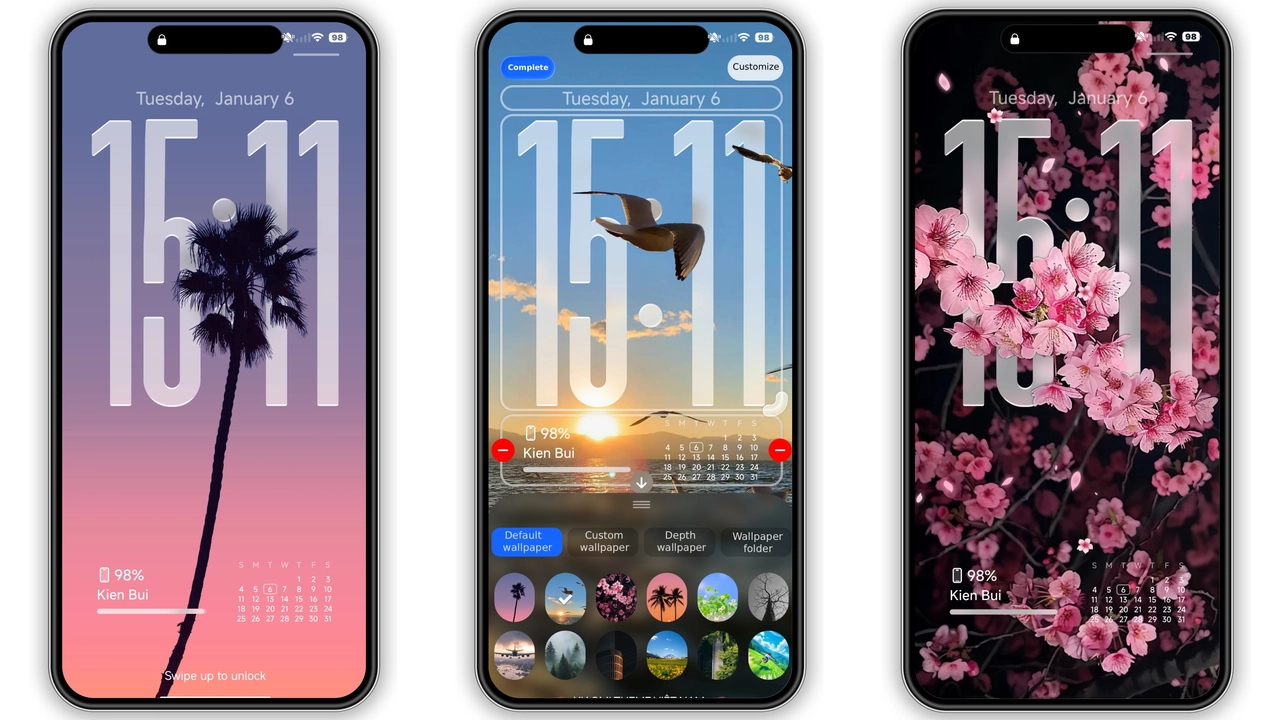
Super26 Pro leans heavily into depth‑of‑field tricks. Icons pop out of the background as you swipe, giving the illusion of floating layers. The shadow work is subtle enough not to distract, yet pronounced enough to feel premium. Color choices stay within a cool‑gray‑blue palette, letting the icons retain recognizability while adding a futuristic vibe. The theme also swaps out default glyphs for custom‑crafted symbols that echo the HyperOS design language—rounded corners, crisp lines, and a hint of neon glow on active elements.
Suggested Read: OX GR2 Dark Red HyperOS Theme for Xiaomi Redmi Phones
Vibrant Lock Screen & Always‑On Display
Lock screen receives a full makeover. A high‑resolution wallpaper set, paired with a semi‑transparent clock widget, creates a sleek silhouette. The always‑on display inherits the same depth cues: notification icons glide in with a gentle fade, while the time remains bold and legible. The wallpaper pack includes both static and subtle motion variants, letting users choose a calm backdrop or a dynamic scene that reacts to ambient light.
Who Will Love This Theme?
• Power users who enjoy visual polish without sacrificing performance. The theme’s 3‑D effects are GPU‑friendly, keeping navigation smooth on mid‑range devices.
• Fans of minimal yet futuristic aesthetics. The palette avoids garish colors, focusing on muted tones accented by neon highlights.
• Xiaomi, Redmi, and POCO owners seeking a cohesive look across system UI, lock screen, and icons. Compatibility spans HyperOS and MIUI, so the theme stays consistent whether you run the latest OS or a stable custom ROM.
• Creators and streamers who want a fresh backdrop for screenshots or video recordings. The depth effect adds visual interest without overwhelming the subject.
Installation Walkthrough & Download Tips
1. Download the MTZ file from the official theme store link. The package size sits just under 60 MB, so a stable Wi‑Fi connection ensures a clean transfer.
2. Open the Theme Store app on your device. Navigate to the “Import” option at the bottom of the Themes list.
3. Select the downloaded MTZ and confirm import. The app validates the package, then adds Super26 Pro to your library.
4. Apply the theme. After activation, the system may prompt a quick restart—accept it to let all UI elements reload correctly.
5. Optional: Import the depth‑effect wallpapers. Unzip the wallpaper bundle, then set any image as lock‑screen or home‑screen background through the system wallpaper picker.
Pros and Cons
• Pros
• Stunning 3‑D depth without lag.
• Unified look across lock screen, AOD, and icons.
• Lightweight package for mid‑range hardware.
• Easy import via native Theme Store.
• Cons
• Limited color variations; users preferring bright palettes may need additional tweaks.
• No built‑in dark‑mode toggle; theme follows system dark setting automatically.
• Wallpaper pack excludes animated live wallpapers.
Theme Preview


Download Links
Use the buttons below to open the theme file and the supporting link.
Super26 Pro Theme mtz File
Super26 Pro Depth Effect Wallpapers
Helpful links
More Theme Updates
For more curated HyperOS and MIUI theme updates, visit Hyper OS x MIUI .


