Parameter · Value
Designer · HUY
Size · 97.33 MB
Format · MTZ
Compatibility · HyperOS / MIUI
Bold iOS‑Inspired Icon Pack
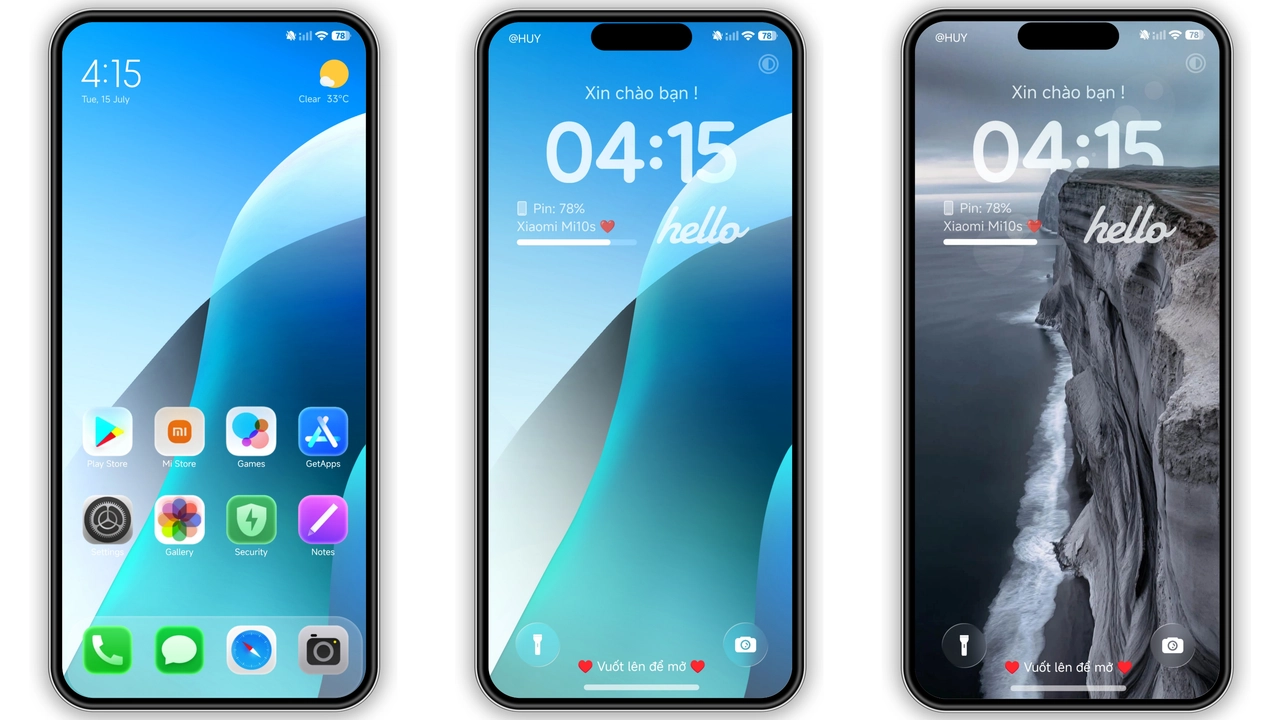
Super 19 drops a full‑blown iOS aesthetic onto Xiaomi’s MIUI skin. Icons receive rounded corners, subtle gradients, and a uniform color palette that leans toward cool blues and soft greys. The result feels less like a skin overlay and more like a cohesive visual language. Even the system apps—Settings, Phone, Messages—adopt the same silhouette, eliminating the jarring mix of native MIUI icons and third‑party packs. Users who miss Apple’s clean look but refuse to switch platforms will find this instantly familiar.
Suggested Read: Putih Biru 3.0.3 – Tema HyperOS untuk Redmi, Poco, Mi
Vibrant Wallpapers & Dynamic Lock Screen
Beyond icons, the theme ships with a curated set of high‑resolution wallpapers. Each image blends abstract geometry with muted pastel tones, ensuring readability of widgets and status icons. The lock screen receives a dynamic overlay: time slides in with a subtle fade, while notification bubbles animate gently. This motion is lightweight, drawing on HyperOS’s built‑in animation engine, so battery impact stays minimal. The lock screen also respects dark mode, swapping to a deeper background when the system switches.
Always‑On Display That Pops
AOD receives a makeover that matches the theme’s minimalism. Battery percentage, date, and next alarm appear in thin, sans‑serif typefaces that echo the iOS vibe. The background adopts a low‑opacity version of the current wallpaper, preserving visual continuity without draining power. Users report that the AOD feels both functional and decorative—no clutter, just essential info at a glance.
Who Will Love This Theme
• Power users seeking a polished, uniform look across all system UI.
• Fans of Apple’s design language who stay on Android for hardware freedom.
• Owners of Xiaomi, Redmi, or POCO devices running HyperOS or MIUI 14 and above.
• Those who appreciate a theme that includes icons, wallpapers, lock screen, and AOD in one package.
Installation Expectations
The theme is distributed as two MTZ files—one for HyperOS, one for MIUI. Both share the same assets; the only difference lies in the manifest version. To install, open the Theme Store app, tap the three‑dot menu, choose “Import,” then select the appropriate MTZ file. After import, apply the theme and restart the device. A quick reboot ensures that status bar widgets and lock screen elements load correctly. No additional permissions or root access are required.
Pros and Cons
• Pros
• Consistent iOS‑style UI across system and third‑party apps.
• Includes wallpapers, lock screen, and AOD—no extra packs needed.
• Light on battery; uses native animation framework.
• Easy import via Theme Store; no root required.
• Cons
• Limited customization; colors are fixed to the designer’s palette.
• Some MIUI widgets (e.g., weather) retain original styling, creating minor visual mismatch.
• No built‑in dark‑mode toggle; relies on system setting.
Theme Preview


Download Links
Use the buttons below to open the theme file and the supporting link.
Super 19 Theme mtz File
Super 19 Theme mtz File
Helpful links
More Theme Updates
For more curated HyperOS and MIUI theme updates, visit Hyper OS x MIUI .


