Parameter · Value
Designer · moscreen
Size · 11.98 MB
Format · MTZ
Compatibility · HyperOS / MIUI
Starlit Nightscape UI
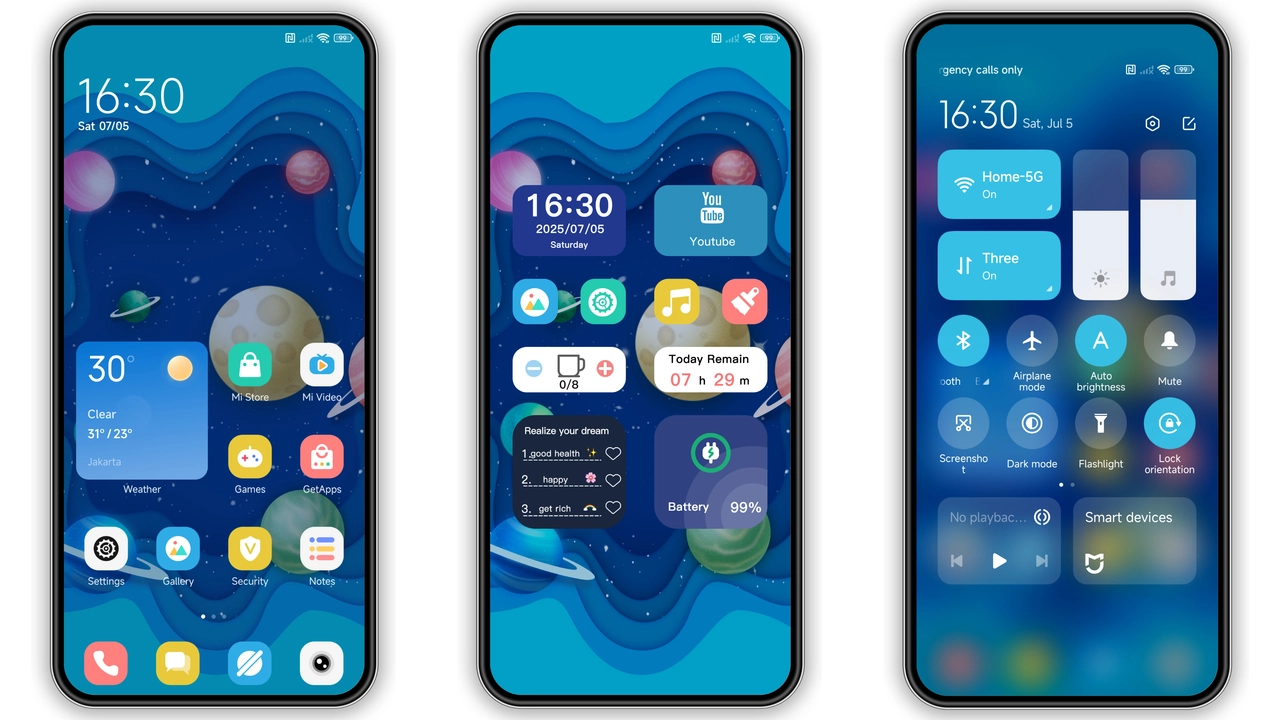
Theme drapes a midnight navy canvas across home screen. Background wallpaper shows a subtle nebula, speckled with twinkling points. Icons receive thin white outlines, matching the celestial palette. Status bar glows faint cyan, keeping readability while staying in mood. Lock screen animates shooting stars that streak across the dark horizon, adding motion without draining battery. Always‑on display mirrors the same hue, showing time in clean sans‑serif font. Navigation bar adopts the same deep shade, creating seamless edge‑to‑edge look.
Suggested Read: Trending OX F3 V2 HyperOS Theme – Fresh Look for Xiaomi & Redmi
Who’ll Feel At Home
Night‑owl users, space enthusiasts, minimalist fans gravitate to this look. If you love dark mode but crave a bit of sparkle, this theme fits. Users who switch between MIUI 12‑14 or HyperOS will appreciate consistent design across versions. Fans of blue‑centric color schemes find the cool tone soothing for long scrolling sessions. The theme also suits POCO power users who want a fresh aesthetic without sacrificing clarity.
Installation Flow on HyperOS & MIUI
Download the MTZ file from the official theme page. Open Theme Store app, tap Import at bottom, locate the file, confirm import. After import, preview appears in My Themes. Select Apply. Device may prompt a quick restart; accept to ensure lock screen and AOD refresh correctly. On HyperOS, the same steps apply; the system treats the file as a standard MIUI theme package. No root required. If the Import button is hidden, switch to Files app, locate the MTZ, share to Theme Store, then proceed.
Pros and Cons
Pros
• Deep navy backdrop feels premium.
• Animated lock screen adds subtle dynamism.
• Icons redesign stays legible on all resolutions.
• Full compatibility with HyperOS, MIUI 12‑14.
• Small file size, quick download.
Cons
• Blue tint may not suit warm‑color lovers.
• AOD font size fixed, not adjustable.
• No built‑in dark‑mode toggle; must switch system theme.
• Requires manual import on some custom ROMs.
Theme Preview

Download Links
Use the buttons below to open the theme file and the supporting link.
Starry Galaxy Theme mtz File
Helpful links
More Theme Updates
For more curated HyperOS and MIUI theme updates, visit Hyper OS x MIUI .


