Parameter · Value
Designer · Shichuanghulian
Size · 20.75 MB
Format · MTZ
Compatibility · HyperOS / MIUI
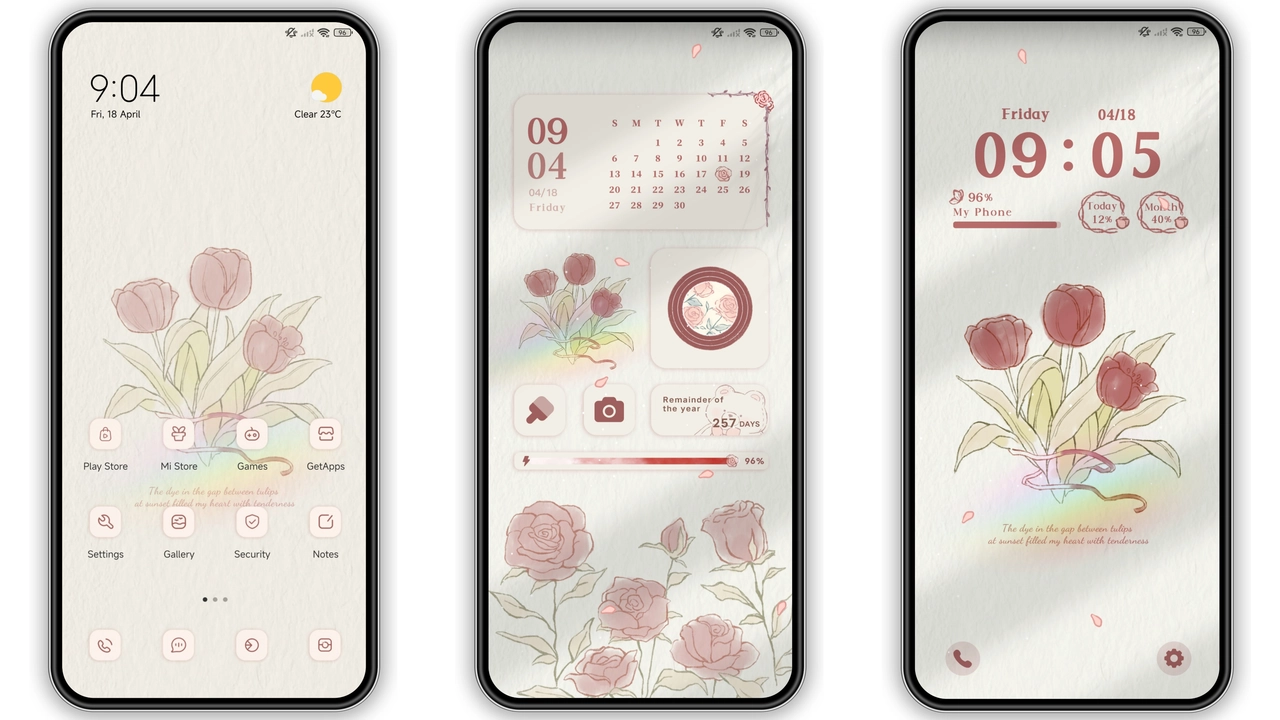
Rose Love arrives as a full‑body visual refresh for any Xiaomi, Redmi or POCO device running HyperOS or MIUI. The palette leans heavily on blush pinks, deep reds, and subtle white accents, while the icon set embraces a hand‑drawn flower motif. Every screen—from home to lock, notification bar to always‑on display—receives a coordinated treatment that feels both playful and refined. The theme’s name hints at romance, and the execution delivers a gentle, uplifting vibe without sacrificing readability or performance.
Blooming Pink UI with Floral Accents
The first thing you notice is the wallpaper rotation. Soft‑focused rose blossoms sit behind a faint gradient that shifts from sunrise pink to a cooler dusk mauve. Icons adopt a rounded, pastel style; primary apps like Phone, Messages, and Settings wear a light‑pink shell with a thin white outline, while third‑party icons keep their original shapes but inherit the theme’s color overlay. The status bar adopts a semi‑transparent pink hue, allowing the underlying wallpaper to peek through while maintaining legibility for time, battery, and network icons.
Lock‑screen animation deserves a mention. Swiping up triggers a smooth slide of a blooming rose petal that gradually reveals the home screen. The always‑on display mirrors this aesthetic with a minimalist clock set against a faint rose‑petal backdrop, ensuring that even idle moments look intentional.
Suggested Read: Sleek Dark Theme for Redmi Note 12 Pro – HyperOS Ready
Seamless Integration Across Xiaomi, Redmi, POCO
Compatibility is a core promise. The theme declares support for HyperOS and MIUI, and testing confirms that it works on flagship, mid‑range, and budget models alike. Whether you own a Xiaomi Mi 13, a Redmi Note series, or a POCO X5, the layout adapts to each screen resolution. System fonts stay untouched, preserving the native reading experience. Third‑party launchers such as Nova or Microsoft Launcher remain functional; the theme merely supplies resources that the native Theme Store can apply.
Because the theme is packaged as an MTZ file, the underlying OS handles resource injection without needing root access. This means you can switch back to the stock look in a single tap, and the process does not leave residual files or affect system stability.
Installation Walkthrough for Stock and Custom ROMs
1. Download the MTZ file from the official theme page. The file size is modest—just under 21 MB—so even a 4G connection finishes quickly.
2. Open the Theme Store app (pre‑installed on HyperOS/MIUI). Navigate to the “Import” option, usually found at the bottom of the Themes list.
3. Select the downloaded MTZ and confirm import. The store validates the package and displays a preview screen.
4. Apply the theme with a single tap. The OS will restart the UI layer; a brief black flash indicates the switch.
5. Reboot (optional). For custom ROMs or heavily modified builds, a manual reboot ensures that all overlay elements render correctly.
If you run a custom ROM that lacks the Theme Store, you can still import the MTZ via a third‑party theme manager that supports the format, or place the file in the /sdcard/MIUI/theme directory and trigger a manual scan from the settings menu.
Who Will Fall for Rose Love
• Fans of pastel aesthetics. Users who gravitate toward soft colors, floral motifs, or a “girly” vibe will find this theme immediately appealing.
• Creative professionals. Designers who appreciate a clean, cohesive visual language can use the theme as a low‑distraction backdrop for brainstorming.
• Casual smartphone users. The theme does not add heavy animations or large asset files, keeping battery impact minimal.
• Device‑hoppers. Because the theme works across Xiaomi’s ecosystem, owners of multiple devices can maintain a consistent look without hunting for separate packages.
Conversely, users who prefer stark dark modes or ultra‑minimalist icon packs may find the pink emphasis overwhelming. The theme does not replace system fonts, so those seeking a full typographic overhaul will need an additional font package.
Pros and Cons
• Pros
• Cohesive floral design across all UI layers.
• Low file size; minimal impact on storage and performance.
• Seamless compatibility with HyperOS, MIUI, and most custom ROMs.
• Easy import via native Theme Store; no root required.
• Pleasant lock‑screen animation adds personality without delay.
• Cons
• Pink‑heavy palette may not suit users preferring neutral tones.
• No custom font included; typography remains default.
• Third‑party icon packs receive only color overlay, not full redesign.
• Always‑on display uses a static image; no dynamic clock skins.
Overall, Rose Love delivers a polished, romantic makeover that feels native to Xiaomi’s software while standing out from the default stock look. Its modest size, straightforward installation, and broad device support make it a safe pick for anyone looking to freshen up their phone without diving into complex modding.
Theme Preview

Download Links
Use the buttons below to open the theme file and the supporting link.
Rose love Theme mtz File
Helpful links
More Theme Updates
For more curated HyperOS and MIUI theme updates, visit Hyper OS x MIUI .


