Parameter · Value
Designer · Rockan
Size · 6.38 MB
Format · MTZ
Compatibility · HyperOS / MIUI
A Cool, Clean Visual Refresh
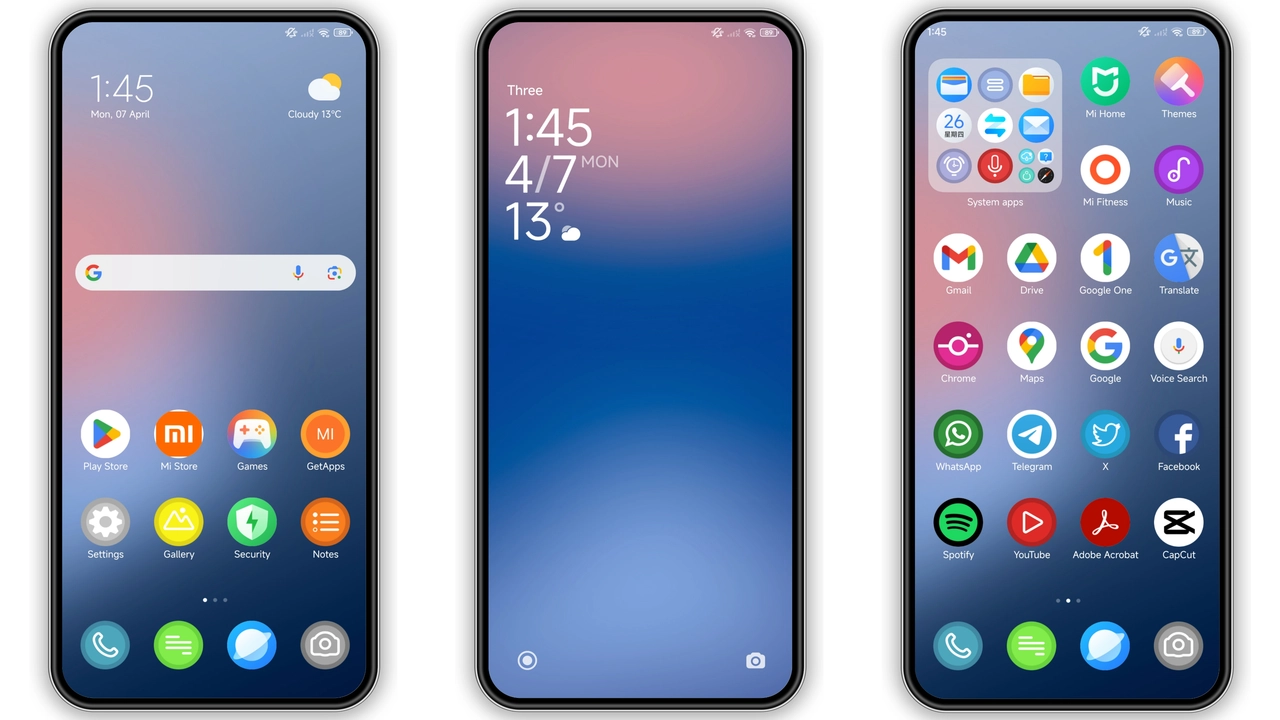
RCOLOR_UI drops a minimalist aesthetic onto HyperOS. Icons adopt a flat, blue‑tinted silhouette that feels both modern and familiar. The wallpaper set leans toward soft gradients, avoiding harsh contrasts while still giving the lock screen a pop. Status bar icons shrink slightly, creating more breathing room. The control center receives a subtle overlay, making toggles easier to spot in bright environments. Always‑on Display (AOD) adopts the same color scheme, turning time and notifications into a low‑key visual cue rather than a distraction.
Suggested Read: USDT HyperOS 3.0 Theme: Trending di Xiaomi, Redmi, dan Poco
Who’ll Love This Blue‑Tinted Palette
Fans of clean design gravitate toward RCOLOR_UI. If you prefer a UI that whispers rather than shouts, the theme fits. The blue accent works well for users who enjoy a cool tech vibe—think developers, gamers, or anyone who wants a subtle brand identity without neon overload. Redmi and POCO owners who feel their stock UI is too generic will appreciate the fresh icons and cohesive color story. The theme also suits users who switch between HyperOS and MIUI, as the visual language stays consistent across both platforms.
Installation Walkthrough & What to Expect
1. Open the Theme Store app on your device.
2. Tap the three‑dot menu, select Import.
3. Locate the RCOLOR_UI .mtz file you downloaded.
4. Confirm import, then apply.
5. Restart to clear any overlay glitches.
The process takes under a minute on most devices. After applying, you’ll notice the new icons instantly. The lock screen may need a quick swipe to refresh; the AOD will display the new clock style after the reboot. No system files are altered; the theme lives entirely within the Theme Store framework, making it safe to uninstall later.
Pros and Cons
• Pros
• Clean, cohesive icon set
• Low‑impact AOD design
• Small file size, fast download
• Works on HyperOS, MIUI, and POCO devices
• Cons
• Limited color variations (blue‑centric)
• No dark‑mode specific assets
• Requires manual restart for full effect
Overall, RCOLOR_UI delivers a polished, low‑key makeover without sacrificing performance. Its modest size and straightforward installation make it a solid choice for anyone looking to refresh their Xiaomi ecosystem.
Theme Preview

Download Links
Use the buttons below to open the theme file and the supporting link.
RCOLOR_UI Theme mtz File
Helpful links
More Theme Updates
For more curated HyperOS and MIUI theme updates, visit Hyper OS x MIUI .


