Parameter · Value
Designer · moscreen
Size · 15.85 MB
Format · MTZ
Compatibility · HyperOS / MIUI
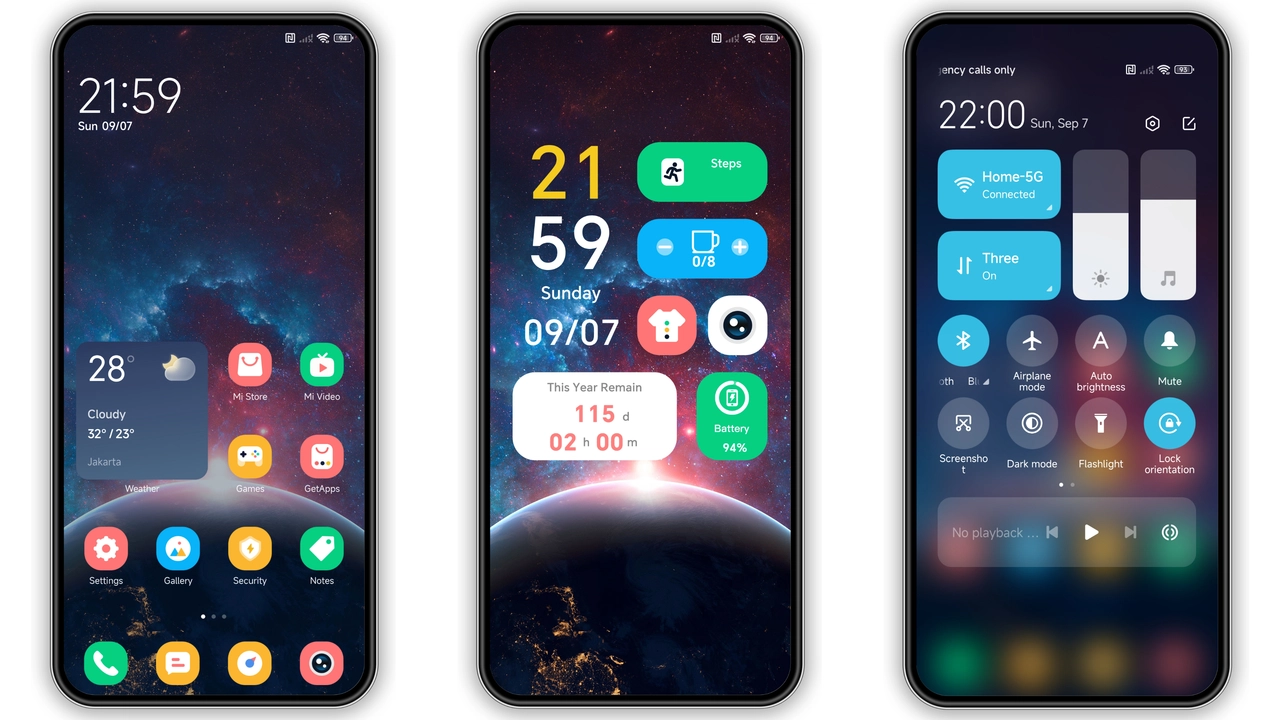
Galactic Color Palette and Icon Redesign
Prism Cosmos drops a burst of nebular hues across every UI element. Primary icons receive a glossy gradient that shifts from deep indigo at the corners to a bright teal core, echoing distant galaxies. Wallpapers feature high‑resolution space photography blended with subtle geometric overlays, giving the home screen a layered depth. The status bar adopts a translucent midnight shade, allowing the underlying wallpaper to peek through while keeping icons legible. Even the notification icons adopt the same gradient logic, creating a cohesive visual language that never feels disjointed.
Suggested Read: Trending: Fresh Light Blue Journal Theme for HyperOS & MIUI
Dynamic Lock Screen & Always‑On Display
The lock screen isn’t just a static image; it animates a slow‑moving starfield that reacts to swipe gestures. Unlock animation slides a comet‑like trail across the screen, reinforcing the cosmic theme. The Always‑On Display (AOD) mirrors this aesthetic, showing time and date in a sleek sans‑serif typeface that glows faintly, reminiscent of distant constellations. Battery and network indicators retain their original shapes but adopt the theme’s teal‑indigo gradient, ensuring readability in low‑light conditions.
Who’ll Love This Cosmic Vibe
• Xiaomi power users who enjoy tweaking UI without breaking system stability. The theme stays within the official MIUI framework, so no root access is required.
• Redmi and POCO owners looking for a fresh visual overhaul that differentiates their device from the stock look.
• Fans of sci‑fi aesthetics who prefer bold color shifts over minimalist palettes.
• Users of HyperOS who want a theme that bridges the gap between MIUI’s legacy design and the newer HyperOS visual language.
Installation Guide & Performance Expectations
1. Open the Theme Store app on your device.
2. Search for “Prism Cosmos” or locate it in the “Community” section.
3. Tap Download – the MTZ file (15.85 MB) saves to internal storage.
4. After download, the store prompts Apply; confirm.
5. Restart the phone to let the system re‑index assets.
The theme installs entirely via MIUI’s native theme engine, meaning no extra permissions or third‑party launchers are needed. Post‑install, most users report a negligible impact on RAM usage; the theme’s assets are optimized for quick loading. Battery drain remains comparable to stock, as the AOD animation is low‑frequency and respects the system’s power‑saving policies.
Compatibility Notes
• Works on MIUI 12, 13 and 14 as well as HyperOS‑based builds.
• Supported devices: Xiaomi, Redmi and POCO models that run the above MIUI versions.
• Custom ROMs that retain the original theme framework (e.g., Xiaomi EU, MIUIRoom) also accept the MTZ file.
• If the Theme Store fails to fetch the file, switch to a Chromium‑based browser, navigate to the theme page, and use the “Open in app” option.
Pros and Cons
Pros
• Cohesive color scheme that ties icons, wallpapers and system bars together.
• Dynamic lock screen adds a subtle wow factor without draining battery.
• Fully compatible with both MIUI and HyperOS, covering a wide device range.
• Small file size; quick download and install.
• No root required; safe for stock ROM users.
Cons
• Bright gradients may feel overwhelming for users who prefer muted tones.
• AOD animation, while light, could be disabled on ultra‑low‑power modes.
• Some third‑party launchers may not fully respect the theme’s icon pack.
• Limited customization beyond the preset palette; users cannot tweak individual colors.
Theme Preview

Download Links
Use the buttons below to open the theme file and the supporting link.
Prism Cosmos Theme mtz File
Helpful links
More Theme Updates
For more curated HyperOS and MIUI theme updates, visit Hyper OS x MIUI .


