Parameter · Value
Designer · 双笙猫
Size · 73.35 MB
Format · MTZ
Compatibility · HyperOS / MIUI
Ever scrolled through your Xiaomi or Redmi phone and wished it had a touch more of that slick, premium iOS vibe? You know the one – clean lines, intuitive layouts, and an overall polished feel that just screams 'high-end.' Well, good news for all you HyperOS and MIUI enthusiasts! There's a theme making waves that promises to bring exactly that Apple-esque elegance to your Android device: the 26 OS HyperOS theme.
This isn't just another dark mode or icon pack. The 26 OS theme aims for a comprehensive overhaul, transforming your phone's interface from top to bottom. It's designed to personalize your device, making it stand out from the crowd with a distinct, sophisticated appearance. If you're tired of the default look and crave something fresh, modern, and distinctly iOS-inspired, keep reading. This theme might just be the digital refresh your phone needs.
First Impressions: A Polished iOS-Inspired Canvas
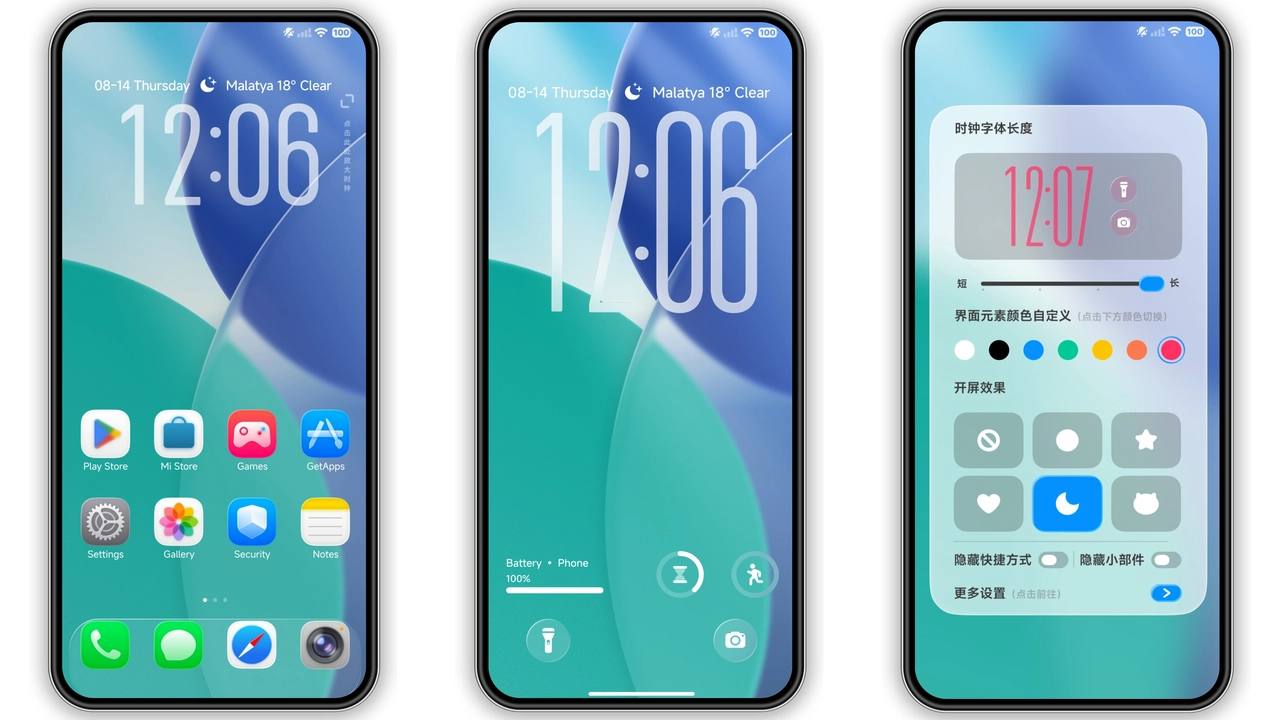
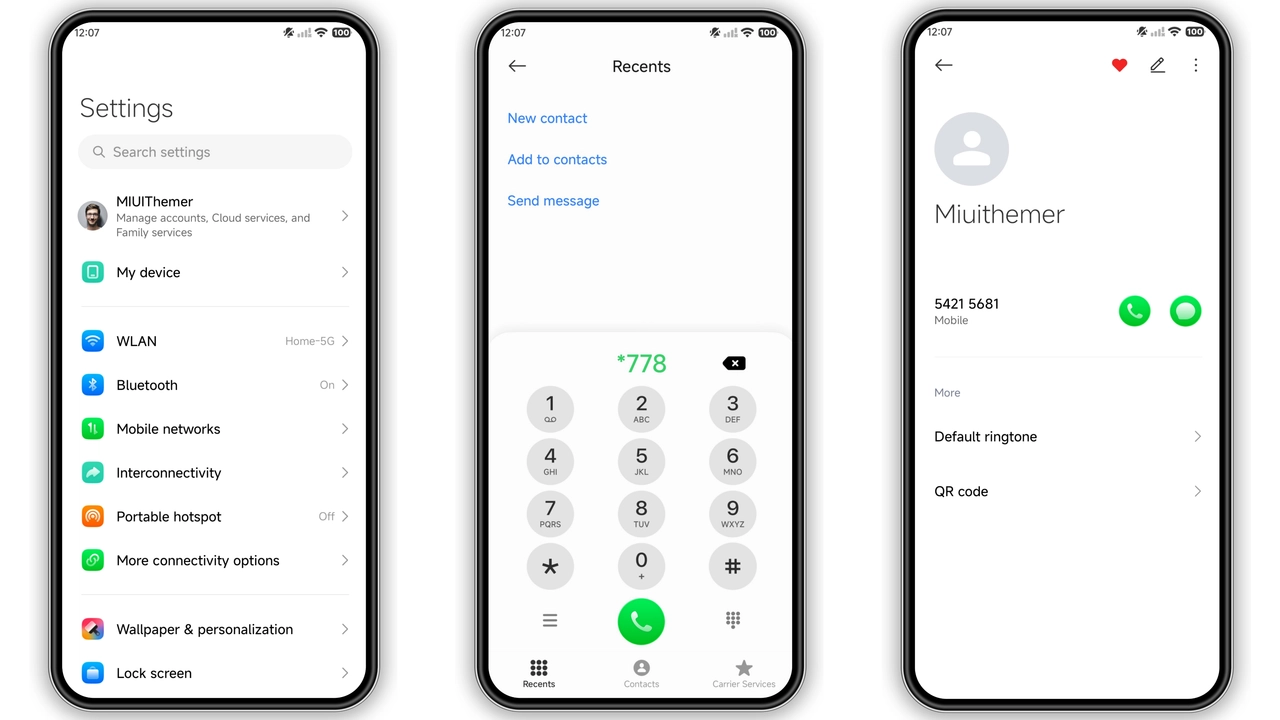
Right from the moment you apply it, the 26 OS theme makes its intentions clear: it wants to give you a taste of Apple's design philosophy. The most immediate change you'll notice is the icon set. Gone are the varied shapes and styles of MIUI's stock icons; in their place, you'll find a unified collection of well-designed, minimalist icons that closely mimic the aesthetic of iOS apps. Each icon feels thoughtfully crafted, with a consistent visual language that contributes to the overall premium feel. This attention to detail on the icons alone can significantly elevate your home screen's appeal.
Beyond the icons, the theme introduces a set of fresh, vibrant wallpapers that complement the clean design. These aren't just generic backgrounds; they're curated to enhance the iOS-like ambiance, often featuring subtle gradients or abstract patterns that feel right at home on an iPhone. The status bar also gets a makeover, adopting a cleaner, more streamlined look that prioritizes essential information without clutter. This consistent visual treatment across fundamental UI elements ensures that the iOS inspiration isn't just skin-deep but permeates the entire user experience, creating a cohesive and immersive visual environment.
Suggested Read: anime space HyperOS Theme for Xiaomi and Redmi Phones
Beyond the Surface: The Lock Screen & AOD Experience
Where the 26 OS theme truly shines for many users is in its lock screen and Always-on Display (AOD) implementations. The lock screen is often the first thing you see, and this theme delivers a cool, dynamic experience. Expect a layout that feels instantly familiar to iPhone users, with a clear clock, notification display, and quick access shortcuts that are both functional and aesthetically pleasing. The typography choices here are particularly effective, contributing to the sophisticated vibe.
But it doesn't stop there. The theme also includes a stylish Always-on Display, ensuring that even when your screen is off, you're greeted with an elegant, minimalist view of time and essential notifications. This AOD isn't just a static element; it's designed to be visually engaging and complement the overall theme, providing a seamless transition from off-screen to lock screen. The combination of a thoughtful lock screen and a sleek AOD means your phone consistently presents a premium, iOS-like facade, enhancing both form and function.
Who's This Theme For? Compatibility & Aesthetic Appeal
This theme caters specifically to Xiaomi, Redmi, and POCO users running either HyperOS or MIUI. If your device supports either of these operating systems, you're in luck. The designer, 双笙猫, has engineered 26 OS to be widely compatible, ensuring that a broad range of devices can benefit from its transformative power. Whether you're on the latest HyperOS build or an earlier MIUI version, the theme aims to deliver a consistent and polished experience.
But beyond technical compatibility, who truly benefits from this theme? It's for those who appreciate the clean, minimalist aesthetic of Apple's iOS but prefer the flexibility and hardware of a Xiaomi device. It's for users who find the stock MIUI or HyperOS interfaces a bit too busy or who simply crave a change of pace. If you're looking to impress, or just want to enjoy a more refined and visually appealing daily interaction with your smartphone, the 26 OS theme is definitely worth exploring. It's a fantastic way to personalize your phone without delving into complex custom ROMs or launchers, offering a premium feel with minimal effort.
Getting It On Your Device: Installation Guide & Tips
Applying the 26 OS theme is straightforward, but the method depends on your device's software. Here's how to get this iOS-inspired look on your phone:
For HyperOS or MIUI Global Stable ROM (Stock ROMs):
1. Browser Choice: Open this page using Firefox, Chrome, or your default Xiaomi Browser. Other browsers might not properly handle the theme store link.
2. Official Theme Store Link: Locate and tap the provided official theme store link. This will direct you to a Xiaomi theme page, likely in Chinese.
3. Open in App: Look for a '3 dots' menu (usually in the top right corner of your browser) and select the 'Open in app' option. This action should launch the native Theme Store application.
4. Download & Apply: Within the Theme Store app, you can now download and apply the 26 OS theme directly.
For MIUI, HyperOS-based Custom ROMs (e.g., Xiaomi.EU ROM, MIUIRoom):
1. Download MTZ File: Download the 26 OS theme MTZ file from the provided download links.
2. Open Theme Store: Launch your device's Theme Store application.
3. Import Theme: Navigate to the 'Themes' option, swipe down, and tap on 'Import'.
4. Select MTZ: Browse and select the downloaded 26 OS Theme mtz File.
5. Apply: Once imported, apply the theme from your local themes list.
Important Note for All Users:
After applying the theme, it's highly recommended to restart your device. This helps ensure all theme elements load correctly and prevents any visual overlaps or inconsistencies that might occur, guaranteeing a smooth and complete transformation of your UI. The theme has been tested and generally works without issues, but a quick reboot solidifies the application.
Pros and Cons of the 26 OS HyperOS Theme
Pros:
• Premium iOS Aesthetic: Delivers a clean, polished, and modern iPhone-like interface.
• Comprehensive Redesign: Transforms icons, wallpapers, status bar, lock screen, and Always-on Display.
• Unified Visuals: Offers a consistent design language across key UI elements.
• Enhanced User Experience: Makes daily interaction feel more sophisticated and visually appealing.
• Free to Use: Completely free, offering a premium look without cost.
• Wide Compatibility: Works across various Xiaomi, Redmi, and POCO devices running HyperOS or MIUI.
Cons:
• Preference-Specific: The iOS aesthetic might not appeal to everyone; some prefer Android's native look.
• File Size: At 73.35 MB, it's a moderately sized theme, requiring a decent download.
• Installation Nuances: Stock ROM users need to navigate the 'Open in app' browser trick.
In essence, the 26 OS HyperOS theme offers a compelling package for anyone looking to infuse their Xiaomi, Redmi, or POCO device with the unmistakable elegance of iOS. It's a testament to the power of themes to truly personalize and refresh your smartphone experience. If you're ready for a change that feels both familiar and refreshingly new, give 26 OS a spin. Your phone might just thank you for it.
Theme Preview

Download Links
Use the buttons below to open the theme file and the supporting link.
26 OS Theme mtz File
26 OS Theme Backup File
Helpful links
More Theme Updates
For more curated HyperOS and MIUI theme updates, visit Hyper OS x MIUI .


