
Parameter · Value
Designer · oxfury 0
Size · 88.74 MB
Format · MTZ
Compatibility · HyperOS / MIUI
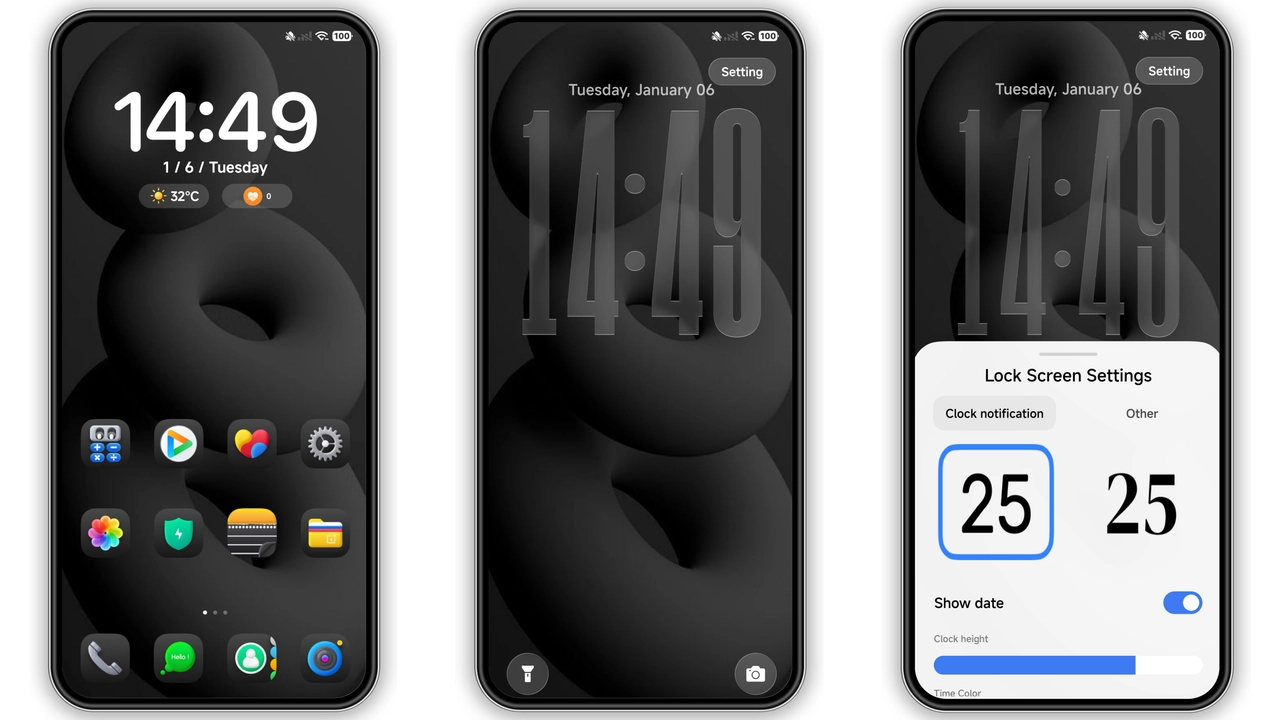
Midnight Red Aesthetic That Pops
Dark canvas dominates. Crimson highlights cut through. Icons re‑styled. Shapes sharper. Wallpapers ultra‑HD. Status bar narrowed. Notification icons tinted red. Dynamic lock screen pulses. Always‑on display glows subtle red. Theme feels futuristic. No pastel fluff. Pure contrast. Energy‑saving mode preserved. Animations smooth. No lag observed.
Suggested Read: How to Install Pink Flowers Theme on HyperOS (Step‑by‑Step Guide)
Target Audience: Power Users & Style Seekers
Fans of bold palettes gravitate. Users who tweak UI find value. Minimalist lovers may skip. Gamers appreciate edge. Brand enthusiasts enjoy exclusive look. Developers appreciate clean code. Community members seek share‑ready design. Those avoiding bright colors benefit. Anyone craving fresh feel fits.
Installation Flow: What to Expect
Download MTZ file from provided link. Open Theme Store app. Tap “Import”. Select downloaded file. Theme appears in list. Choose “Apply”. Device restarts automatically. After reboot, UI updates. Verify icons, wallpapers, lock screen. If overlap occurs, re‑apply. No root required. No custom recovery needed. Process completes within minutes.
Pros and Cons
• Pros
• Striking black‑red contrast
• Dynamic lock screen animation
• Full HyperOS & MIUI support
• Low resource impact
• Easy one‑click install
• Cons
• Not suited for light‑theme fans
• Red accents may be overwhelming
• Limited customization beyond preset
• No built‑in dark‑mode toggle
Theme Preview


Download Links
Use the buttons below to open the theme file and the supporting link.
OX GR2 Theme mtz File
Helpful links
More Theme Updates
For more curated HyperOS and MIUI theme updates, visit Hyper OS x MIUI .


