Theme Metadata
Parameter · Value
Designer · Inzhadie
Size · 32.55 MB
Format · .mtz
Compatibility · HyperOS, MIUI 12‑14
Neon‑Lit Lock Screen That Pops
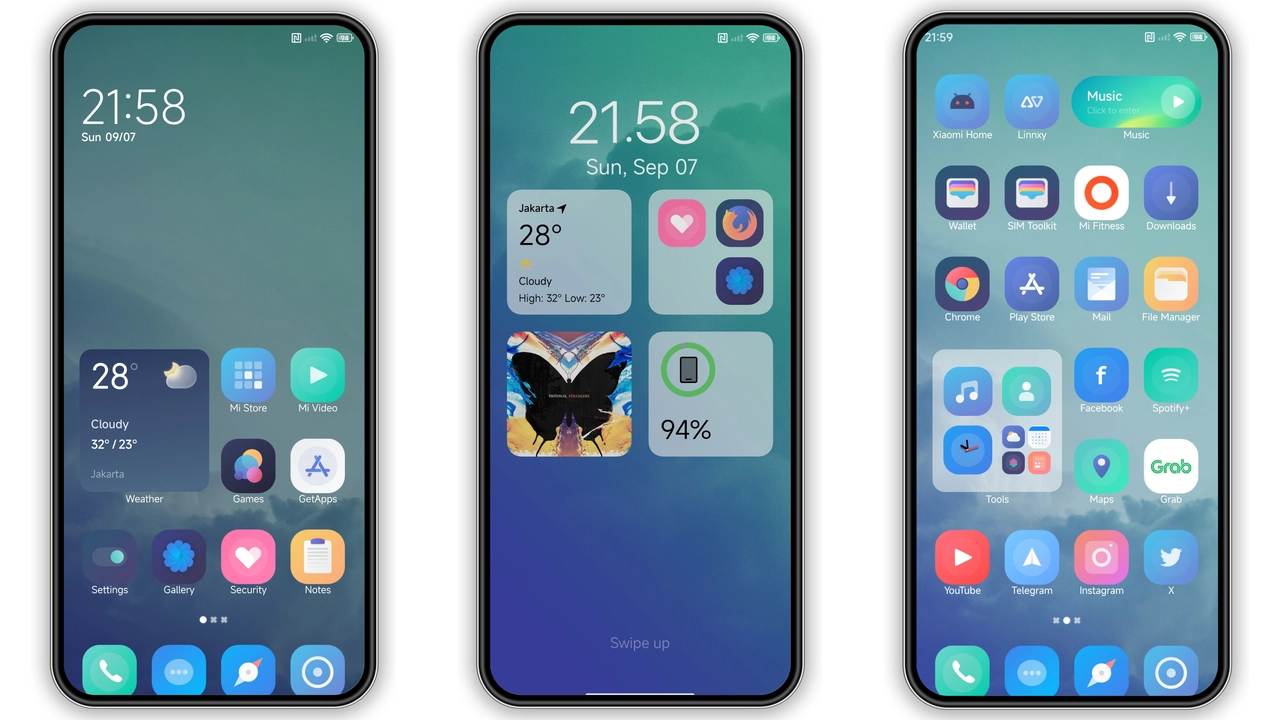
Lock screen glows with shifting neon gradients. Dark background amplifies contrast. Motion‑responsive elements add life. Battery indicator adopts subtle pulse.
Suggested Read: Trending Sea‑Inspired MTZ Theme for HyperOS & MIUI – Fresh Look
Fresh Icon Set With Bold Contrasts
Icons rebuilt in flat neon outlines. Primary colors—electric blue, vivid magenta—stand out against muted panels. App folders inherit same palette, keeping UI cohesive.
Always‑On Display Redefined
AOD adopts low‑power neon accents. Time, date, notifications rendered in crisp neon strokes. Ambient mode respects battery saver, dimming after inactivity.
Subtle Color Tweaks Across UI
Status bar, quick settings tinted with theme’s accent hue. Navigation bar shadows softened for smoother flow. Wallpapers curated to match neon palette.
Pros and Cons
• Pros
• Striking neon aesthetic
• Consistent visual language across system
• Wide MIUI version support
• Lightweight MTZ package
• Cons
• Neon may be too bright for low‑light environments
• Limited customization beyond default palette
• Some icons retain original colors, breaking uniformity
Installation Notes Download MTZ file. Open Theme Store → Import → select file. Apply, then reboot for full effect. Works on Xiaomi, Redmi, POCO devices running HyperOS or MIUI 12‑14.
Theme Preview

Download Links
Use the buttons below to open the theme file and the supporting link.
Neuropass 2.0 Theme mtz File
Helpful links
More Theme Updates
For more curated HyperOS and MIUI theme updates, visit Hyper OS x MIUI .


