Parameter · Value
Designer · Kartalbey
Size · 24.08 MB
Format · MTZ
Compatibility · HyperOS / MIUI (Xiaomi, Redmi, POCO)
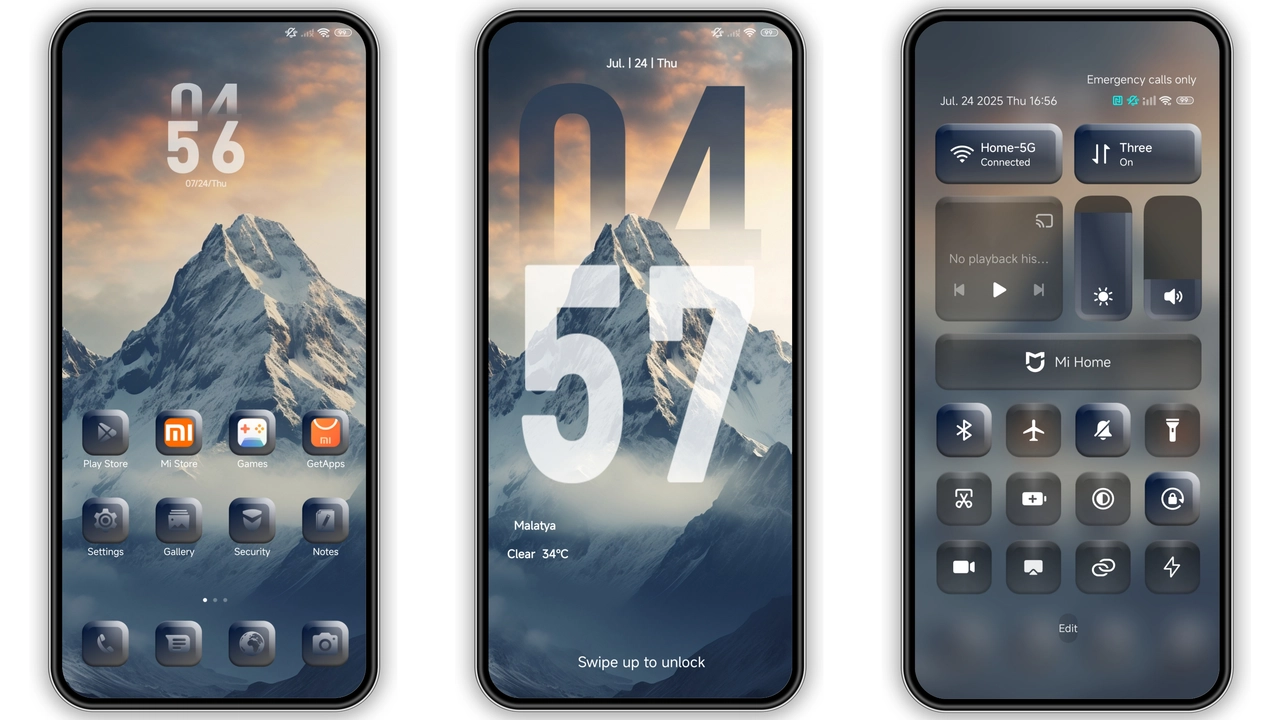
Gray‑Toned Icon Pack That Marries Minimalism and Depth
The first thing you notice is the icon set. All icons adopt a muted gray palette, stripping away the usual glossy finish. This isn’t a bland downgrade; each glyph retains subtle shadows that give a sense of depth without shouting for attention. The result feels like a calm, high‑contrast version of the stock UI—perfect for users who spend hours scrolling and want visual fatigue reduced. The icons also follow a consistent silhouette language, so third‑party apps blend in rather than sticking out like a sore thumb.
Suggested Read: HyperOS MTZ Theme for Redmi Note – Bold Look, Quick Setup
Dynamic Lock Screen That Reacts to Time & Weather
Mountain’s lock screen isn’t static wallpaper. It cycles through a series of mountain‑inspired landscapes that shift with the time of day. Dawn brings soft pastel hues, midday brightens the peaks, and night drapes them in deep blues. Weather integration adds a thin overlay—rainy days sprinkle a gentle mist, while clear skies keep the view crisp. The animation is smooth, and the battery impact is negligible thanks to HyperOS’s optimized rendering pipeline.
Always‑On Display That Keeps Essentials in View
The AOD design mirrors the lock screen’s aesthetic. Minimalist time display sits in the center, flanked by battery percentage and notification icons that inherit the gray icon style. No intrusive widgets, just the basics. The theme respects privacy: incoming messages appear as discreet silhouettes until you unlock, preventing shoulder‑surfing. Users who love to glance at the time without waking the phone will appreciate this understated approach.
Installation Flow: From Download to Live Preview
1. Download the MTZ file from the official link.
2. Open the Theme Store app (pre‑installed on HyperOS/MIUI).
3. Tap the three‑dot menu → Import → select the MTZ file.
4. Apply the theme. A quick reboot ensures all overlays render correctly.
The process is identical on Xiaomi, Redmi, and POCO models, provided they run the HyperOS or a compatible MIUI version. No root or custom recovery needed. If the import button is missing, switch to the default Xiaomi browser; some third‑party browsers hide the import option.
Who Should Try This Theme?
• Users craving a muted, professional look without sacrificing visual clarity.
• Fans of nature‑inspired wallpapers who want the scenery to change throughout the day.
• Anyone looking to reduce eye strain during night‑time scrolling.
• Device owners who prefer a cohesive feel across system apps and third‑party launchers.
Pros and Cons
• Pros
• Consistent gray icon set reduces visual clutter.
• Dynamic lock screen adds personality without battery drain.
• Seamless AOD that respects privacy.
• Easy install via built‑in Theme Store.
• Works on Xiaomi, Redmi, POCO devices.
• Cons
• Gray palette may feel too subdued for users who love vibrant colors.
• Limited customization; you cannot tweak individual icons without third‑party packs.
• AOD lacks widget support; only basic info displayed.
Overall, Mountain delivers a polished, nature‑infused experience that feels right at home on HyperOS devices. Its restraint is its strength—by focusing on a few well‑executed visual tweaks, it avoids the bloat that many theme packs bring.
Theme Preview

Download Links
Use the buttons below to open the theme file and the supporting link.
Mountain Theme mtz File
Helpful links
More Theme Updates
For more curated HyperOS and MIUI theme updates, visit Hyper OS x MIUI .


