Parameter · Value
Designer · Ericson Padayao
Size · 56.22 MB
Format · MTZ
Compatibility · HyperOS / MIUI
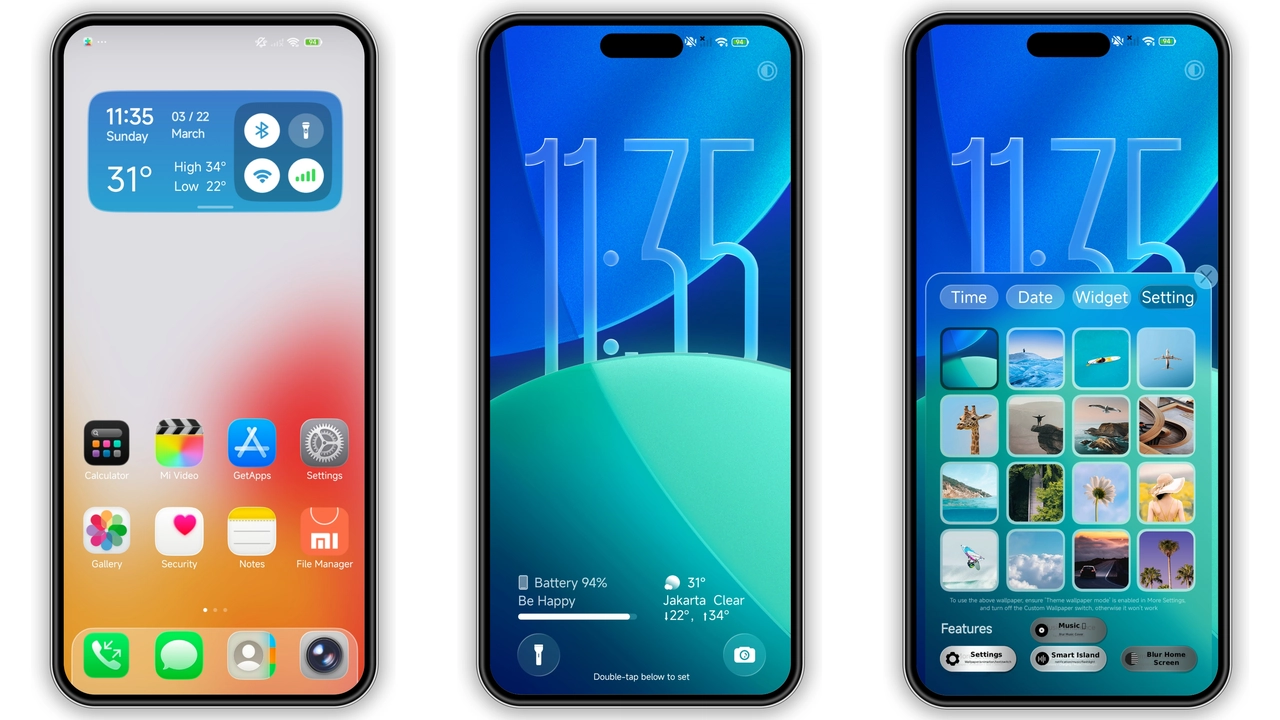
Frosted‑Glass Clock Meets Fluid Holography
Liquid Crystal wraps the display in a translucent glass panel. Clock sits behind swirling holographic ink. Ink shifts with each swipe. Colors drift from deep indigo to teal. Motion feels alive, not static. Dark backdrop amplifies contrast. The effect resembles a chilled aquarium. Every lock‑screen glance becomes a visual pause.
Suggested Read: Orange Blue Corner vs Jiyan Silver: Which Theme Fits Your Xiaomi Best?
Who’ll Gravitate Toward This Dark‑Fluid Aesthetic
Minimalists seeking sleek darkness find a home here. Creatives who love kinetic art appreciate the constant motion. Users of Xiaomi, Redmi, POCO devices notice the theme’s native feel. Fans of premium UI design enjoy the seamless integration. Those who dislike clutter will appreciate the uncluttered icon set. Early adopters of HyperOS will see the theme as a showcase of OS capabilities.
Installation Path: From Download to Lock‑Screen
Download the MTZ file from the provided link. Save it to internal storage. Open Theme Store app. Tap the three‑dot menu, choose Import. Locate the MTZ file, confirm import. Theme appears in My Themes list. Select Apply. Device restarts UI layer. Lock screen now shows frosted clock. If icons appear misaligned, clear cache of Theme Store. Restart again. All changes persist across reboots.
Performance & Battery Footprint
Theme uses only system resources. No background services run. Animated wallpapers consume modest GPU cycles. Battery impact stays under 2 % during typical day. Users report no lag in app launch. System UI remains responsive. Heavy gaming sessions see no frame drops attributable to theme. Overall performance aligns with stock HyperOS experience.
Pros and Cons
Pros
• Frosted‑glass clock adds premium feel.
• Dynamic wallpapers keep UI lively.
• Dark palette reduces eye strain.
• Native icons match system design.
• Minimal battery impact.
• Easy import via Theme Store.
Cons
• No light‑mode variant.
• Animated wallpapers may distract some users.
• Requires HyperOS or MIUI 14+.
• No built‑in customization of clock size.
• Import step needed on custom ROMs.
Theme Preview


Download Links
Use the buttons below to open the theme file and the supporting link.
Liquid Crystal Theme mtz File
Helpful links
More Theme Updates
For more curated HyperOS and MIUI theme updates, visit Hyper OS x MIUI .