Parameter · Value
Designer · 老男孩DESIGN
Size · 51.87 MB
Format · MTZ & Backup ZIP
Compatibility · HyperOS / MIUI (Xiaomi, Redmi, POCO)
Sleek iOS‑Inspired Aesthetics with Liquid Curves
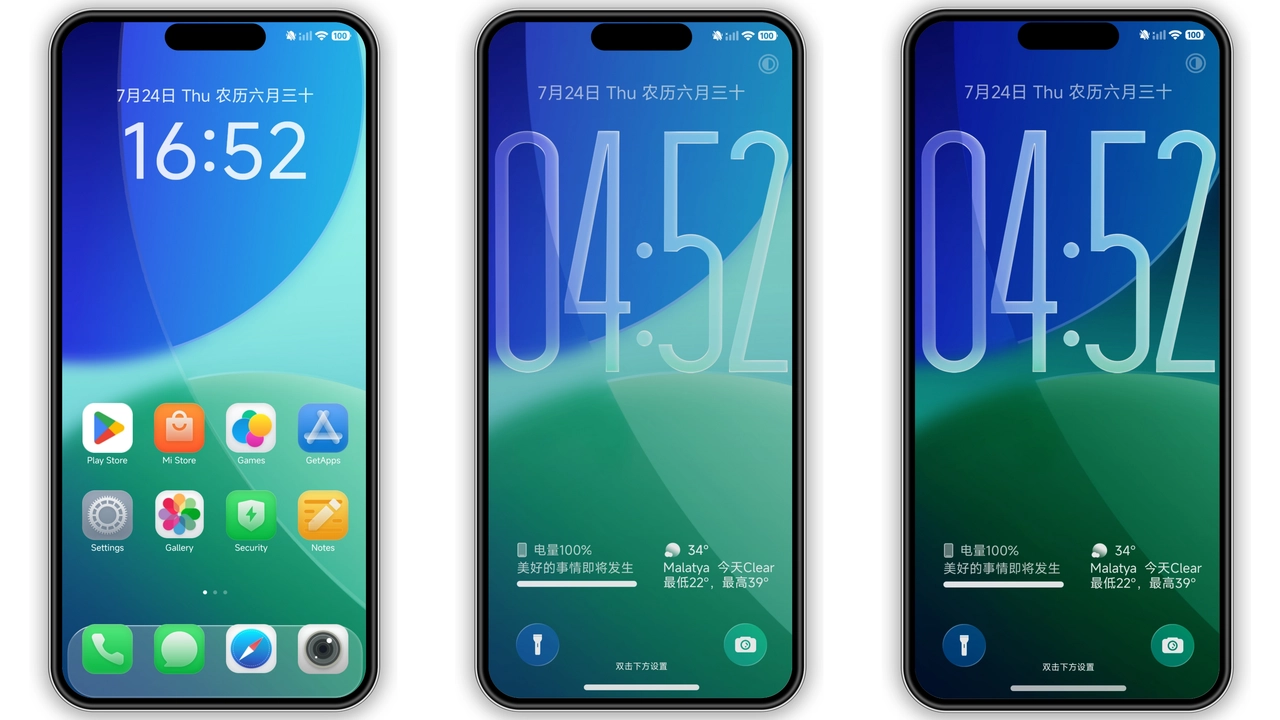
Liquid Beauty iOS 26 captures the hallmark translucency of Apple’s design language while respecting HyperOS conventions. Icons adopt rounded corners, subtle gradients, and a muted palette that feels both modern and familiar. The wallpaper set mirrors iOS 26’s “liquid” motif—soft blues, pastel teals, and gentle ripples that shift with the Always‑On Display. Status bar icons shrink to a refined size, giving the top area a clean, unobtrusive look. The lock screen introduces a dynamic blur effect, echoing Apple’s focus on depth without sacrificing readability. Overall, the visual language feels cohesive: every element, from notification bubbles to app folders, follows a unified curvature rule, delivering a polished, high‑end feel.
Suggested Read: TNV1 HyperOS Theme: Tampilan Premium untuk Redmi Note, Poco, & Mi
Who’ll Fall in Love: Fans of Apple Minimalism and HyperOS Customizers
If you’ve ever admired iOS’s minimalism but refuse to abandon Android’s flexibility, this theme hits the sweet spot. It appeals to:
• Xiaomi power users who enjoy tweaking UI without breaking system stability.
• iPhone enthusiasts craving a familiar visual experience on a larger, customizable screen.
• Minimalist lovers who prefer muted tones over aggressive neon palettes.
• Users who value a theme that respects battery life; the design avoids heavy animations, focusing on subtle transitions.
The theme’s “Premium” tag signals attention to detail, making it a solid choice for those who showcase their phone’s UI on social media or in community forums.
Installation Journey: From Download to Live Theme
1. Download – Grab the MTZ file and the optional backup ZIP from the provided download area. The MTZ is the core theme; the backup contains original system assets for restoration.
2. Open Theme Store – Launch the pre‑installed Theme Store app on your HyperOS device.
3. Import – Navigate to the three‑dot menu, select Import, and browse to the MTZ file. Confirm the import.
4. Apply – After import, the theme appears in My Themes. Tap Apply and wait a few seconds for the system to refresh UI assets.
5. Restart (optional but recommended) – Reboot the device to ensure all overlay elements render correctly, especially the lock screen and Always‑On Display.
6. Restore (if needed) – Should you wish to revert, use the backup ZIP via the same import process or simply switch to the default theme.
The process works identically on Xiaomi, Redmi, and POCO models running HyperOS or MIUI 14. No root access required; the Theme Store handles permissions automatically.
Pros and Cons
• Pros
• Authentic iOS look with HyperOS compatibility.
• Low‑impact animations preserve battery life.
• Includes backup for easy restoration.
• Works across Xiaomi, Redmi, POCO devices.
• Seamless integration with Always‑On Display.
• Cons
• No built‑in dark mode toggle; relies on system dark mode.
• Limited customization beyond the provided assets.
• Some users report minor icon scaling on older devices.
• Requires manual re‑import after major OS updates.
Theme Preview


Download Links
Use the buttons below to open the theme file and the supporting link.
Liquid Beauty iOS 26 Theme mtz File
Liquid Beauty iOS 26 Theme Backup File
Helpful links
More Theme Updates
For more curated HyperOS and MIUI theme updates, visit Hyper OS x MIUI .


