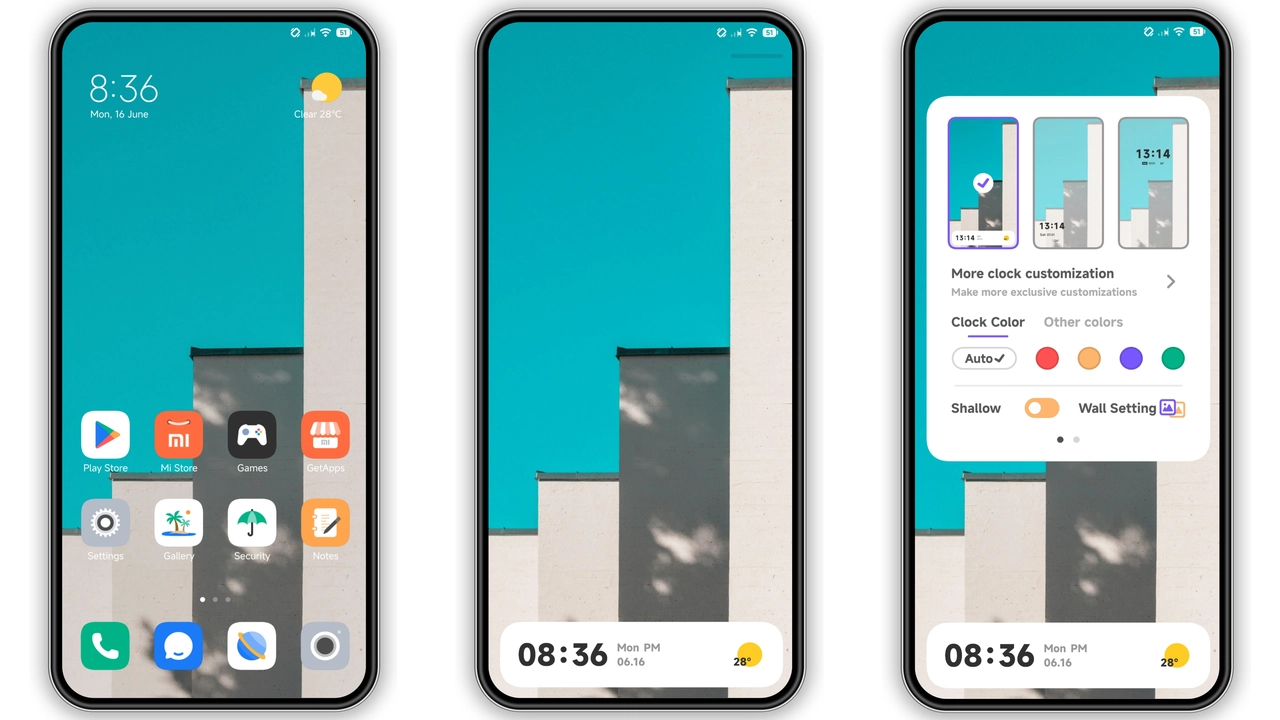
Parameter · Value
Designer · Md New world
Size · 19.37 MB
Format · MTZ
Compatibility · HyperOS / MIUI
Bold Dark Palette with Subtle Neon Accents
The JRUI theme embraces a deep, almost‑black canvas that immediately reduces eye strain on bright days. Neon‑tinted highlights—think electric teal on notification dots and soft magenta on quick‑settings toggles—break the monotony without shouting. The contrast is calibrated so that text remains crisp, while the background absorbs excess light. This balance works especially well on AMOLED panels, where true blacks translate to genuine power savings.
Suggested Read: Endhunts HyperOS Theme Review: Fresh Look for Xiaomi & Redmi
Revamped Icon Set Gives Apps New Personality
Every core app icon receives a fresh silhouette. Google apps keep their recognisable glyphs but adopt a rounded‑square frame that matches Xiaomi’s UI language. Third‑party icons, such as WhatsApp and Spotify, are re‑drawn in a minimalist style: flat colors, subtle gradients, and a uniform corner radius. The result feels cohesive, as if the whole OS were curated by a single design team rather than a patchwork of individual developers.
Dynamic Lock Screen & Always‑On Display Enhancements
Lock‑screen widgets are the star of this update. A rotating wallpaper carousel showcases high‑resolution artwork that changes based on the time of day. The clock adopts a sleek sans‑serif typeface with a faint glow that mirrors the neon accents used elsewhere. Always‑On Display (AOD) inherits the same font and color scheme, ensuring continuity even when the phone is idle. Battery‑saving mode dims the AOD to a low‑contrast gray, preserving the theme’s aesthetic while extending runtime.
Installation Walkthrough & Performance Expectations
1. Open the official Theme Store app on your device.
2. Locate the JRUI theme entry—search by “JRUI”.
3. Tap Download; the store will fetch the MTZ package (19.37 MB).
4. After download, press Apply. The system will prompt a brief restart to finalize asset loading.
5. Upon reboot, verify that the new icons, lock‑screen widgets, and AOD appear as described.
The installation process is straightforward and mirrors the standard MIUI/HyperOS theme workflow. Because the package size is modest, download time is negligible on 4G/5G networks. Users report no noticeable lag in UI responsiveness; animations remain buttery smooth, and memory consumption stays within normal limits for a theme of this scope.
Who Will Love This Theme?
• Power users who enjoy a dark UI but dislike the flatness of stock dark mode. The neon accents provide visual interest without overwhelming the eye.
• Fans of consistency who appreciate a unified icon language across both native and third‑party apps.
• Night‑time readers who benefit from true‑black backgrounds on AMOLED screens, extending battery life while reducing glare.
• Creative types who like to showcase dynamic lock‑screen art and enjoy the occasional splash of color.
Conversely, users who prefer a light theme or heavily customized icon packs may find the neon accents too pronounced. The theme also assumes a relatively recent device; older hardware with limited GPU capability might experience a minor dip in frame rates during lock‑screen animations.
Pros and Cons
• Pros
• Cohesive dark aesthetic with eye‑catching neon accents.
• Fresh, uniform icon set that covers most popular apps.
• Dynamic lock‑screen and AOD that enhance personalization.
• Lightweight package, fast download, minimal performance impact.
• Easy installation via the native Theme Store.
• Cons
• Neon highlights may be too vivid for ultra‑minimalist users.
• Light‑mode support is limited; theme defaults to dark only.
• Some niche third‑party apps retain their original icons.
• Requires HyperOS or MIUI; custom ROMs need manual MTZ import.
Theme Preview

Download Links
Use the buttons below to open the theme file and the supporting link.
JRUI Theme mtz File
Helpful links
More Theme Updates
For more curated HyperOS and MIUI theme updates, visit Hyper OS x MIUI .


