Parameter · Value
Designer · 逐梦画师
Size · 38.64 MB
Format · MTZ, Backup ZIP
Compatibility · HyperOS, HyperOS 2.0, MIUI 11‑14, Xiaomi/Redmi/POCO
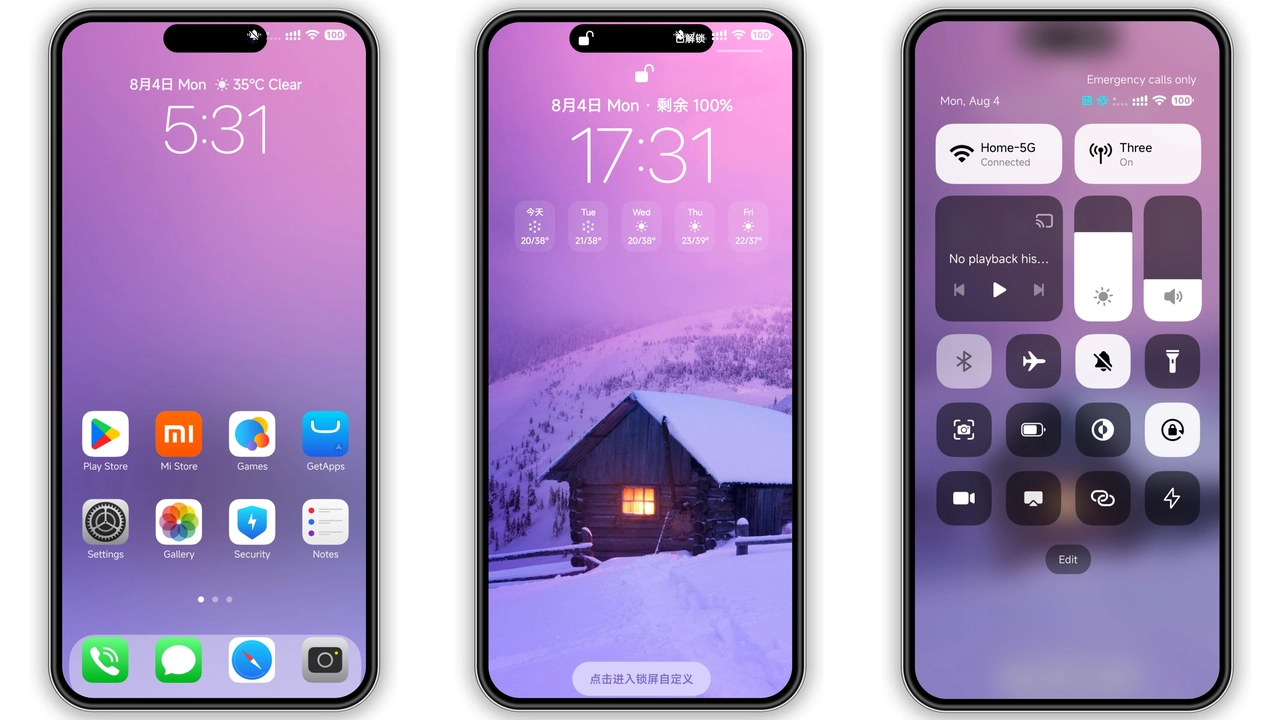
iOS‑Level Visual Polish Meets HyperOS Flexibility
Theme mimics iOS icon grid. Icons adopt rounded corners, subtle gradients. Wallpapers shift from pastel to deep‑blue tones. Status bar adopts thin white text, dark background. Lock screen animates with smooth slide‑up effect. Always‑on Display shows time in minimalist font, battery icon in crisp white. Animations stay lightweight, preserve battery life. Color palette balances cool blues with occasional orange accents. Shadows stay shallow, keep UI airy. Overall feel: modern, clean, instantly familiar to iPhone users.
Suggested Read: Putih Biru 3.0.3 – Tema HyperOS untuk Redmi, Poco, Mi
Who’ll Love This Minimalist‑Rich Design
Fans of Apple aesthetics gravitate here. Users tired of cluttered MIUI skins find relief. Photographers appreciate high‑resolution wallpapers. Gamers enjoy unobtrusive HUD, clear notifications. Developers like consistent spacing for quick glances. Older users value legible fonts, high contrast. Anyone seeking a fresh look without heavy mods fits the bill.
Installation Flow and What to Expect
Download MTZ file and backup ZIP from theme page. Open Theme Store app, tap Import. Select MTZ, confirm. Theme installs in seconds. Apply via My Themes. Restart recommended; clears residual assets. After reboot, icons swap, wallpapers load, lock screen updates. AOD activates automatically. No system reboot needed for basic changes, but a quick power‑cycle ensures smooth transition. If any element appears missing, clear cache from Settings > Apps > Theme Store.
Pros and Cons
• Pros
• iOS‑like icon set feels premium.
• Dynamic lock screen adds flair.
• Low RAM impact, smooth performance.
• Works on HyperOS 2.0 and MIUI 11‑14.
• Includes full backup for easy revert.
• Cons
• No built‑in dark mode toggle; relies on system theme.
• Limited customizability beyond preset icons.
• Backup ZIP size adds extra storage use.
• Some POCO models may need manual font adjustment.
Theme Preview


Download Links
Use the buttons below to open the theme file and the supporting link.
Codename X Theme mtz File
Codename X Theme Theme Backup File
Helpful links
More Theme Updates
For more curated HyperOS and MIUI theme updates, visit Hyper OS x MIUI .


