Parameter · Value
Designer · 苏哥suger
Size · 42.53 MB
Format · MTZ & Backup ZIP
Compatibility · HyperOS, MIUI (global & Chinese)
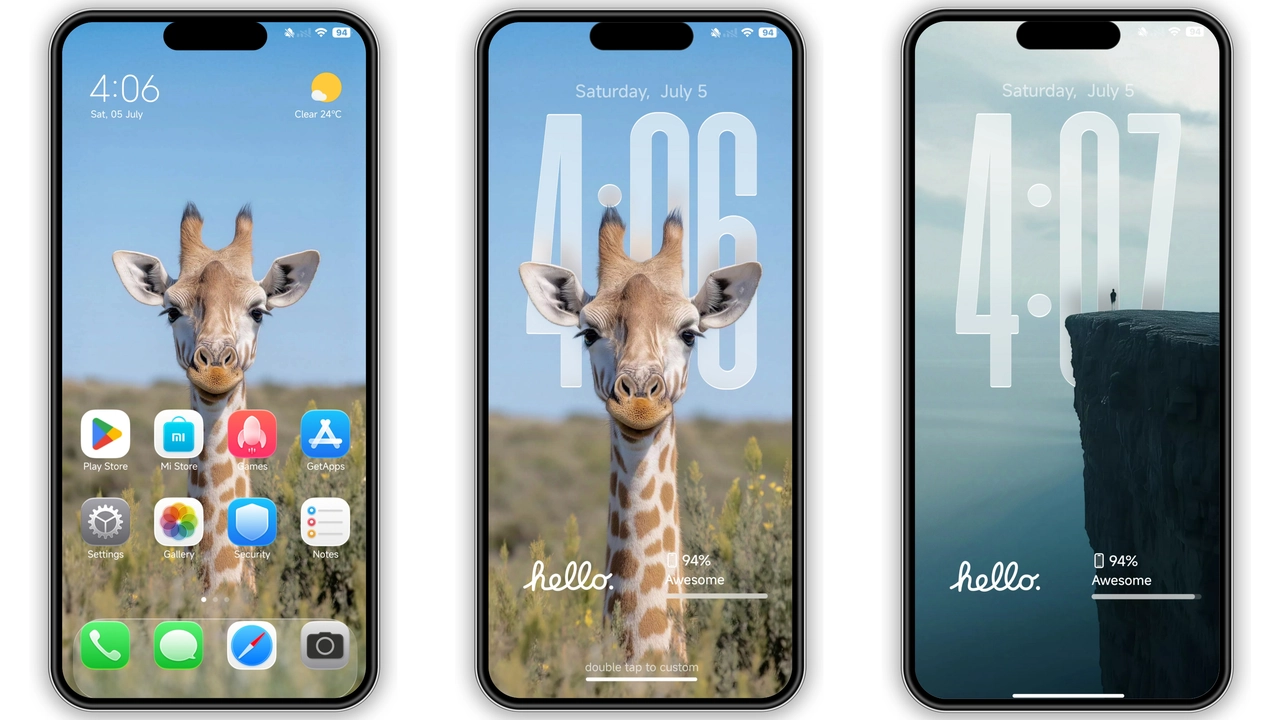
Apple‑Grade Icon Pack & Dynamic Lockscreen
The theme swaps every stock icon for a crisp, rounded iOS‑style counterpart. System apps, messaging, camera, and settings all receive a subtle gloss that mimics Apple’s design language. The lockscreen isn’t static; it animates the time and date with a smooth fade, echoing iOS 26’s dynamic widgets. Users notice the immediate visual lift—icons feel lighter, the UI breathes more space, and the overall feel leans toward premium minimalism.
Suggested Read: OX GR1 HyperOS Theme – A Detailed Archive for Xiaomi & Redmi Fans
Wallpaper & Always‑On Display Palette
Four high‑resolution wallpapers ship with the package. Each wallpaper follows a pastel‑tinted gradient that blends well with the icon set. The Always‑On Display (AOD) adopts a monochrome clock style, mirroring iOS’s lock‑screen glance. The AOD background subtly darkens at night, preserving battery while keeping the aesthetic intact. The theme also tweaks the status bar: icons turn white, the carrier label shrinks, and the battery indicator gains a thin outline.
Ideal Users & Use Cases
• Apple fans on Android – Those who miss iOS aesthetics but refuse to switch platforms will find this theme a perfect bridge.
• Minimalist seekers – The clean iconography and muted wallpaper palette appeal to users who despise clutter.
• Power users on HyperOS – Since the theme is built for HyperOS, it integrates with the new gesture system and system‑wide dark mode without glitches.
• Device‑hoppers – Xiaomi, Redmi, and POCO owners can apply the same look across multiple devices, maintaining a consistent visual identity.
Installation Walkthrough & Gotchas
1. Download – Grab the MTZ file (or the backup ZIP for manual import) from the theme page.
2. Open Theme Store – Launch the pre‑installed Theme Store app.
3. Import – Tap the three‑dot menu, select Import, locate the MTZ file, and confirm.
4. Apply – After import, press Apply. The system will prompt a quick restart; accept it.
5. Verify – Post‑restart, check the lockscreen, AOD, and icon grid. If any element appears misaligned, clear the theme cache in Settings → Apps → Theme Store → Storage → Clear Cache.
Common pitfalls
• Using a non‑Xiaomi browser may block the “Open in app” link; switch to Firefox or the default Xiaomi Browser.
• Global MIUI builds sometimes hide the import button; enable Developer options → Show system UI to reveal it.
• AOD glitches can occur on devices with low‑end CPUs; disabling AOD in Settings resolves the lag.
Pros and Cons
• Pros
• Authentic iOS look, no compromises.
• Light‑weight (42 MB) – no noticeable performance hit.
• Works on HyperOS and MIUI across Xiaomi, Redmi, POCO.
• Includes dynamic lockscreen and AOD tweaks.
• Cons
• No built‑in dark‑mode variant; relies on system dark theme.
• Limited to Chinese‑region wallpapers; global users may prefer custom backgrounds.
• Requires manual import on some MIUI versions.
Theme Preview


Download Links
Use the buttons below to open the theme file and the supporting link.
iOS 26 Theme Backup
iOS 26 Theme mtz File
Helpful links
More Theme Updates
For more curated HyperOS and MIUI theme updates, visit Hyper OS x MIUI .


