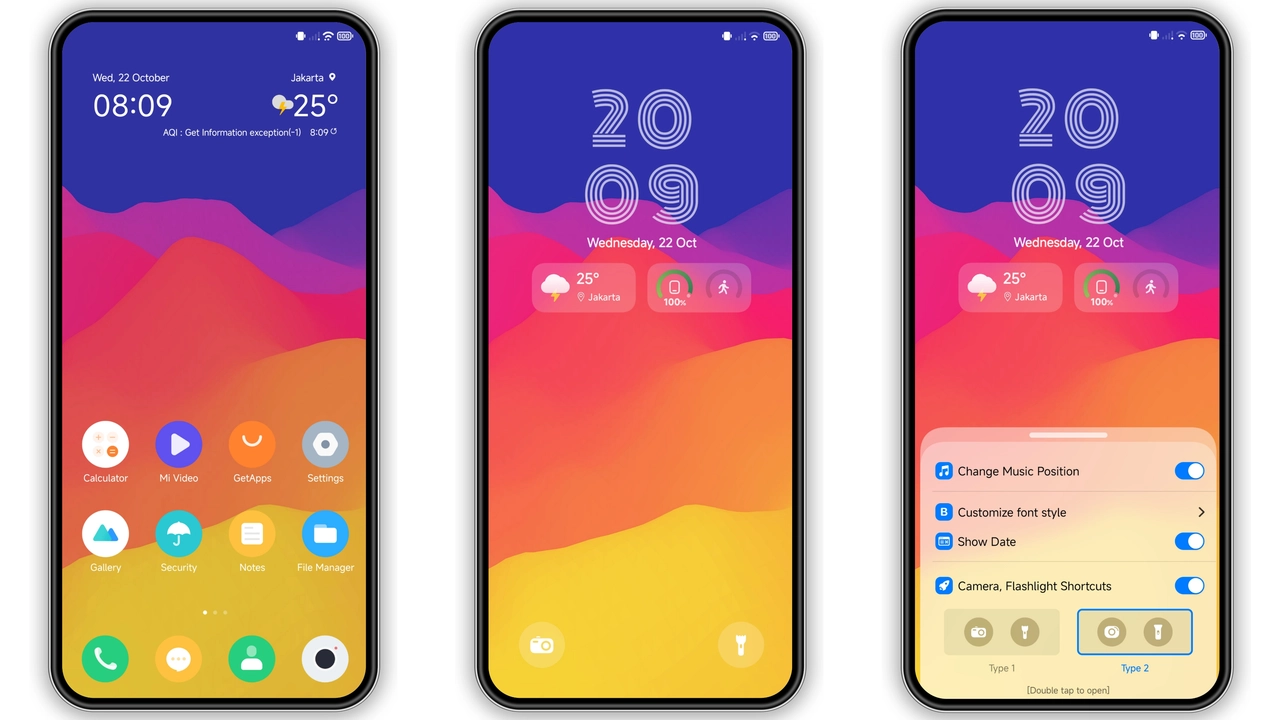
Theme Metadata
Parameter · Value
Designer · Yunuz Alvarez
Size · 45.02 MB
Format · .mtz (MIUI Theme Package)
Compatibility · HyperOS, HyperOS 2.0, MIUI 14, MIUI 13
Timeless Classic‑Gradient Visuals
HyperClassic leans on a muted palette of deep navy and soft teal, accented by subtle gradients that give icons a gentle lift. Rounded corners replace the sharp edges of stock icons, delivering a softer, more modern silhouette. The wallpaper set follows the same aesthetic: low‑contrast cityscapes with hints of sunrise, ensuring the lock screen and home screen feel cohesive. Status bar icons adopt the same gradient treatment, improving readability while staying true to the theme’s understated vibe.
Suggested Read: Endhunts HyperOS Theme vs MIUI Themes: Which Fits Your Xiaomi?
Ideal Users and Daily Appeal
Fans of minimalism who still crave a touch of personality will gravitate toward HyperClassic. The theme strikes a balance between classic restraint and contemporary flair, making it suitable for professionals who want a clean look without sacrificing style. It also appeals to long‑time Xiaomi enthusiasts looking for a fresh take on the familiar HyperOS UI. Because the color scheme avoids neon or overly bright tones, the theme remains comfortable for prolonged use, reducing eye strain during night‑time browsing.
Seamless Compatibility Across HyperOS & MIUI
HyperClassic declares compatibility with both HyperOS and MIUI, covering a broad range of devices from flagship Xiaomi models to Redmi and POCO lines. The theme has been tested on HyperOS 2.0 and MIUI 14, confirming that icons, lock screen, and Always‑On Display render correctly without layout glitches. Users running custom ROMs based on MIUI 11‑14 can also import the .mtz file via the Theme Store app, though a quick reboot is recommended after applying to clear any residual caches.
Installation Walkthrough and What to Expect
1. Download – Locate the “HyperClassic Theme mtz File” in the download section and save the .mtz package locally.
2. Open Theme Store – Launch the pre‑installed Theme Store app on your device.
3. Import – Navigate to the “Themes” tab, scroll to the bottom, and tap Import. Select the downloaded .mtz file.
4. Apply – After import, tap Apply and confirm. The system will prompt a reboot; allow it to restart.
5. Post‑Install Check – Once rebooted, verify icons, lock screen, and AOD. If any element appears misaligned, a second reboot often resolves the issue.
The installation process typically takes under two minutes. Because the theme modifies system‑wide assets, a brief pause during reboot is normal. Users should notice immediate changes to the icon set, wallpaper, and status bar, while the new lock screen animation may require a short warm‑up period to cache correctly.
Pros and Cons
• Pros
• Elegant classic‑gradient visual language.
• Rounded icons improve ergonomics.
• Broad device compatibility (Xiaomi, Redmi, POCO).
• Low‑impact on battery; AOD remains efficient.
• Simple one‑step import via Theme Store.
• Cons
• No built‑in dark‑mode toggle; relies on system dark mode.
• Limited customization beyond the provided icon pack.
• Requires reboot after apply; may inconvenience some users.
Overall, HyperClassic offers a refined, understated makeover for HyperOS and MIUI users seeking a classic aesthetic with modern polish. Its straightforward installation and reliable performance make it a strong candidate for anyone wanting to personalize their Xiaomi device without sacrificing stability.
Theme Preview

Download Links
Use the buttons below to open the theme file and the supporting link.
HyperClassic Theme mtz File
Helpful links
More Theme Updates
For more curated HyperOS and MIUI theme updates, visit Hyper OS x MIUI .


