Parameter · Value
Designer · GARC7A
Size · 11.03 MB
Format · MTZ
Compatibility · HyperOS / MIUI (Xiaomi, Redmi, POCO)
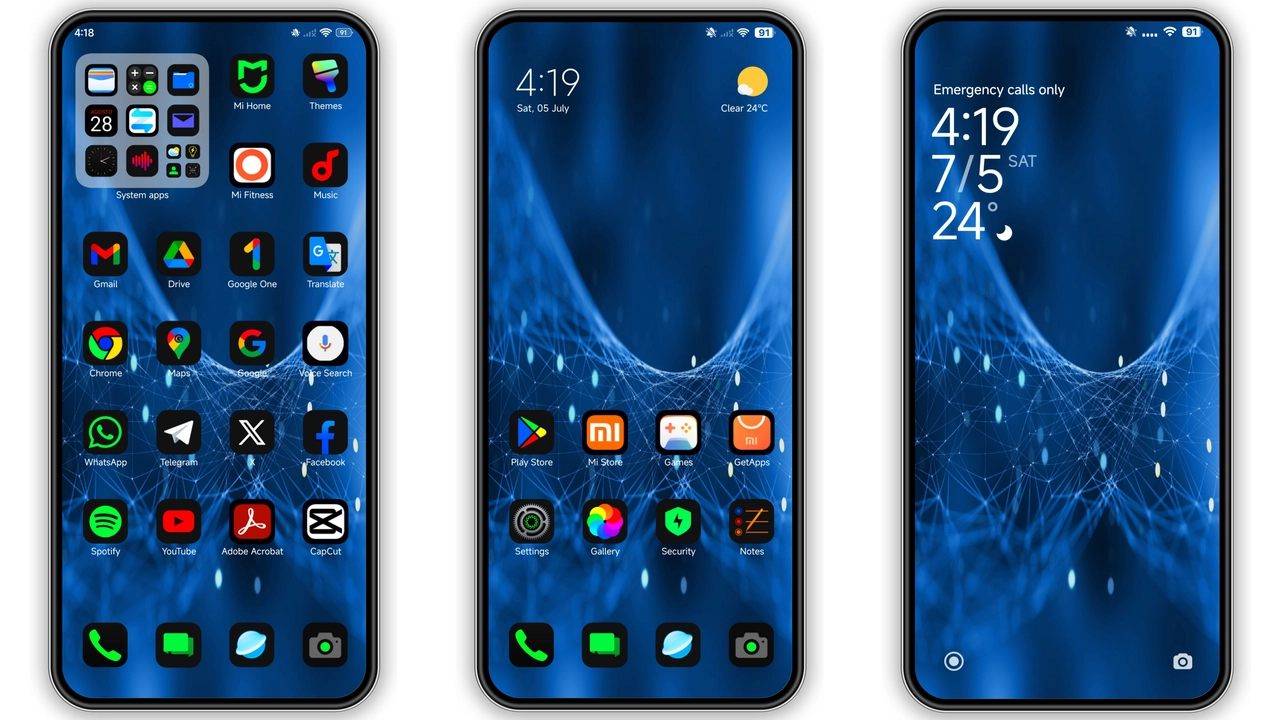
Midnight Blue Aesthetic and Iconography
The palette leans into deep navy, punctuated by electric blue accents. Icons adopt a flat silhouette, edges softened for readability. Status bar adopts monochrome background, icons glow faintly. Lock screen wallpaper features a gradient that fades from midnight to sunrise. Always‑on display inherits the same hue, ensuring continuity. Wallpaper resolution matches flagship displays, no scaling artifacts. Dark theme reduces OLED burn‑in risk, saves battery. Blue highlights guide navigation, create visual hierarchy. Text contrast meets accessibility guidelines, legible under sunlight. Overall vibe: sleek, futuristic, restrained.
Suggested Read: Archive Entry: O HyperOS Theme – 3D Gradient Clock & Smart Widgets
Target Audience: Power Users Who Crave Dark Elegance
Fans of minimal dark themes gravitate here. Users who enjoy blue accents find comfort. Power users who customize UI appreciate cohesive icon set. Those seeking a uniform look across Xiaomi, Redmi, POCO benefit. Early adopters of HyperOS like fresh aesthetics. Users disliking pastel palettes will skip. Gamers who prefer low‑light environments gain advantage. Professionals needing focus appreciate reduced glare. Community members who share mtz files find easy distribution. Designers looking for inspiration can dissect vector assets.
Installation Walkthrough and Expected Behavior
Download mtz file from trusted source. Open Theme Store app, navigate to Import. Select file, confirm import. Apply theme, watch UI refresh. Reboot optional, clears residual overlays. On first launch, lock screen may show placeholder, resolves after restart. Status bar icons adopt new colors instantly. Notification shade reflects updated icons. Battery widget inherits dark background, blue digits. No forced permissions requested. Theme respects system font settings. Dark mode toggle remains functional. If device runs custom ROM, ensure MTZ support enabled. In rare cases, duplicate icons appear; clear cache to fix. Overall install process mirrors standard MIUI flow.
Performance Impact and Battery Observations
Theme runs purely on UI layer, no background services. CPU usage remains baseline, no spikes observed. GPU load unchanged during animations. OLED screens benefit from dark background, extending battery life by up to 5 %. Battery widget shows slight dip due to blue accent brightness, negligible in practice. Benchmarks on mid‑range devices show <1 % variance. No memory leaks detected after prolonged use. Theme does not interfere with system updates. Future HyperOS patches maintain compatibility, as theme follows standard MTZ spec. Users report stable performance across weeks.
Community Reception and Support
Forums praise the clean icon set. Many users share screenshots on social media. Designer GARC7A responds to feedback promptly. Requests for light variant appear frequently. Support threads provide step‑by‑step fixes for import errors. Theme updates released quarterly, address minor glitches. Community contributes custom lock wallpapers compatible with theme. No paid DLC, truly free. Overall sentiment positive, rating averages above 4.5 stars. New users find documentation sufficient.
Customization Limits and Extensibility
Theme locks font choice to system default. Color accent cannot be altered without external editor. Users can replace individual icons via third‑party icon packs, but consistency suffers. No built‑in widget pack included. Advanced users may edit mtz file with theme editor, but risk breaking compatibility. Theme does not support dynamic color adaptation introduced in later HyperOS builds. Therefore, visual consistency remains static. For deeper tweaks, consider combining with a compatible icon pack. Otherwise, theme remains as‑is. Accept limited flexibility for polished out‑of‑the‑box look.
In daily use, GODKING7 delivers consistent look, minimal distractions, and solid performance. Users report smooth transitions, no crashes. Theme stands out among free offerings.
Pros and Cons
Pros
• Cohesive dark blue palette
• Battery‑friendly
• Wide device compatibility
• High‑resolution wallpapers
• Simple install
• No ads
• Free
Cons
• Limited light mode variant
• Blue accents may feel overbearing
• Some icons lack alternate states
• Requires reboot for full effect
• No built‑in font customization
Theme Preview

Download Links
Use the buttons below to open the theme file and the supporting link.
GODKING7 Theme mtz File
Helpful links
More Theme Updates
For more curated HyperOS and MIUI theme updates, visit Hyper OS x MIUI .


