Parameter · Value
Designer · Mazyoku
Size · 56.11 MB
Format · MTZ
Compatibility · HyperOS / MIUI
Rain‑Soaked Aesthetic That Feels Like iOS
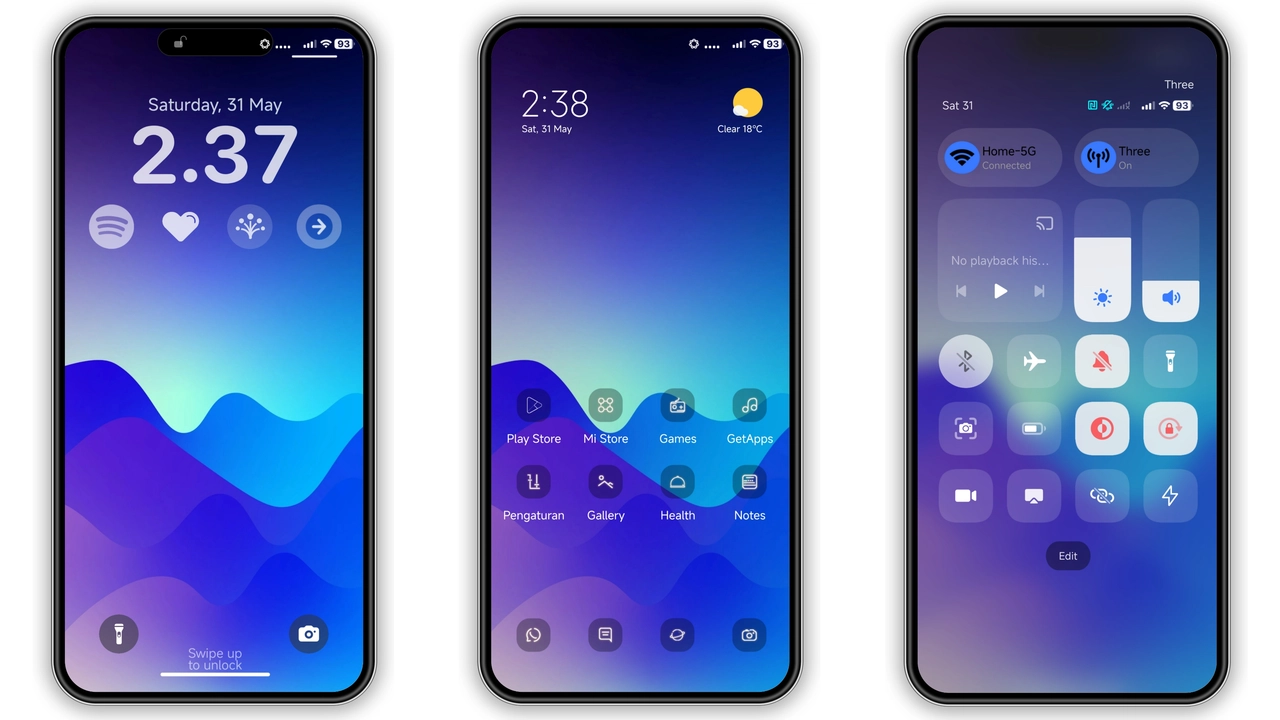
Crying Rain 0.6 captures the muted glow of an iPhone night screen and translates it to Xiaomi’s ecosystem. Deep charcoal backgrounds host subtle raindrop textures that ripple across the lock screen and always‑on display. Icons receive a rounded, glass‑like finish, each shadow calibrated to mimic iOS depth cues. The status bar adopts the slim, white‑on‑black layout familiar to iPhone users, while the notification shade retains Xiaomi’s swipe‑up fluidity. Dynamic lock‑screen animations simulate falling droplets, creating a living wallpaper that never feels static.
Suggested Read: Trending MTZ Theme “重感 爱而无畏” – A Fresh Look for HyperOS & MIUI
Ideal Users: Minimalists Who Crave Dark Elegance
If you gravitate toward clean lines, muted palettes, and a hint of kinetic motion, this theme hits the sweet spot. Designers who appreciate negative space will enjoy the uncluttered home layout. Night‑owl gamers find the low‑light palette gentle on the eyes during marathon sessions. Users switching from iOS to HyperOS appreciate the familiar iconography without sacrificing Xiaomi’s customization depth. Even POCO owners who favor performance‑first devices can adopt a sophisticated look without compromising speed.
Seamless Compatibility Across HyperOS and MIUI
Crying Rain 0.6 declares compatibility with HyperOS and MIUI, meaning it works on the latest stock ROMs for Xiaomi, Redmi and POCO handsets. The theme respects regional variations; it adapts the system fonts and language settings automatically. No extra patches are required for MIUI 14 or HyperOS‑based custom ROMs such as Xiaomi EU. The MTZ package bundles all necessary resources, so the Theme Store app imports it without conflict. Users on older MIUI versions may notice missing dynamic lock‑screen effects, but the core visual overhaul remains intact.
Installation Walkthrough and What to Expect
1. Download the MTZ file from the official theme page. The package size stays under 60 MB, so a Wi‑Fi connection prevents data spikes.
2. Open the Theme Store app, tap Themes, then scroll to the bottom and select Import.
3. Locate the downloaded Crying Rain 0.6.mtz file and confirm import.
4. Apply the theme. The system will prompt a quick restart; accept it to ensure the lock‑screen animation loads correctly.
5. After reboot, verify the new icons, wallpaper, and status bar. If any element appears misaligned, clear the theme cache in Settings → Themes → Manage and re‑apply.
Expect a short loading period as the system renders the dynamic lock screen. Battery impact is negligible; the animation runs only when the device is idle on the lock screen. Users report smoother transitions compared to stock themes, thanks to optimized PNG assets.
Pros and Cons
Pros
• iOS‑like visual fidelity on Android hardware
• Dark palette reduces eye strain
• Dynamic rain animation adds subtle liveliness
• Full icon set, wallpaper, lock screen, AOD included
• Compatible with both HyperOS and MIUI stock ROMs
Cons
• Dynamic lock screen unavailable on legacy MIUI versions
• No built‑in light‑mode variant
• Theme size may be large for devices with limited storage
• Requires Theme Store import; sideloading not supported directly
Overall, Crying Rain 0.6 delivers a polished, rain‑kissed aesthetic that bridges iOS elegance with Xiaomi’s customization power. Its broad compatibility and minimal performance overhead make it a strong candidate for anyone seeking a dark, minimalist makeover.
Theme Preview


Download Links
Use the buttons below to open the theme file and the supporting link.
Crying Rain 0.6 Theme mtz File
Crying Rain 0.6 Wallpaper
Helpful links
More Theme Updates
For more curated HyperOS and MIUI theme updates, visit Hyper OS x MIUI .



