Parameter · Value
Designer · Fernhart
Size · 40.16 MB
Format · .mtz
Compatibility · HyperOS / MIUI (global)
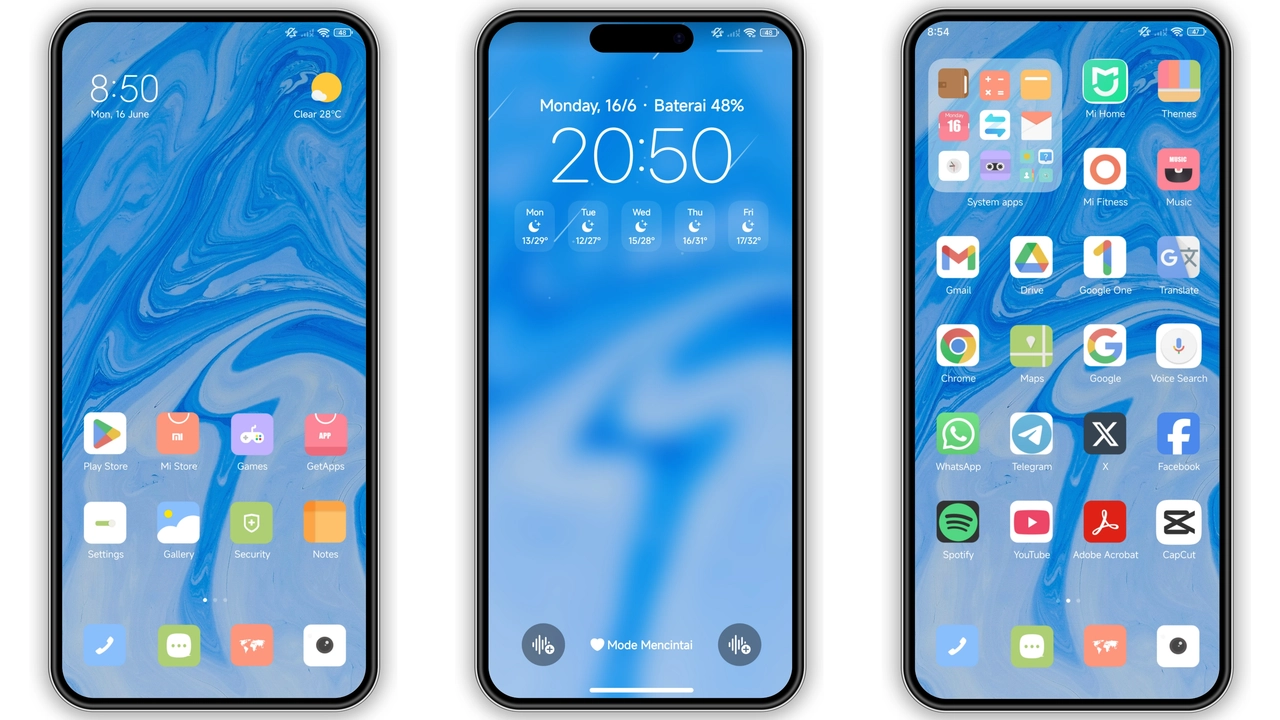
Midnight‑Blue Icon Pack & Wallpaper Fusion
Crying Blues leans into deep sapphire tones, pairing custom‑crafted icons with a full‑screen wallpaper that mimics a rainy night sky. Icons retain a flat‑ish silhouette but gain subtle gradients that echo the theme’s ambient lighting. The wallpaper shifts slightly with the lock‑screen swipe, giving a sense of motion without draining battery.
Suggested Read: Archive Spotlight: Cute Baking House MTZ Theme for HyperOS & MIUI
Dynamic Lock Screen that Reacts to Time
Lock screen isn’t static. A faint pulse radiates from the clock at each hour change, while the background hue deepens as night falls. This visual cue doubles as a low‑key reminder of the passing day, perfect for users who enjoy subtle dynamism.
Always‑On Display (AOD) Redefined
AOD adopts the same midnight palette, displaying time in thin, white type against a semi‑transparent overlay. Battery and notification icons inherit the theme’s icon style, ensuring visual consistency even when the screen is dim.
Who’ll Love Crying Blues?
• Night‑owls who prefer darker UI but still want a splash of color.
• Fans of minimalism who dislike cluttered widgets yet appreciate a cohesive look.
• iOS‑inspired users drawn to the clean, rounded icon set.
• POCO owners seeking a fresh aesthetic without rooting or flashing.
Compatibility Checklist
• Device must run HyperOS or MIUI (global builds).
• Supports Xiaomi, Redmi, and POCO models with standard screen resolutions.
• Requires at least Android 13 base for dynamic lock‑screen effects.
• No custom ROM restrictions; works on stock and most mainstream custom ROMs.
Installation Expectations & Practical Download Notes
1. Download the .mtz file (40.16 MB). The file is hosted on a reliable file‑sharing service; ensure a stable Wi‑Fi connection to avoid corruption.
2. Open Theme Store app, tap “Themes”, scroll to bottom, select “Import”.
3. Locate the downloaded .mtz, confirm import, then apply.
4. Reboot (optional but recommended) to clear any overlay glitches.
5. Adjust: If the status bar icons appear too dim, toggle “Dark Mode” in Settings → Display → Dark mode → “Always on”.
Common Pitfalls
• Import fails on browsers other than Firefox/Chrome – switch to one of these.
• AOD may not animate on heavily customized ROMs; revert to stock UI for full effect.
• Some third‑party launchers ignore the icon pack – use the native launcher for best results.
Pros and Cons
• Pros
• Cohesive blue aesthetic, from icons to AOD.
• Dynamic lock screen adds subtle flair.
• Low battery impact; uses native animations.
• Compatible with stock and most custom ROMs.
• Cons
• Limited to blue palette; not ideal for users seeking multicolor themes.
• Requires manual import; no direct Play Store link.
• AOD animation may stutter on low‑end devices.
Final Thoughts
Crying Blues delivers a polished, moody experience that feels native to HyperOS while standing out from the default stock look. Its balanced use of animation and flat design makes it suitable for daily use without feeling gimmicky. If you enjoy a darker UI with a splash of color, this theme is worth a try.
Theme Preview


Download Links
Use the buttons below to open the theme file and the supporting link.
Crying blues Theme mtz File
Helpful links
More Theme Updates
For more curated HyperOS and MIUI theme updates, visit Hyper OS x MIUI .


